> ## Documentation Index
> Fetch the complete documentation index at: https://docs.mixpanel.com/llms.txt
> Use this file to discover all available pages before exploring further.
# AI-Powered Data Governance
Mixpanel uses AI to help you keep your project clean and well-governed with less manual effort. Instead of hunting through Lexicon by hand, these capabilities proactively surface issues in your data and let you resolve them in bulk.
AI-Powered Data Governance is available to organizations on an **Enterprise** plan that have Mixpanel's AI features (Mixpanel Agent) enabled in your organization settings. See our [pricing page](https://mixpanel.com/pricing/) for more details.
## Merge suggestions
Over time, the same concept often ends up tracked under several names — `Add to Cart`, `add_to_cart`, and `addToCart`, or `from_date` and `from-date`. These duplicates clutter Lexicon, split your data across reports, and make analysis harder.
Merge suggestions automatically discover these potential duplicates in your project for you, so you don't have to hunt for them by hand. Mixpanel groups near-duplicate **events** and **event properties** together and suggests a single canonical name for each group, so you can clean them up in bulk instead of merging one pair at a time.
Merge suggestions cover events and event properties only — user (profile) properties cannot be merged at this time.
To review and apply merge suggestions:
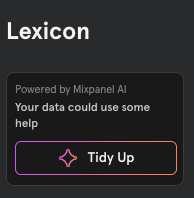
1. Open [Lexicon](/docs/data-governance/lexicon) and click **Tidy Up**, then **Reduce clutter**.
 2. The **Merge Duplicate Events and Properties** window opens, listing the suggested groups of duplicates in two sections — Events and Event Properties.
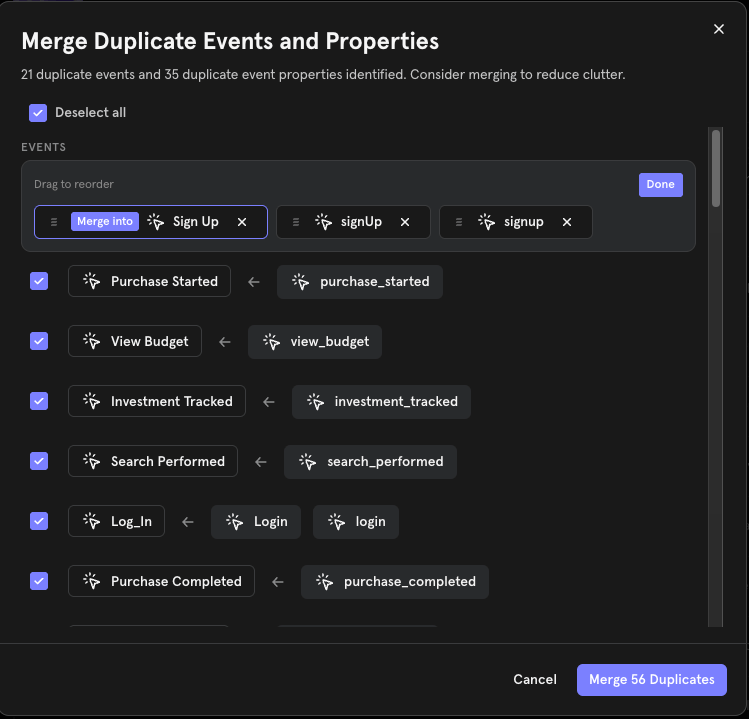 3. Review the suggestions. **Every group is selected by default.** Each group shows the near-duplicate names it found and the canonical name they'll merge into. To change the canonical name or drop a name from a group, edit the group before submitting.
4. Uncheck any group you don't want to merge, or use **Select all** / **Deselect all** to adjust the whole list at once.
5. Click **Merge Duplicates** to submit.
Submitting is a single batch action: **selected groups are merged, and every unselected group is dismissed** so it won't be suggested again. If you want to keep a suggestion for later, leave the window without submitting rather than deselecting it.
Merging behaves exactly like a [manual Lexicon merge](/docs/data-governance/lexicon#merging-data) — the underlying raw data is unaffected, and a merge can be undone from Lexicon. As with any merge, update any reports or custom events that referenced the old names afterward, and note that [Autocapture](/docs/tracking-methods/autocapture) events cannot be merged. Merging requires the same permission as a manual merge.
3. Review the suggestions. **Every group is selected by default.** Each group shows the near-duplicate names it found and the canonical name they'll merge into. To change the canonical name or drop a name from a group, edit the group before submitting.
4. Uncheck any group you don't want to merge, or use **Select all** / **Deselect all** to adjust the whole list at once.
5. Click **Merge Duplicates** to submit.
Submitting is a single batch action: **selected groups are merged, and every unselected group is dismissed** so it won't be suggested again. If you want to keep a suggestion for later, leave the window without submitting rather than deselecting it.
Merging behaves exactly like a [manual Lexicon merge](/docs/data-governance/lexicon#merging-data) — the underlying raw data is unaffected, and a merge can be undone from Lexicon. As with any merge, update any reports or custom events that referenced the old names afterward, and note that [Autocapture](/docs/tracking-methods/autocapture) events cannot be merged. Merging requires the same permission as a manual merge.