> ## Documentation Index
> Fetch the complete documentation index at: https://docs.mixpanel.com/llms.txt
> Use this file to discover all available pages before exploring further.
# Custom Properties: Calculate new properties on the fly
Free plan users can create custom properties locally within a report. Growth and Enterprise plan users can save the custom properties globally to reuse in other reports. See our [pricing page](https://mixpanel.com/pricing/) for more details.
## Overview
Custom properties let you combine existing properties into new properties on the fly, using a simple Excel-like formula language. You can then use these new properties almost anywhere that you can use regular properties, with the ability to save/share them for reuse across your team. For more on why we built this, check out [our blog](https://mixpanel.com/blog/introducing-the-mixpanel-modeling-layer/).
## Creating a Custom Property
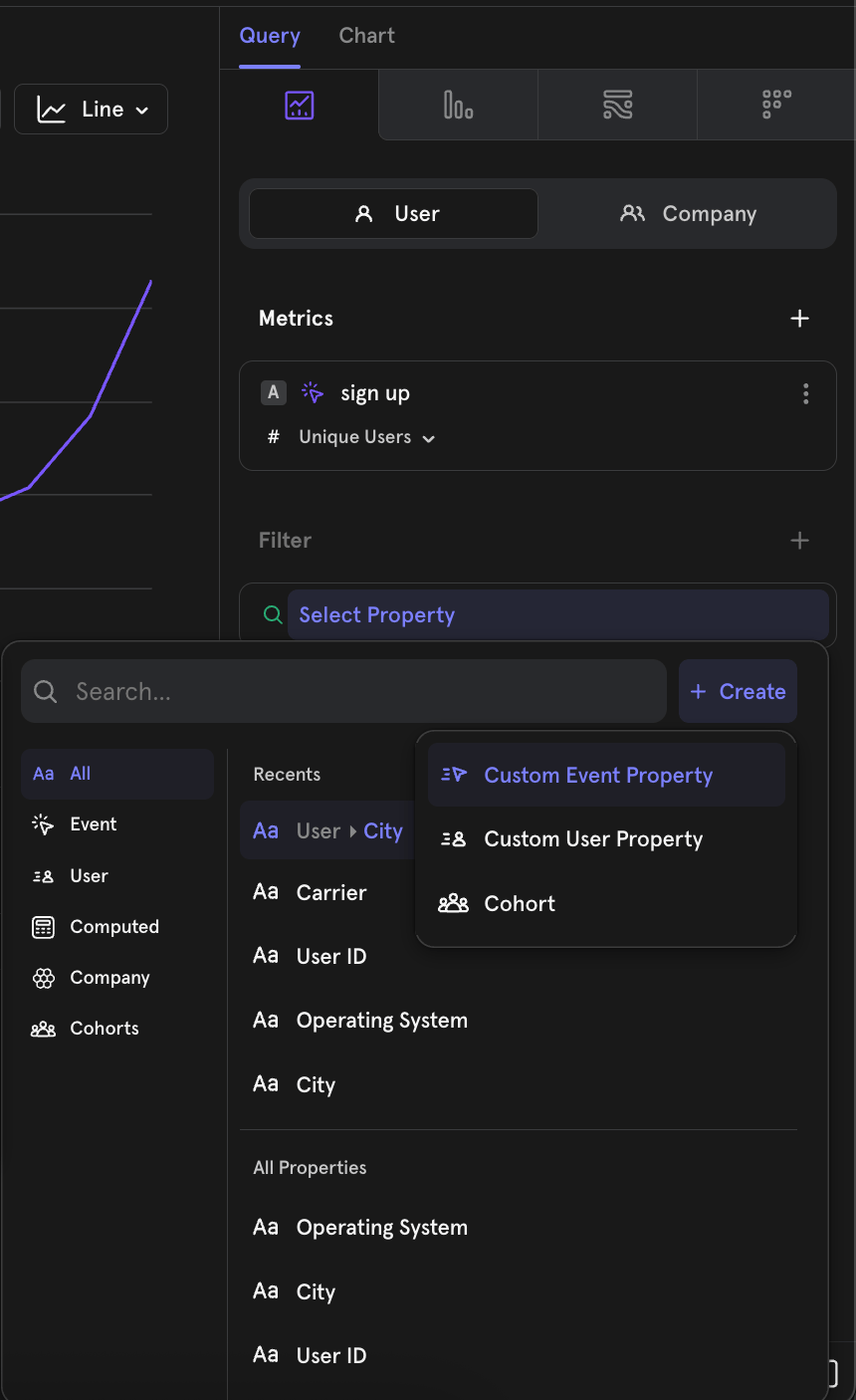
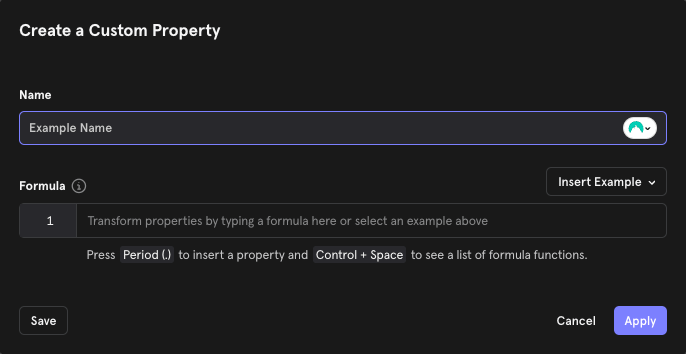 If you're new to this feature, we recommend starting with one of the examples. Click the **Insert Example** drop down to populate the box with a use-case specific custom property.
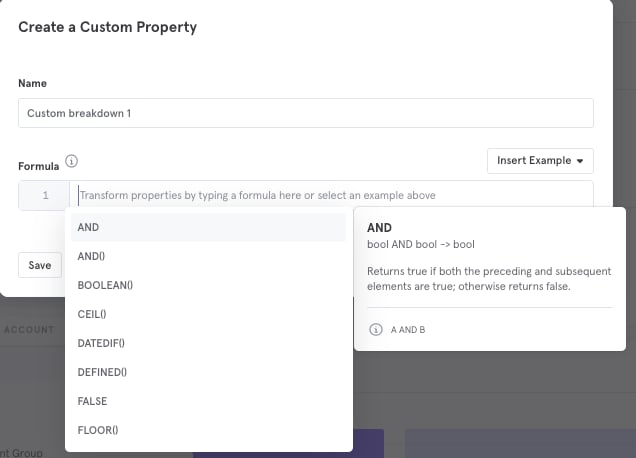
When writing your formula, click **Ctrl + Space** to see a list of all the available [functions and their descriptions](/docs/features/custom-properties#functions). Type **period (.)** to open the menu for choosing an event/profile properties to add to the custom property definition.
If you are creating a “Custom Event Property” both event and user profile properties will be available to select. If you are creating a “Custom Profile Property” only user profile properties will be available for use in the custom property.
Note that the formula used to compose your custom property can't be longer than 20,000 characters.
If you're new to this feature, we recommend starting with one of the examples. Click the **Insert Example** drop down to populate the box with a use-case specific custom property.
When writing your formula, click **Ctrl + Space** to see a list of all the available [functions and their descriptions](/docs/features/custom-properties#functions). Type **period (.)** to open the menu for choosing an event/profile properties to add to the custom property definition.
If you are creating a “Custom Event Property” both event and user profile properties will be available to select. If you are creating a “Custom Profile Property” only user profile properties will be available for use in the custom property.
Note that the formula used to compose your custom property can't be longer than 20,000 characters.
 ## Saving and Reusing a Custom Property
Custom properties are local to the report by default when you select **Apply**. To save the custom property permanently for use in other reports and to make it usable by other project members, click **Save**. We recommend Applying the custom property and using it in your local analysis first, before saving and sharing, to reduce clutter in the project.
When you create custom properties and select **Save as Custom Property**, your created custom property will be private by default. You can also add a description at this stage, so you and your colleagues can know what the custom property is for. You can also decide to save the custom property and **share** that custom property with specific colleagues, teams, or the entire organization by clicking "**Save and Share**":
## Common Use Cases
**Grouping Marketing Channels**
If you're a marketer, using Mixpanel to show the impact of various channels on acquisition, you might want to group your UTM Sources into higher level buckets. For example:
* Facebook, Instagram, Twitter → Social
* Google, Bing → Search
* Everything else → Organic
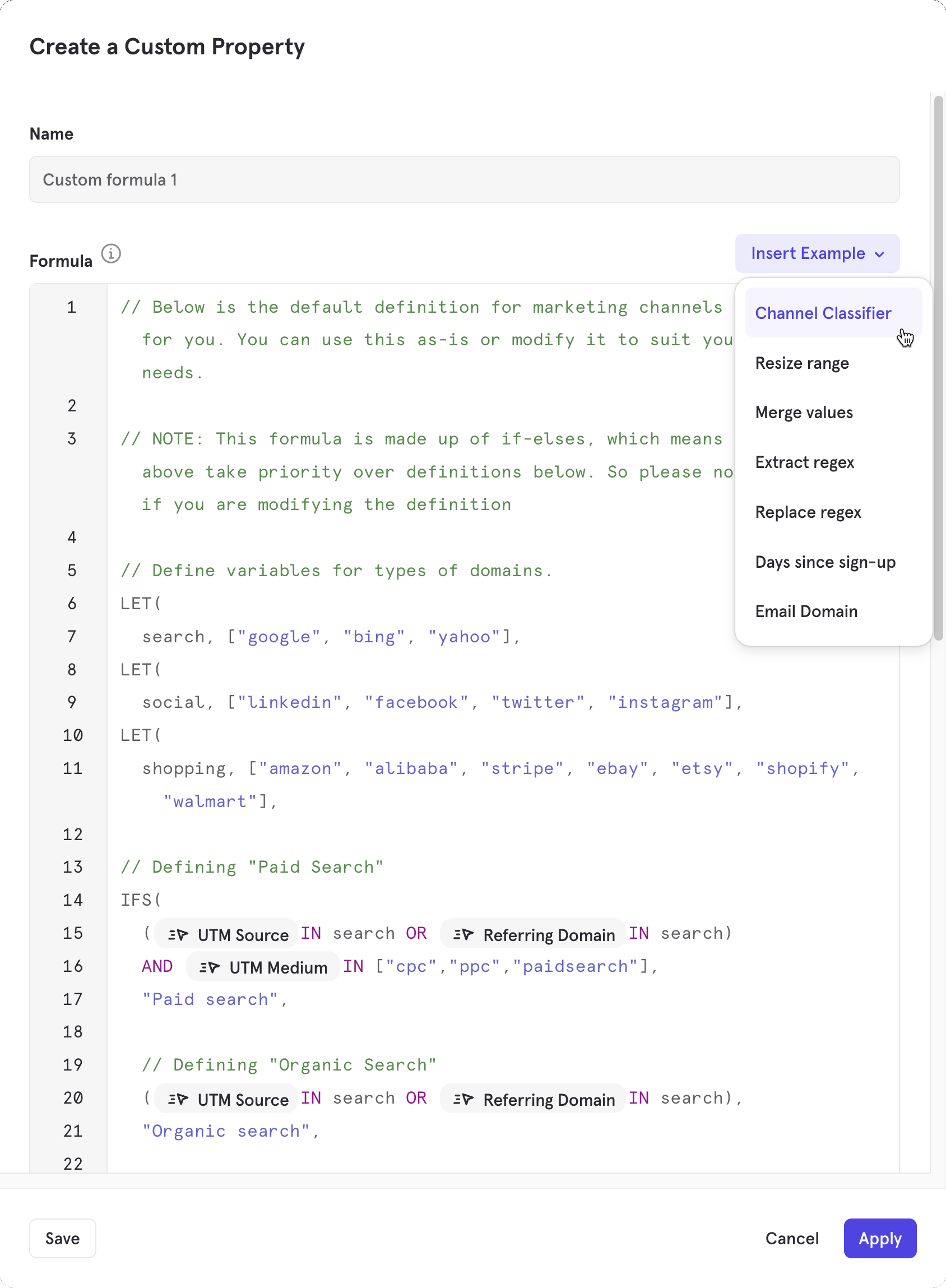
You can also use the [Channel Classifier](/changelogs/2023-11-16-channel-classifier) template in custom properties as a starting point.
## Saving and Reusing a Custom Property
Custom properties are local to the report by default when you select **Apply**. To save the custom property permanently for use in other reports and to make it usable by other project members, click **Save**. We recommend Applying the custom property and using it in your local analysis first, before saving and sharing, to reduce clutter in the project.
When you create custom properties and select **Save as Custom Property**, your created custom property will be private by default. You can also add a description at this stage, so you and your colleagues can know what the custom property is for. You can also decide to save the custom property and **share** that custom property with specific colleagues, teams, or the entire organization by clicking "**Save and Share**":
## Common Use Cases
**Grouping Marketing Channels**
If you're a marketer, using Mixpanel to show the impact of various channels on acquisition, you might want to group your UTM Sources into higher level buckets. For example:
* Facebook, Instagram, Twitter → Social
* Google, Bing → Search
* Everything else → Organic
You can also use the [Channel Classifier](/changelogs/2023-11-16-channel-classifier) template in custom properties as a starting point.
 **Compute Properties Mathematically from Other Properties**
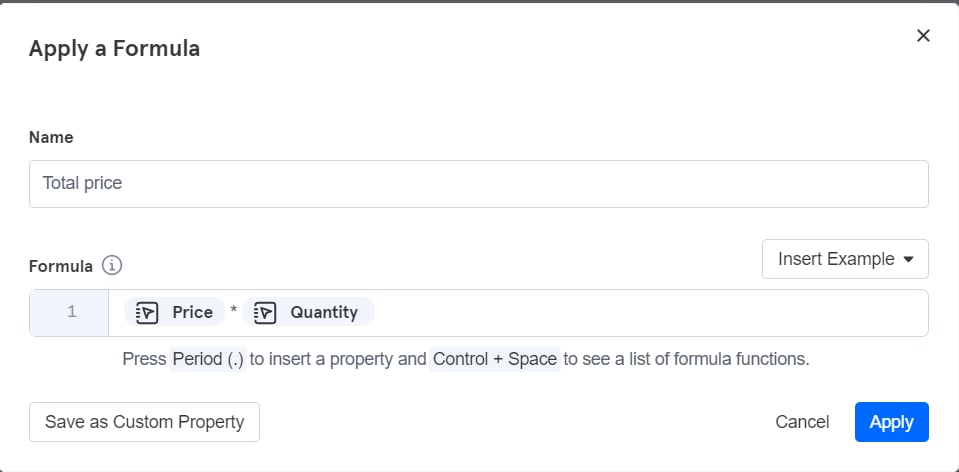
If you have an e-commerce app, you can combine "price" and "quantity" properties into a "total price" property as follows:
**Compute Properties Mathematically from Other Properties**
If you have an e-commerce app, you can combine "price" and "quantity" properties into a "total price" property as follows:
 **Compute the Number of Days Between Two Date Properties**
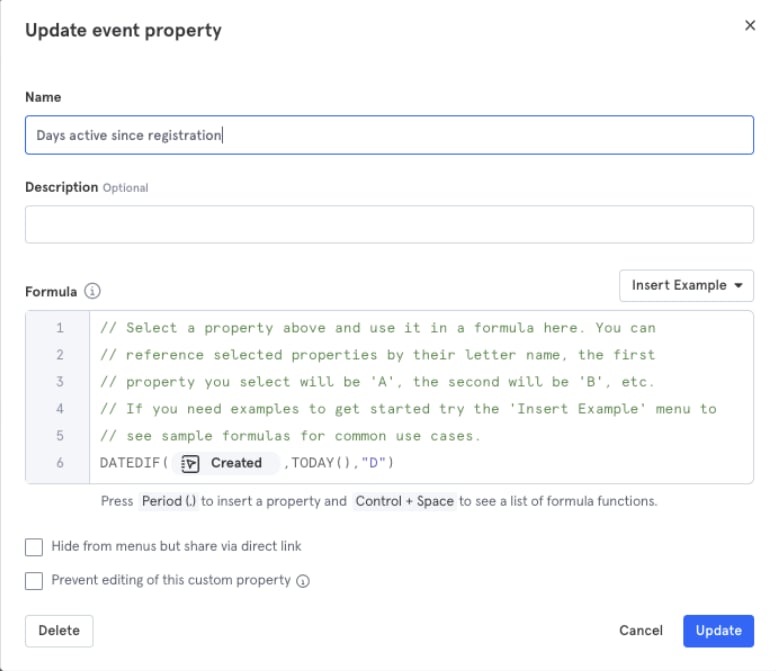
Use custom properties to compute the date/time difference between two date properties. You can also use the special "TODAY()" function to find the difference between a date property and the current date/time. This is ideal when you want to transform a "DateofBirth" property into “age” or a "Created" property into “days active since registration”.
A new custom property can be defined by taking into account the “Created” property and using the following transformation:
**Compute the Number of Days Between Two Date Properties**
Use custom properties to compute the date/time difference between two date properties. You can also use the special "TODAY()" function to find the difference between a date property and the current date/time. This is ideal when you want to transform a "DateofBirth" property into “age” or a "Created" property into “days active since registration”.
A new custom property can be defined by taking into account the “Created” property and using the following transformation:
 **Compare Different Properties**
Use custom properties to create a new property if two property values are the same.
For example:
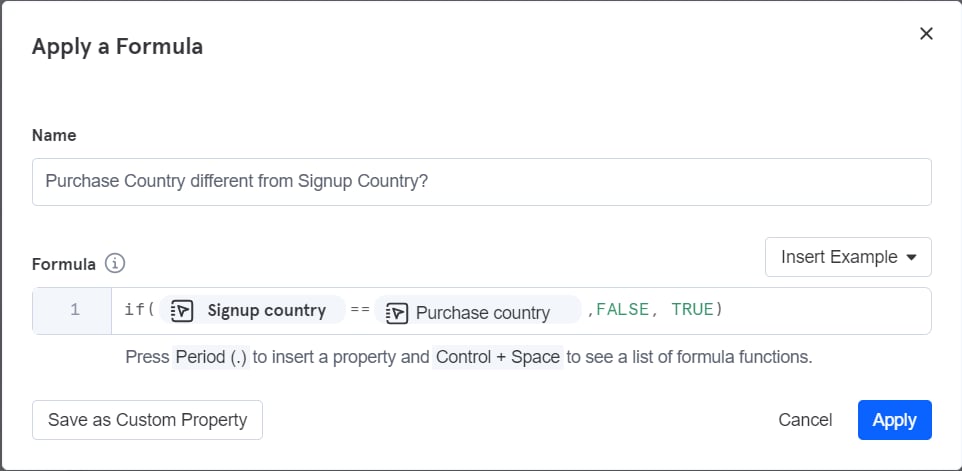
A company wants to find out what percentage of purchases are being made by users who have changed countries since signing up.
They can create a custom property to determine whether the two country values are the same with this transformation:
**Compare Different Properties**
Use custom properties to create a new property if two property values are the same.
For example:
A company wants to find out what percentage of purchases are being made by users who have changed countries since signing up.
They can create a custom property to determine whether the two country values are the same with this transformation:
 **Extract Domain from Email Address**
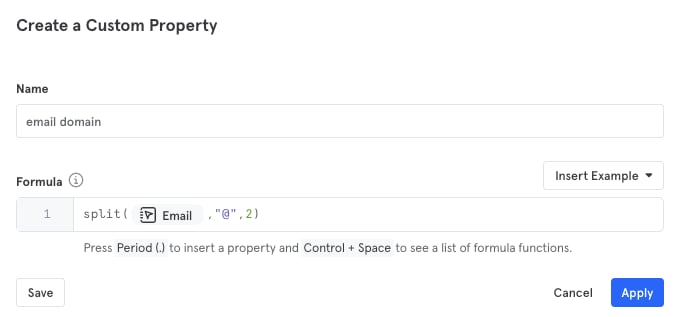
Extract the domain of the email from an email address. You can parse out parts of a string after "@" using the SPLIT function:
**Extract Domain from Email Address**
Extract the domain of the email from an email address. You can parse out parts of a string after "@" using the SPLIT function:
 **Query a List with an Index**
Let's say you have a list of recommendations as a property, and you’d like to parse out the first recommendation as another string property.
You can parse out the first delivery ID in a list property with several DeliveryIDs:
**Query a List with an Index**
Let's say you have a list of recommendations as a property, and you’d like to parse out the first recommendation as another string property.
You can parse out the first delivery ID in a list property with several DeliveryIDs:
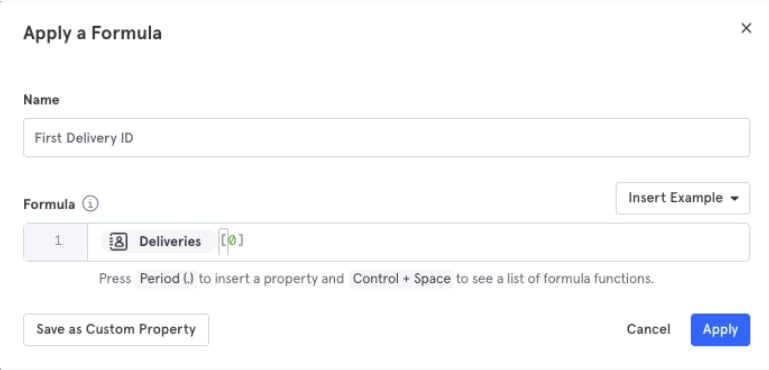 The same syntax works with objects.
## Borrowed Properties
Borrowed properties allow you to take a property from a prior event and automatically add it as a property on a future event without needing to explicitly track the property in the future event.
**Use Cases:**
* Use client-side properties to populate a property on a server-side event. Example: “purchase” event could be a server-side event, while the “product search” event is a client-side event.
* Track a single event property and apply it to subsequent events. Example: It may be hard to track whether every event has dark mode enabled. You would need to keep track of the state of dark mode, and then add a “dark mode” property to every event that you track. Using borrowed events, you can just track one event with a property that indicates whether dark mode has been enabled or not, and have subsequent events borrow the property from that event.
Each project can use up to 20 borrowed properties.
### Creating Borrowed Properties
The following is a demonstration of Borrowed Properties using the [E-Commerce demo project](https://mixpanel.com/project/3018488), which anyone with a Mixpanel account can access.
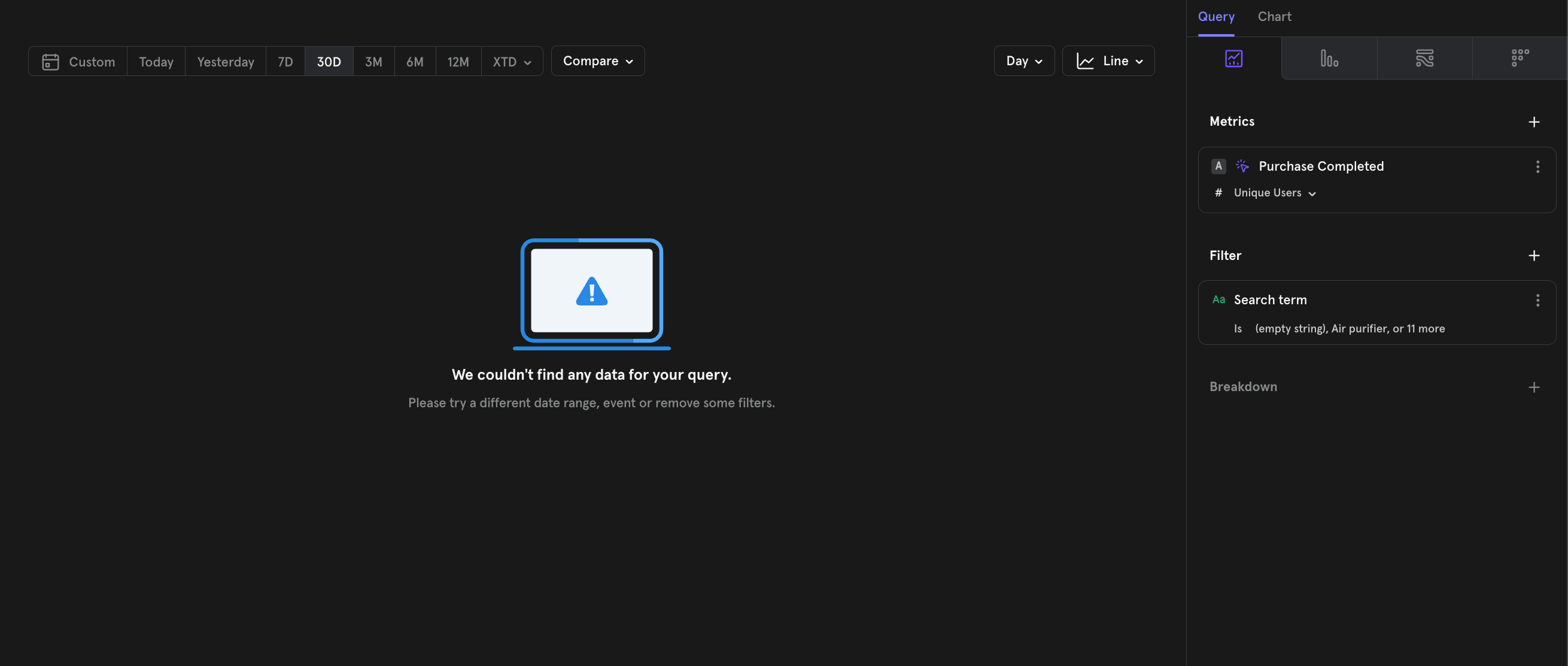
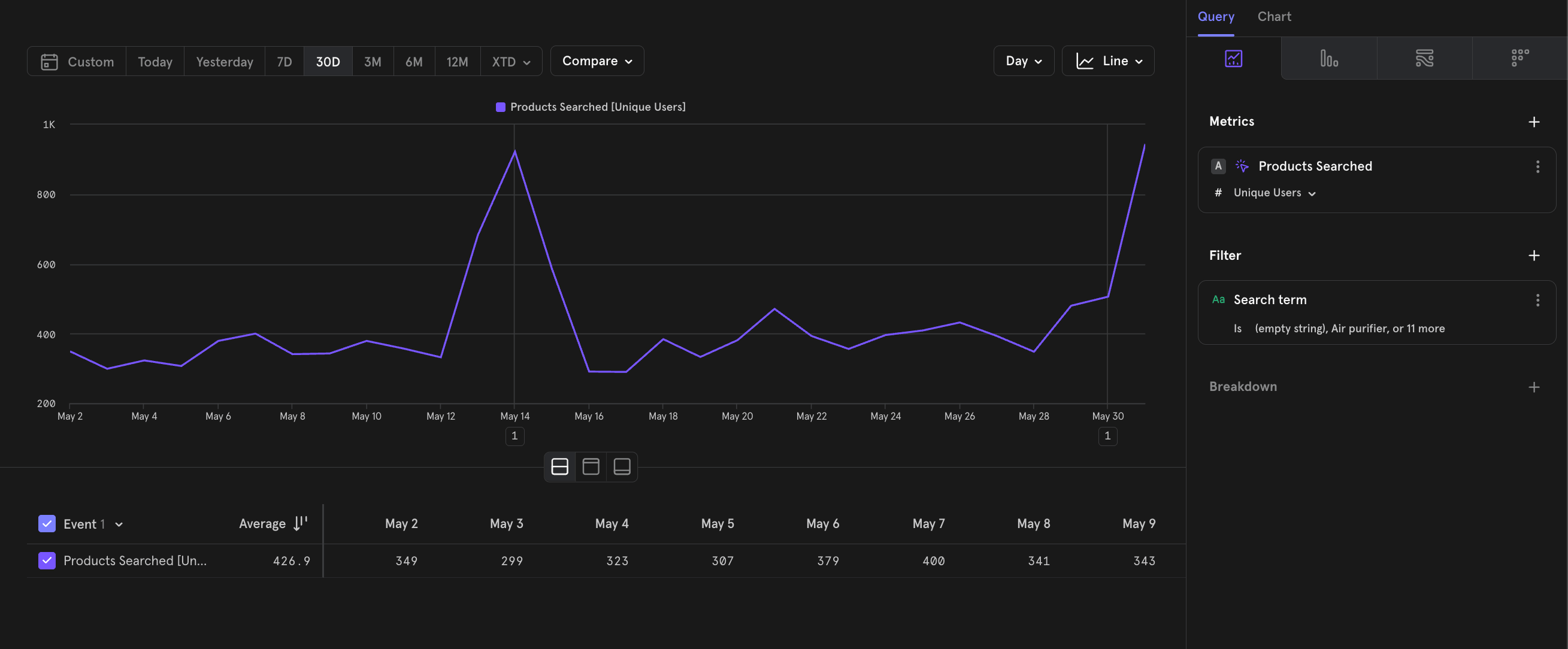
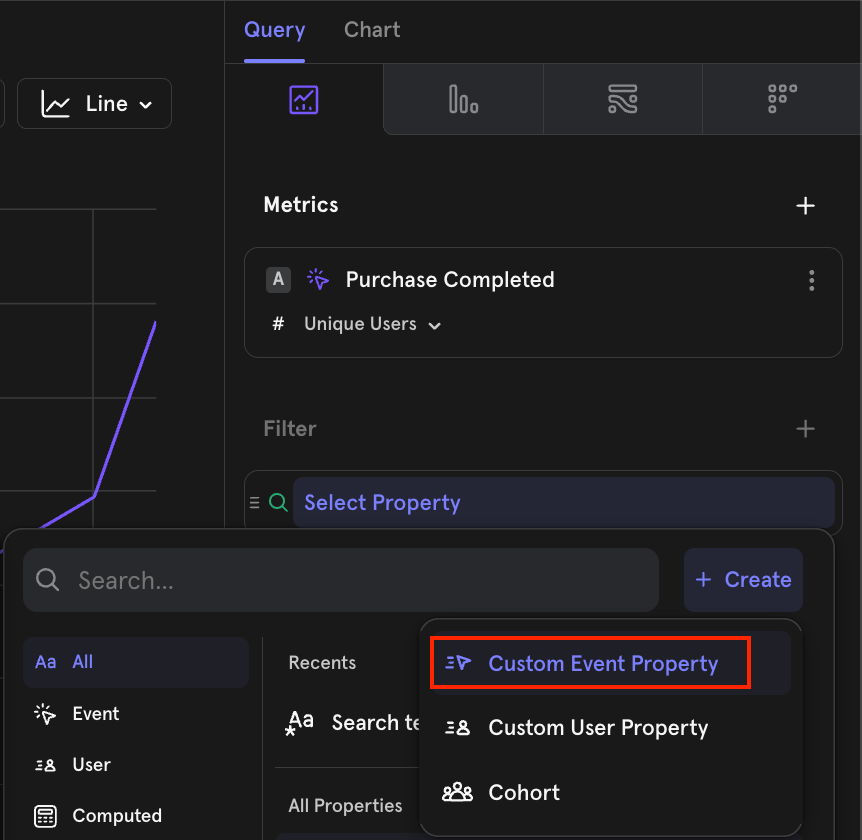
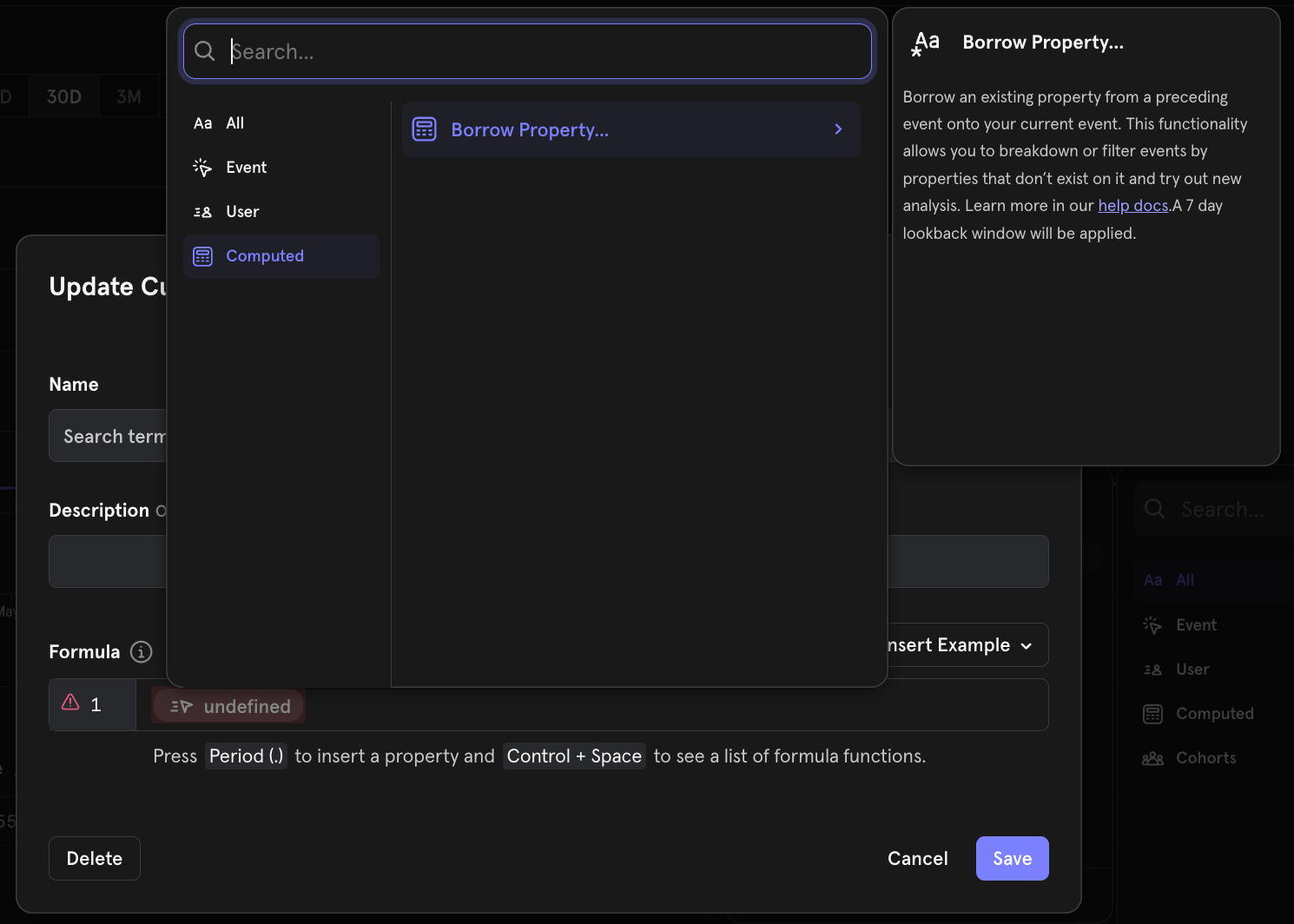
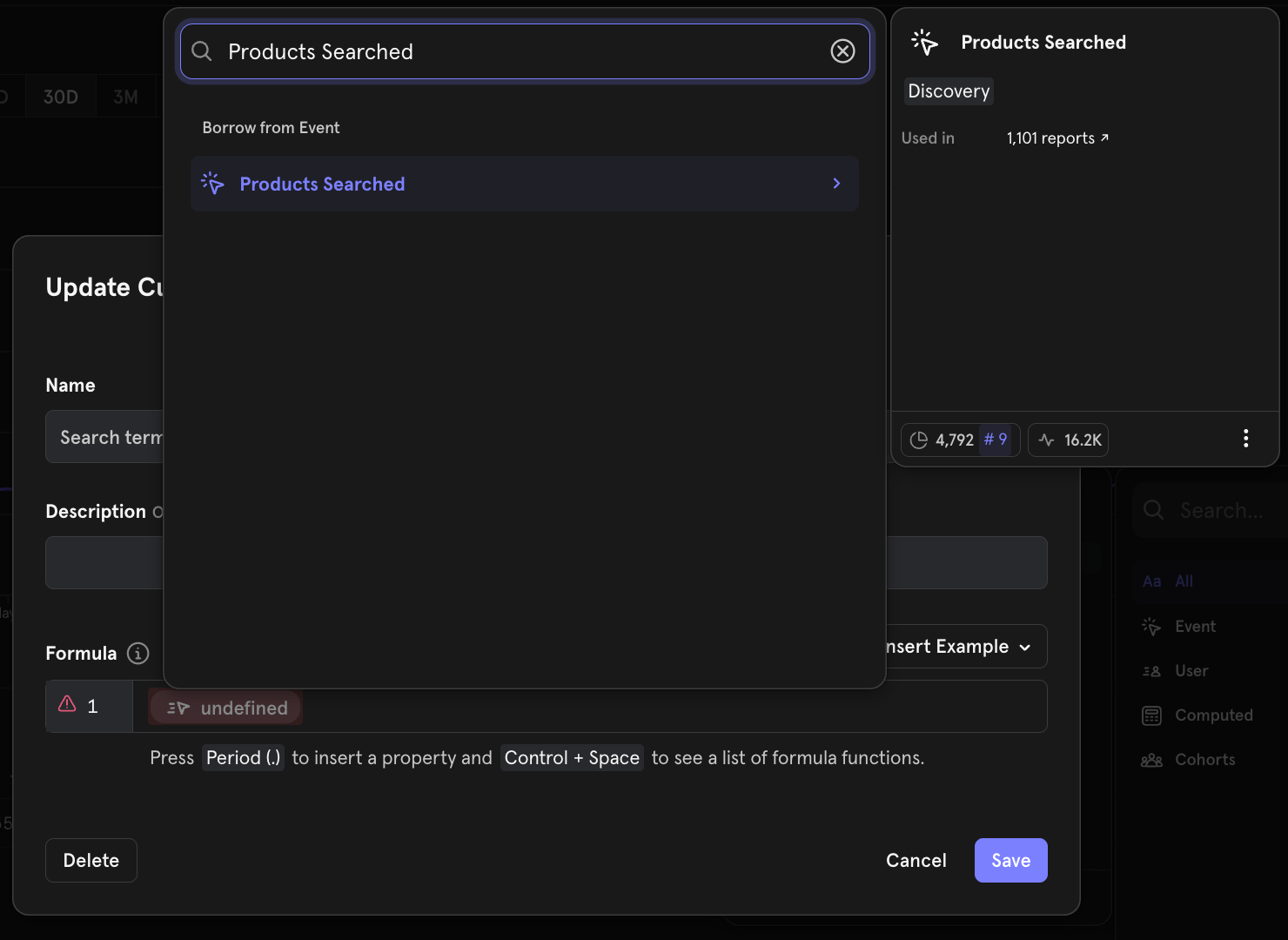
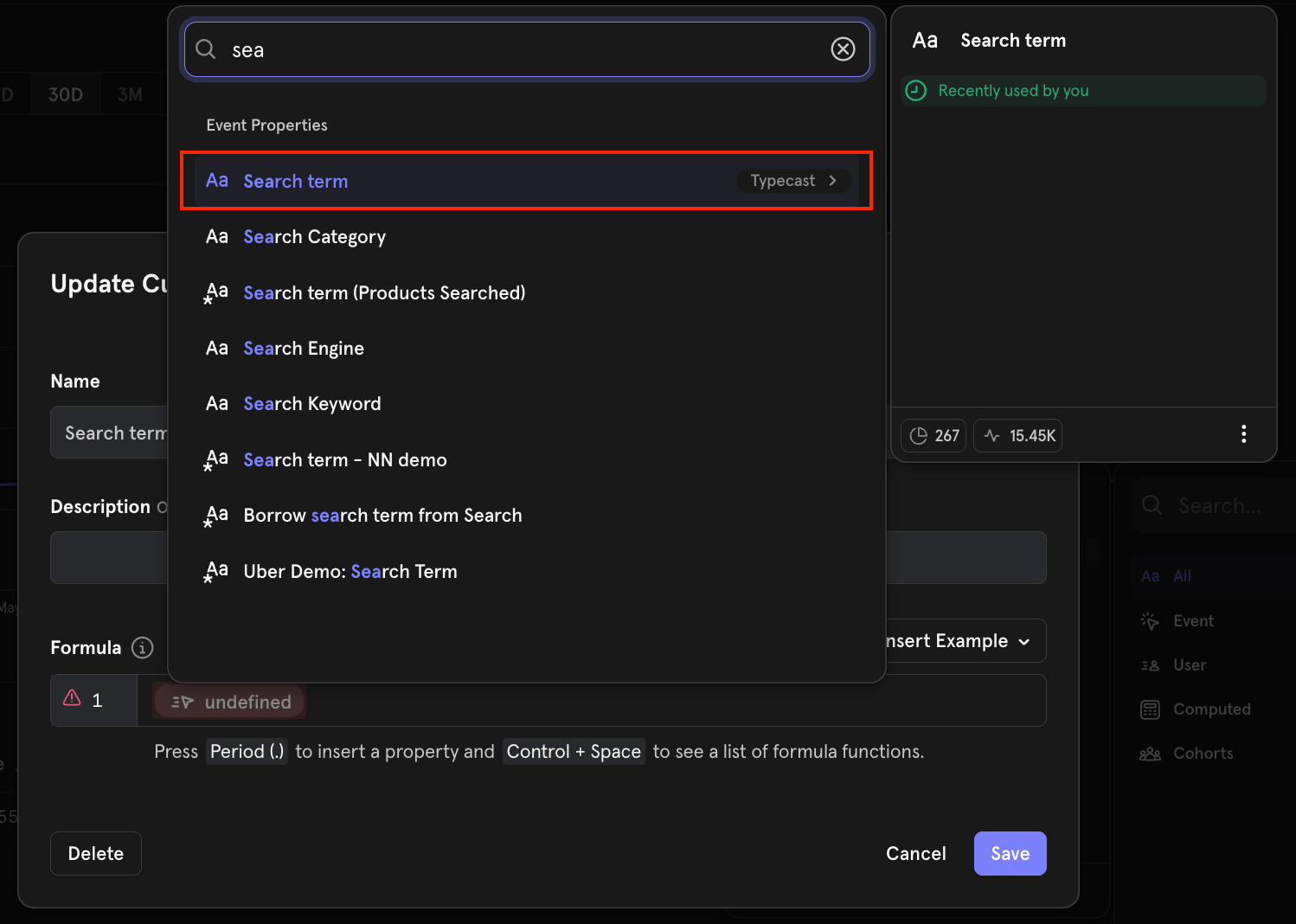
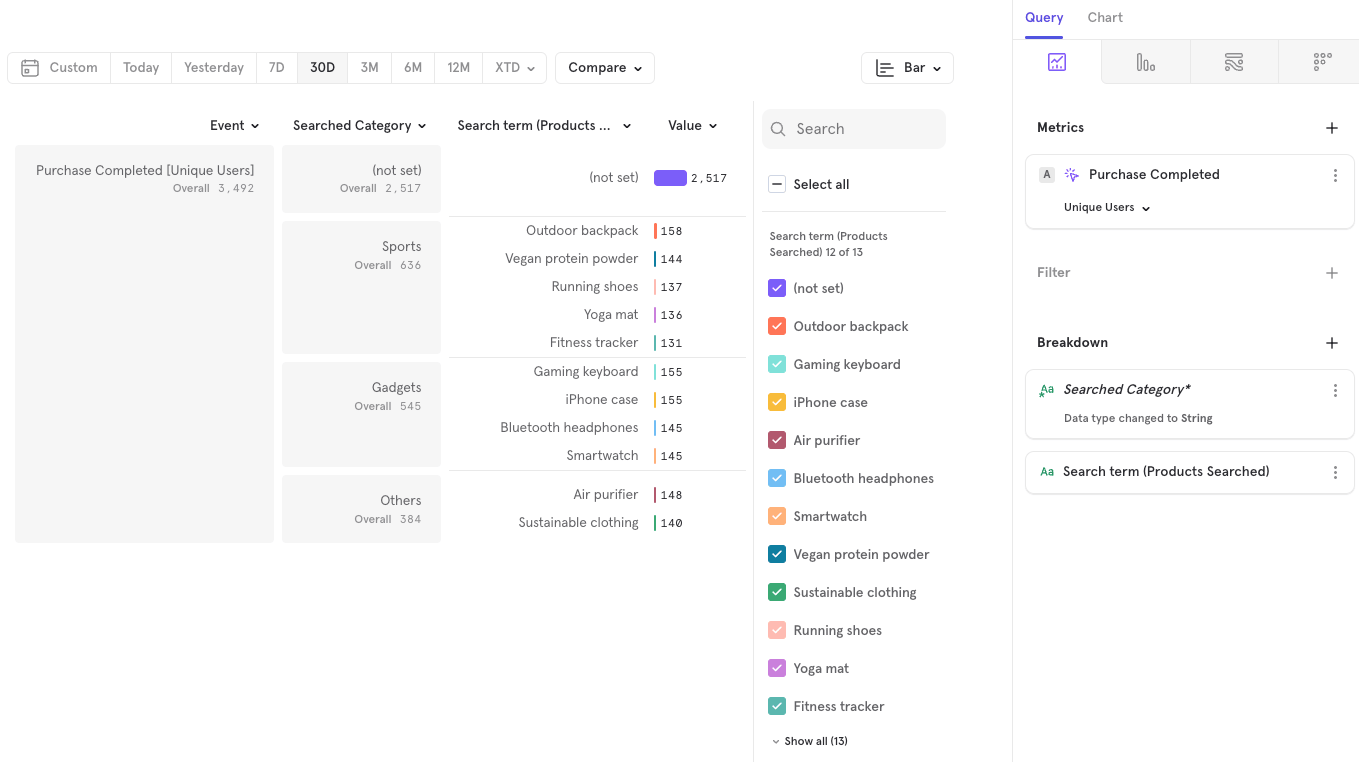
In this demonstration, we present an event called **"Purchase Completed"**, which lacks the event property **"Search term"**. To enable a breakdown by **"Search term"**, we apply the Borrowed Property feature, leveraging the property from another event called **"Product Searched"**.
The same syntax works with objects.
## Borrowed Properties
Borrowed properties allow you to take a property from a prior event and automatically add it as a property on a future event without needing to explicitly track the property in the future event.
**Use Cases:**
* Use client-side properties to populate a property on a server-side event. Example: “purchase” event could be a server-side event, while the “product search” event is a client-side event.
* Track a single event property and apply it to subsequent events. Example: It may be hard to track whether every event has dark mode enabled. You would need to keep track of the state of dark mode, and then add a “dark mode” property to every event that you track. Using borrowed events, you can just track one event with a property that indicates whether dark mode has been enabled or not, and have subsequent events borrow the property from that event.
Each project can use up to 20 borrowed properties.
### Creating Borrowed Properties
The following is a demonstration of Borrowed Properties using the [E-Commerce demo project](https://mixpanel.com/project/3018488), which anyone with a Mixpanel account can access.
In this demonstration, we present an event called **"Purchase Completed"**, which lacks the event property **"Search term"**. To enable a breakdown by **"Search term"**, we apply the Borrowed Property feature, leveraging the property from another event called **"Product Searched"**.
 ### Borrowing Mechanics
Borrowed Properties capture the value from the most recent borrowed event.
We apply a seven-day lookback window, so the second event must occur within seven days of the first. If no first event exists within this window, the borrowed property is assigned the value (not set).
The video below demonstrates how to create a borrowed property.
Some key notes
* Borrowed property creation is limited to Admin & Owner Roles only
* A project can have a maximum of 20 borrowed properties. Hence, you are encouraged to only create borrowed properties useful to the larger team
* A borrowed property, once created, is like any other custom property. It can be accessed by all in the project, depending on permissions
* Borrowing of a property is strictly from the most recent event in the 7-day lookback window. To elaborate
* Say on event “purchase”, you want to borrow property “search term” from an event “search product”. If there are multiple events “search product” before “purchase”, the property will be borrowed from the most recent “search product” event where the property is set.
* Lookback is also fixed to a 7-day window. Say the “purchase” event occurred on 31st Jan, if the most recent “search product” occurred on 20th Jan, the borrow functionality will return “search term” = (not set), since this event happened 11 days ago, which is outside the lookback window range.
To use a borrowed property with other [functions](/docs/features/custom-properties#functions), you would need to:
1. Create a custom property with just the borrowed property on its own
### Borrowing Mechanics
Borrowed Properties capture the value from the most recent borrowed event.
We apply a seven-day lookback window, so the second event must occur within seven days of the first. If no first event exists within this window, the borrowed property is assigned the value (not set).
The video below demonstrates how to create a borrowed property.
Some key notes
* Borrowed property creation is limited to Admin & Owner Roles only
* A project can have a maximum of 20 borrowed properties. Hence, you are encouraged to only create borrowed properties useful to the larger team
* A borrowed property, once created, is like any other custom property. It can be accessed by all in the project, depending on permissions
* Borrowing of a property is strictly from the most recent event in the 7-day lookback window. To elaborate
* Say on event “purchase”, you want to borrow property “search term” from an event “search product”. If there are multiple events “search product” before “purchase”, the property will be borrowed from the most recent “search product” event where the property is set.
* Lookback is also fixed to a 7-day window. Say the “purchase” event occurred on 31st Jan, if the most recent “search product” occurred on 20th Jan, the borrow functionality will return “search term” = (not set), since this event happened 11 days ago, which is outside the lookback window range.
To use a borrowed property with other [functions](/docs/features/custom-properties#functions), you would need to:
1. Create a custom property with just the borrowed property on its own
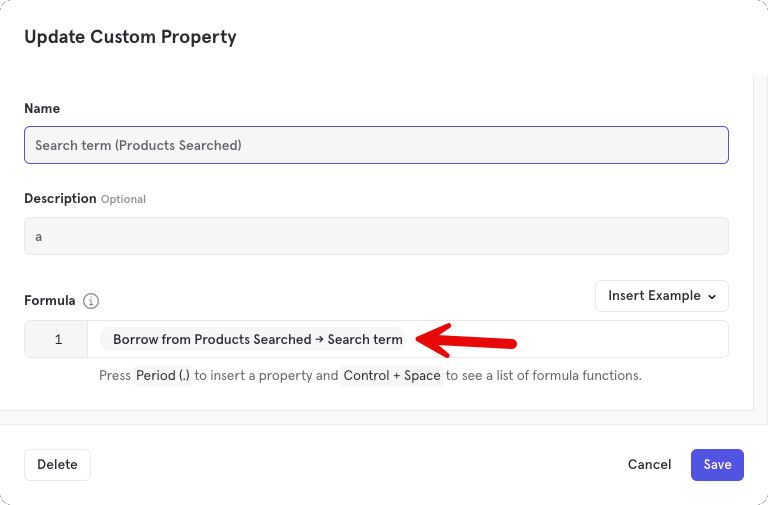
2. Create a separate custom property using the borrowed property (i.e., the 1st custom property)
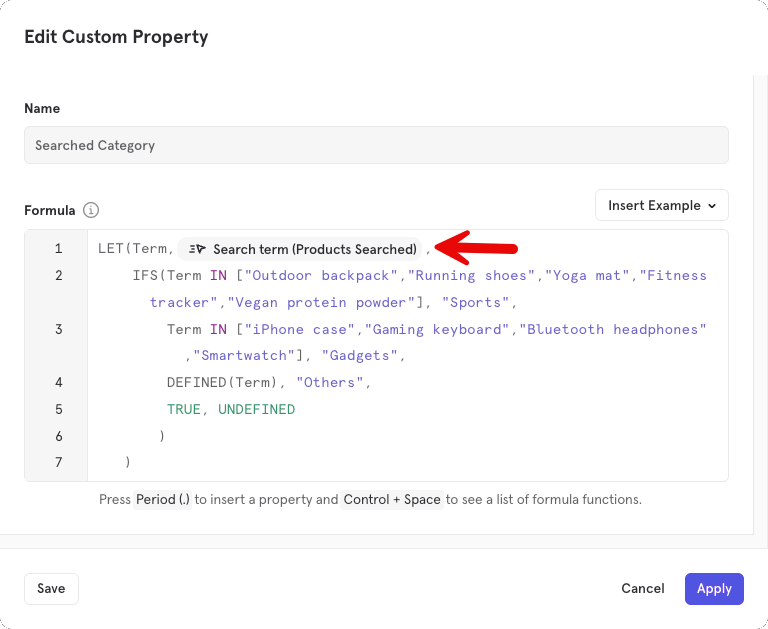
3. Here's an example of a [report](https://mixpanel.com/s/1c4Pl9) with *Searched Category* custom property using *Search term (Products Searched)* borrowed property
## Reference
### Functions
export const letExpression = `
// define a variable "spend" and use it in an expression
let(
spend, * ,
ifs(
spend < 50, "no discount",
spend < 200, "gold discount",
spend > 200, "platinum discount",
TRUE, "invalid"
)
)
`.trim();
Use the following functions in the **Formula** field to modify your custom property:
| Function | Definition | Syntax & Example |
| -------------- | -------------------------------------------------------------------------------------------------------------------------------------------------------------------------------------------------------------------------------------------------------------------------------------------------- | --------------------------------------------------------------------------------------------------------------------------------------------------------------------------------------------------------------------------------------------------------------------------------------------------------------------------------------------------------------------------------------------------------------------------------------------------------------------------------------------------------------------------------------------------------------- |
| if | Evaluates if an expression is true or false. | if(condition, value if true, value if false)
Example:
`if(A=="Facebook" or A=="Twitter", "Social", A)`
|
| ifs | Runs multiple checks and returns a value corresponding to the first true result. If no conditions are true, undefined is returned. | ifs(condition1, value1, condition2, value2, …)
Example:
`ifs( A<60,"Less than 1 hour",`
`A<120, "More than 1 hour but less than 2 hours",`
`A>=120, "More than 2 hours")` |
| not | Returns values that are not true. | not(condition)
Example:
`not(A == "Facebook")` |
| and | Returns true if both conditions are met. Else, returns false. | x and y
Example:
`if(A=="San Francisco" and B=="Chrome", "Valid user", "Invalid User")` |
| or | Returns true if either condition is met. Else, returns false. | x or y
Example:
`if(A=="San Francisco" or B=="Chrome", "Valid user", "Invalid User")` |
| in | Returns true if the first condition is contained in the second condition. | x in condition
Example:
`if("Facebook" in A, "Facebook Corporation", A)`
This can also be used to check against a list of values:
`if(A in ["Chrome","Firefox","Edge"],"Acceptable browser","Unsupported browser")` |
| boolean | Casts the argument to a boolean. | boolean(value)->false, boolean(alternate value)-> true
Example:
`boolean(A)` |
| number | Casts the argument to a number. | number(value to cast)
Example:
`number(A)` |
| string | Casts the argument to a string. | string(value to cast)
Example:
`string(A)` |
| defined | Determines if a value exists. If a property is not defined on a parent event or profile, this will return false, otherwise this will return true. | defined(variable to check for existence)
Example:
`defined(A)` |
| has\_prefix | Determines whether a string starts with another string. This comparison is case-insensitive. | has\_prefix(string to check, prefix)
Example:
`has_prefix(A, "United")` |
| has\_suffix | Determines whether a string ends with another string. This comparison is case-insensitive. | has\_suffix(string to check, suffix)
Example:
`has_suffix(A,"States")` |
| min | Determines the minimum value between two numbers. | min(number, number)
Example:
`min(A,B)` |
| max | Determines the maximum value between two numbers. | max(number, number)
Example:
`max(A,B)` |
| floor | Returns the largest integer that is smaller than or equal to the input (ie: rounds down to the nearest integer). | floor(number)
Example:
`floor(A)` |
| ceil | Returns the smallest integer value greater than or equal to the input (ie: rounds up to the nearest integer). | ceil(number)
Example:
`ceil(A)` |
| round | Returns the nearest integer value of the input value. | round(number)
Example:
`round(A)` |
| upper | Cast string property values to uppercase. | upper(string property)
Example:
`upper(A); upper("hello")` -> "HELLO" |
| lower | Cast string property values to lowercase. | lower(string property)
Example:
`lower(A); lower("FacEBook")` -> "facebook" |
| parse\_url() | Extracts the part of the url that is specified: domain(google) or full\_domain(google.co.uk) | parse\_url(string property, "domain") or parse\_url(string property, "full\_domain")
Example: parse\_url(A,"domain") |
| regex\_extract | If haystack is a string and pattern matches at least one substring, extracts the result from the first pattern match in haystack. The result is a string equal to the entire regex match, or if a capture group is specified, only that portion of the match. We use the PCRE2 regex engine. | regex\_extract(haystack, pattern, \)
Example:
`regex_extract("iPhone5.1","iPhone(...)",1)` ->5.1 |
| regex\_match | Returns true if the pattern matches any part of the string. We use the PCRE2 regex engine. | regex\_match(haystack, pattern)
Example:
`regex_match("zzhaystackzz", "ha(..)ack")` -> true
// Use (?-i) for case-sensitive matching: `regex_match("HAYSTACK", "(?-i)haystack")` -> false |
| regex\_replace | Replaces the parts of a string that match a regular expression with a different string. We use the PCRE2 regex engine. | regex\_replace(haystack, pattern, replacement)
Example:
// convert currency string to number: `regex_replace("$1,234,567", "[^.0-9]\*", ""))` -> `1234567` |
| datedif | Subtract two dates. Units:
D: days.
M: months.
Y: years
MD: days remaining after subtracting whole months.
YM: months remaining after subtracting whole years.
YD: days, assuming start\_date and end\_date are within 1 year.
Use TODAY() for current day. |
datedif(start\_date,end\_date,unit)
Example:
`datedif(registration_date,TODAY(), "M")` -> 5 |
| len | Returns the length of the string or the list. | len(string) or len(list)
Example:
`len("Canada")` -> 6 |
| left | Returns characters from the beginning of a given string. | left(string, num\_of\_characters)
Example:
`left("Canada",3)` -> "Can" |
| right | Returns characters from the end of a given string | right(string, num\_of\_characters)
Example:
`right("Canada",3)` -> "ada" |
| mid | Returns characters from the middle of a given string | mid(string, first\_index, num\_of\_characters)
Example:
`mid("Canada",1,4)` -> "Cana" |
| split | Splits a string into different parts based on a user-specified delimiter, and lets you select a particular split. Delimiter must be a single ASCII character. To fetch a list of all splits, don't pass a third argument. The first split is accessible by passing n=1 (second with n=2, ...) | split(input string, delimiter, \[n: optional]) → string
Examples with 1 split:
`split("dwight@dm.com","@",2)` -> "dm.com"
`split("dwight@dm.com","@",4)` -> undefined
`split("dwight@dm.com","/",2)` -> `dwight@dm.com`
`split("empty//string/","/",2)` -> ""
Examples with all splits:
`split("dwight@dm.com","@")` -> \["dwight", "dm.com"]
`split("a/b/c/d", "/")` -> \["a", "b", "c", "d"]
`split("a/b/c/d", "-")` -> \["a/b/c/d"]
`split("a//b/c/d", "/")` -> \["a", "", "b", "c", "d"] |
| let | Define a variable and use it in an expression. This helps keep the custom property definition neat and non-repetitive. Variables are only active within the scope of the LET function. You can nest multiple let functions to define multiple variables. | let(name, definition, expression)
`// define a variable "spend" and use it in an expression`
`let(`
`spend, * ,`
`ifs(`
`spend < 50, "no discount",`
`spend < 200, "gold discount",`
`spend > 200, "platinum discount",`
`TRUE, "invalid"`
`)`
`)`
*Note: \ and \ are event properties.* |
| any | Evaluates to TRUE if the given expression is true for any value in the given list. The expression can refer to the current list element by the given name. | any(name, list, expr)
Example:
Let's say you had a list of numbers called priceList= \[5,205,178,12,22]
`any(X, priceList, X > 300)` -> false.
`any(X, priceList, X >= 5 and X < 300)` -> true. |
| all | Evaluates to TRUE if the given expression is true for all values in the given list. The expression can refer to the current list element by the given name. | all(name, list, expr)
Example:
Let's say you had a list of numbers called priceList= \[5,205,178,12,22]
`all(X, priceList, X > 5 and X < 200)` -> false.
`all(X, priceList, X >= 5 and X < 300)` -> true. |
| filter | Filters the given list to only include items for which the given expression is true. The expression can refer to the current list element by the given name. | filter(name, list, expr)
Example:
Let's say you had a list of numbers called priceList= \[5,205,178,12,22]
`filter(X, priceList, X>100)` -> new shortened list = \[205,178] |
| map | Transforms each value in the given list using the given expression. The expression can refer to the current list element by the given name. | map(name, list, expr)
Example:
Let's say you had a list of states = \["Georgia","Florida","Texas"]
`map(X, states, lower(X))` -> \["georgia","florida","texas"] |
| sum | Sums all numbers in the given list. Non-numeric items in the list are ignored. | sum(list)
Example:
Let's say you had a list of numbers called priceList= \[5,205,178,12,22]
`sum(priceList)` -> 422.
`sum(filter(X, priceList, X>100))` -> 383, because `filter(X,priceList, X>100)` -> \[205,178] and `sum([205,178])` -> 383. |
### Numeric Operators
Use the following numeric operators in the **Formula** field to modify your custom property using:
* `+`: Addition. Operator can also be used to create string concatenation, for example: `"string_to_concatenate" + your string property`
* `-`: Subtraction
* `*`: Multiplication
* `/`: Division
* `%`: Modulo
### Comparison Operators
Use the following comparison operators in the **Formula** field to modify your custom property:
* `<`: The first number is strictly less than the second number.
* `>`: The first number is strictly greater than the second number.
* `>=`: The first number is greater than or equal to the second number.
* `<=`: The first number is less than or equal to the second number.
* `==`: The first argument is equal to the second argument. If both arguments are strings, the comparison is case-insensitive.
* `!=`: The first argument is not equal to the second argument. If both arguments are strings, the comparison is case-insensitive.
### Constants
* `false`: Represents the literal value of boolean false.
* `true`: Represents the literal value of boolean true.
* `undefined`: Represents the literal value of cases that aren't defined.