> ## Documentation Index
> Fetch the complete documentation index at: https://docs.mixpanel.com/llms.txt
> Use this file to discover all available pages before exploring further.
# 3 Ways Top Teams Put Mixpanel Agent to Work
[**Mixpanel Agent**](/docs/mixpanel-agent) is an AI analyst built into Mixpanel. Ask it a question or give it a task, and it works out which reports or actions to use, without you specifying each step.
If you're new to Mixpanel Agent, or you've tried it once and aren't sure what else it's good for, this guide is for you. It can do a lot, which makes "where do I start" the real question for most new users. Three patterns come up more than any others, across every industry and language:
* Build me something.
* Tell me why this moved.
* Tell me if this worked.
This guide walks through each one, so you can match your question to a starting point and act on it right away. No setup beyond what's already in your Mixpanel project is required, though results improve if your team has filled in [Business Context](/docs/business-context).
**Note**: You don't need the perfect prompt to get value with Mixpanel Agent. Describe what you want in plain language and see what comes back, knowing you can always refine from there.
***
## Turn a rough idea into a board or report
Most people's first move with Mixpanel Agent isn't a question. It's a build request.
Some requests are bare: "make DAU over a week." Others come in fully specified, with filters and breakdowns already decided. Either way, describe what you want and Mixpanel Agent returns a working report or board.
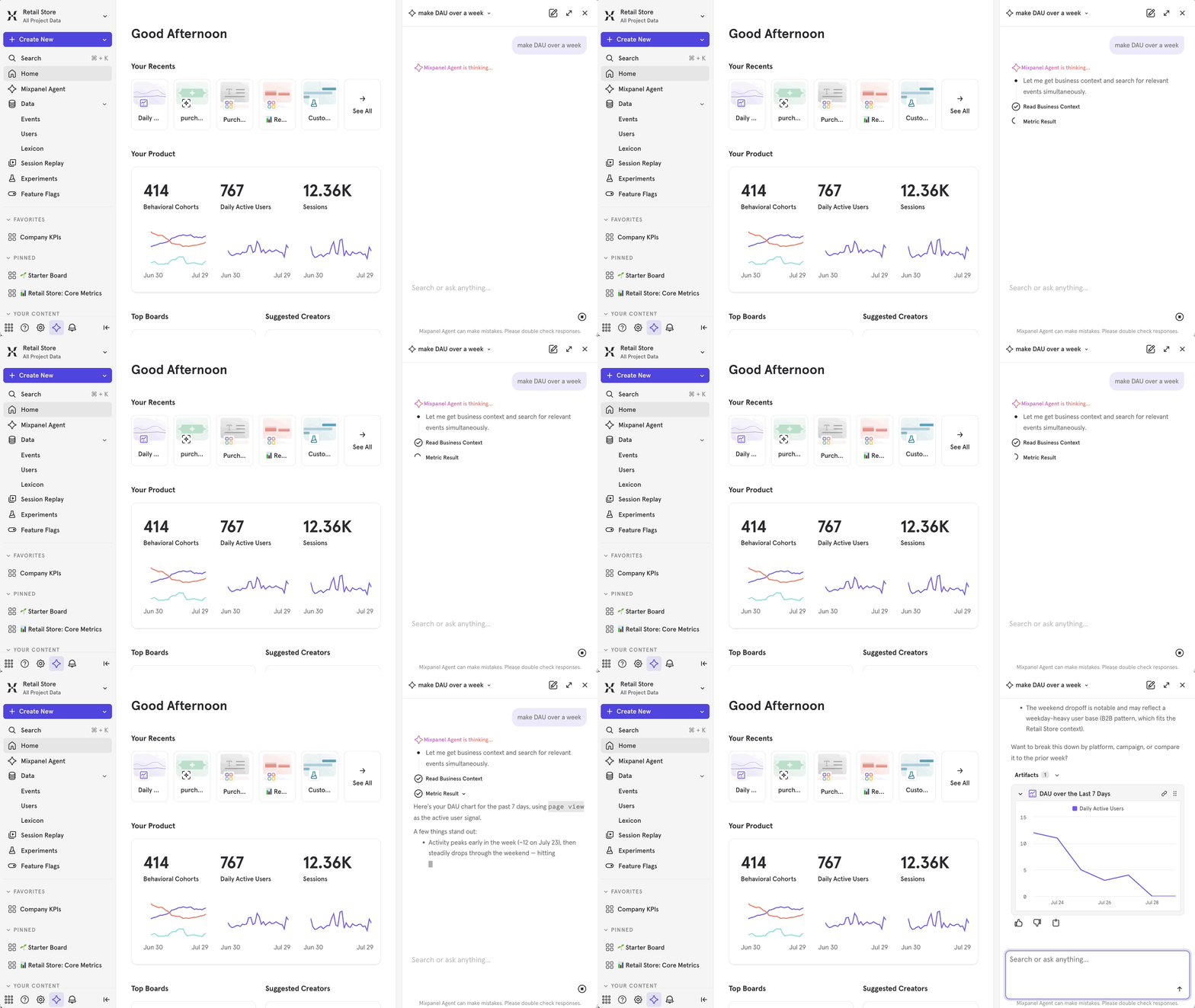 This is the easiest way to try Mixpanel Agent for the first time. If you'd normally open a blank report and click through metric and filter options, ask instead.
**In practice:** A growth lead needs a referral performance view for a stakeholder meeting: invites sent, signups, conversion rate, by channel. They describe it in one sentence. A multi-chart board comes back in about a minute. They fix one event mapping and share the link.
**Pro tip**: Mixpanel Agent won't replace your own judgment. Treat what comes back as a first draft; and check the events and filters Mixpanel Agent chose before you share it with anyone else.
***
## Find out why a metric moved
Once a chart is in front of someone, the next question is "why."
Ask Mixpanel Agent directly, or trigger it from an Insights report or an alert. The [**RCA Agent**](/guides/guides-by-use-case/empower-your-team/mixpanel-agent/use-cases#rca-agent) (root cause analysis) returns which dimensions explain the shift, ranked by significance, plus a plain-language read and a confidence level.
This is the easiest way to try Mixpanel Agent for the first time. If you'd normally open a blank report and click through metric and filter options, ask instead.
**In practice:** A growth lead needs a referral performance view for a stakeholder meeting: invites sent, signups, conversion rate, by channel. They describe it in one sentence. A multi-chart board comes back in about a minute. They fix one event mapping and share the link.
**Pro tip**: Mixpanel Agent won't replace your own judgment. Treat what comes back as a first draft; and check the events and filters Mixpanel Agent chose before you share it with anyone else.
***
## Find out why a metric moved
Once a chart is in front of someone, the next question is "why."
Ask Mixpanel Agent directly, or trigger it from an Insights report or an alert. The [**RCA Agent**](/guides/guides-by-use-case/empower-your-team/mixpanel-agent/use-cases#rca-agent) (root cause analysis) returns which dimensions explain the shift, ranked by significance, plus a plain-language read and a confidence level.
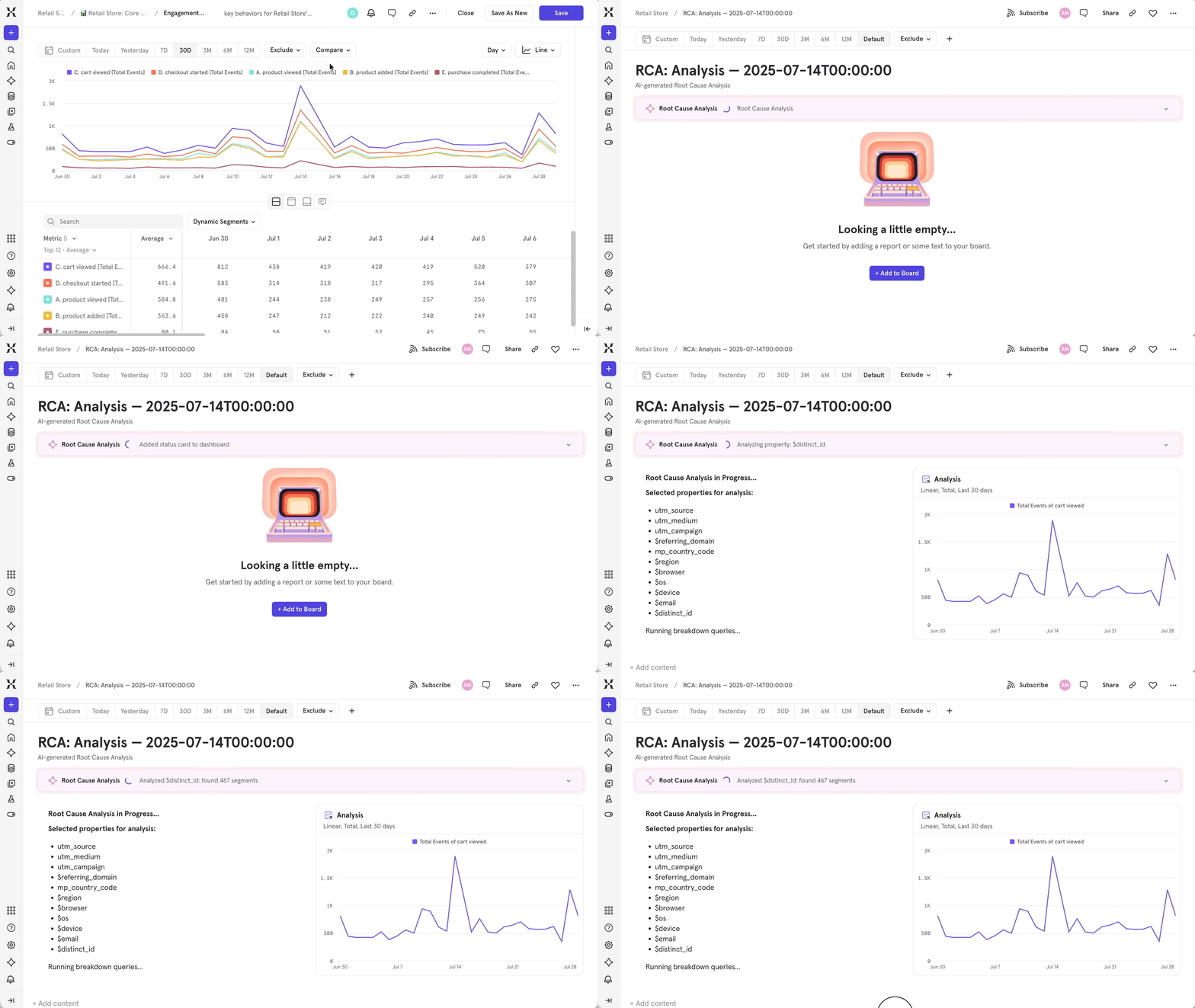 The same instinct shows up in another form too: teams asking Mixpanel Agent to catch early signs a user is going quiet, before it shows up as a drop in a retention report. Asking Agent to look for these signals directly is often the fastest way to catch them.
**In practice:** A PM notices checkout completion dropped week-over-week and triggers RCA from the report. The top factor comes back in seconds: one iOS version, most of the variance, starting the same day a payment SDK update shipped. It’s specific enough to hand straight to engineering.
**Pitfall**: RCA explains what's in your data, not what's true. If the underlying events weren't tracked correctly, RCA will confidently explain the wrong thing. Confirm your tracking before trusting a surprising result.
***
## Check whether a change worked
The third question shows up right after a launch: a pricing change, a policy update, a new onboarding flow. Teams come to Agent with a specific before-and-after comparison already in mind, often within hours of shipping.
The path depends on what kind of change you're measuring: an ongoing metric you're watching, or a formal test with a ship-or-kill decision at the end.
* **Watching a metric you own?** The [**KPI Agent**](/guides/guides-by-use-case/empower-your-team/mixpanel-agent#kpi-agent) delivers a scheduled digest, so you're not manually pulling the number and writing the summary yourself.
* **Ran a formal test?** The [**Experiments Agent**](/guides/guides-by-use-case/empower-your-team/mixpanel-agent/use-cases#experiments-agent) reads the full experiment or feature flag and returns a plain-language verdict: what happened, whether it's significant, what to do next.
**In practice:** An engineering team has results from a savings goal flow experiment, but no one's sure whether the lift is worth shipping. Asking the Experiments Agent for a summary returns a clear answer: Conversion increased a few percentage points, both guardrail metrics held, recommendation is to ship. That summary goes straight to the decision-maker.
***
## Key takeaways
* The fastest way to learn what Mixpanel Agent can do is to point it at a question you already have, not to read about its features first.
* If you'd normally build a report by hand, describe it instead and review what comes back before sharing it.
* Pair a metric shift with RCA before you dig into breakdowns yourself. You'll get a ranked explanation, not just a hunch to chase down.
* Route "did it work" questions to KPI Agent for metrics you own on an ongoing basis, and to Experiments Agent for formal tests with a ship or kill decision.
* All three use cases get sharper answers once your team's [Business Context](/docs/business-context) is filled in.
👉 **Next steps**: Make sure to set up [Business Context](/docs/business-context) if your team hasn't already. Then, pick whichever of the three matches your question right now and try it.
The same instinct shows up in another form too: teams asking Mixpanel Agent to catch early signs a user is going quiet, before it shows up as a drop in a retention report. Asking Agent to look for these signals directly is often the fastest way to catch them.
**In practice:** A PM notices checkout completion dropped week-over-week and triggers RCA from the report. The top factor comes back in seconds: one iOS version, most of the variance, starting the same day a payment SDK update shipped. It’s specific enough to hand straight to engineering.
**Pitfall**: RCA explains what's in your data, not what's true. If the underlying events weren't tracked correctly, RCA will confidently explain the wrong thing. Confirm your tracking before trusting a surprising result.
***
## Check whether a change worked
The third question shows up right after a launch: a pricing change, a policy update, a new onboarding flow. Teams come to Agent with a specific before-and-after comparison already in mind, often within hours of shipping.
The path depends on what kind of change you're measuring: an ongoing metric you're watching, or a formal test with a ship-or-kill decision at the end.
* **Watching a metric you own?** The [**KPI Agent**](/guides/guides-by-use-case/empower-your-team/mixpanel-agent#kpi-agent) delivers a scheduled digest, so you're not manually pulling the number and writing the summary yourself.
* **Ran a formal test?** The [**Experiments Agent**](/guides/guides-by-use-case/empower-your-team/mixpanel-agent/use-cases#experiments-agent) reads the full experiment or feature flag and returns a plain-language verdict: what happened, whether it's significant, what to do next.
**In practice:** An engineering team has results from a savings goal flow experiment, but no one's sure whether the lift is worth shipping. Asking the Experiments Agent for a summary returns a clear answer: Conversion increased a few percentage points, both guardrail metrics held, recommendation is to ship. That summary goes straight to the decision-maker.
***
## Key takeaways
* The fastest way to learn what Mixpanel Agent can do is to point it at a question you already have, not to read about its features first.
* If you'd normally build a report by hand, describe it instead and review what comes back before sharing it.
* Pair a metric shift with RCA before you dig into breakdowns yourself. You'll get a ranked explanation, not just a hunch to chase down.
* Route "did it work" questions to KPI Agent for metrics you own on an ongoing basis, and to Experiments Agent for formal tests with a ship or kill decision.
* All three use cases get sharper answers once your team's [Business Context](/docs/business-context) is filled in.
👉 **Next steps**: Make sure to set up [Business Context](/docs/business-context) if your team hasn't already. Then, pick whichever of the three matches your question right now and try it.