

Overview
Mixpanel Agentic Automations are sub-agents of Mixpanel Agent that you configure once to do recurring analysis work for you, and deliver the result where you already work. You decide when an Automation runs, on a schedule or when a metric crosses a threshold, and what it should look at; the agent does the analysis and sends you the result. Today, Automations monitor a KPI: watch a metric you own and get a digest explaining what changed. We’re expanding what an Automation can do, so that over time you’ll describe the job in your own words rather than pick from a fixed set of use cases. If you’d like early access or want to help shape this, reach out to your account manager and ask to be connected with our product team.KPI Monitoring
A KPI Monitor watches a metric you care about and ships a personalized digest, either on the cadence you choose or whenever the metric crosses a threshold you set. Each digest summarizes what changed in the last window, calls out shifts the agent considers notable, and gives you a way to give feedback so we can improve what the agent surfaces over time.Create a KPI Monitor
You can also create and manage Automations by asking Mixpanel Agent — see below.1
Launch the Automation creation workflow
Click ’+ Create New’ button in your side navigation bar. At the bottom of the ‘Analysis’ section, click the Automation button. You can also go straight to mixpanel.com/app/agent-flows/new.\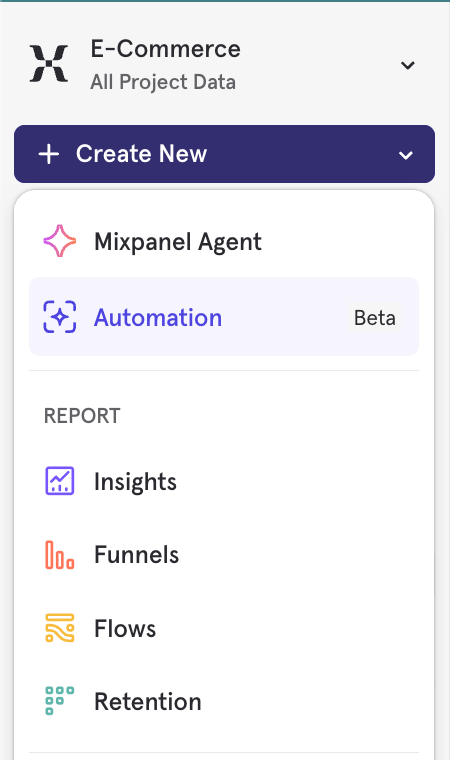
Don’t see this button? Your organization may not have Mixpanel AI enabled. See the Mixpanel Agent FAQ for how to enable Mixpanel AI features in settings.
2
Name the Automation
Pick the automation type and give it a name. The Automation is created as a Draft right away, before you configure anything, and won’t run until it’s fully configured and saved. You’ll set up everything else on the Automation’s Configuration tab.
3
Set the trigger
An Automation runs either on a schedule or when a threshold is crossed.On a schedule. Digests can be delivered daily, weekly, or monthly, at a time of day you choose. Daily schedules can run on specific weekdays, weekly schedules on a single weekday, and monthly schedules on either a day of the month or an nth weekday. You can also repeat every few weeks or months instead of every one. Weekly is a balanced default cadence for most teams.When a threshold is crossed. Instead of a fixed cadence, the Automation checks your metric every hour and only runs when it meets a condition you define. See Run when a threshold is crossed.Changing the cadence resets the analysis window to the new cadence’s default.
4
Configure the metric analysis
Metric. Choose any Insights metric — sums, counts, or unique counts over an event or custom event, as well as funnels, retention, and saved metrics. Click Select metric to open the metric builder, where you can also add filters. The agent will use the metric’s existing definition as the source of truth for what it watches.Breakdown (optional). In the same metric builder, pick one property to break the metric down by, and each digest ranks its segments alongside the overall number. See Break a KPI down by a property.Instructions. Use the Instructions field to tell the agent how to interpret results and what to call out. For example: “Flag anything that deviates more than 2 standard deviations from the 30-day average” or “Focus on week-over-week change, not absolute values.”Instructions shape the digest’s commentary, not the underlying query. The agent runs a single, fixed query based on the metric you selected. It cannot run additional queries, pull in other metrics, or take actions. Instructions guide how the agent frames its summary: which comparisons to emphasize, what thresholds matter to you, and what language to use when describing shifts.Analysis window. Set how much history each digest analyzes. The options depend on the cadence you picked, or on the firing limit for a threshold trigger, and each has a sensible default.
5
Set up delivery
Digests can land in Slack, email, or both — you can add multiple email recipients and multiple Slack channels at the same time. Slack delivery requires the Slack integration to be configured for your project.Delivery is optional. With no channel configured, results only appear on the Automation’s overview page.
6
Save
Save your configuration. Once the Automation has a name, a valid metric, and a trigger, saving activates it — your first digest arrives at the next cadence boundary, or the first time your threshold condition is met. You can pause, edit, or delete the Automation at any time. A paused Automation stays paused when you edit it, until you flip the Activate toggle back on.The Automation’s overview page keeps a run history, including whether each digest was delivered. If a run fails, for example because the metric couldn’t be queried, you’ll see the reason there and in the same Slack channels or email inboxes the digest would have gone to, so you can fix the metric configuration.
Break a KPI down by a property
If you track a KPI across many segments — regions, fulfillment centers, products, accounts — you don’t need one Automation per segment. Pick a single property to break the metric down by, and every digest ranks that property’s segments for you. Each digest leads with the overall metric, then surfaces the top 5 and bottom 5 performing segments. So a daily monitor on Orders Completed broken down byfulfillment_center_id tells you both how order volume is doing overall and which centers are pulling ahead or falling behind — even on a day when the total looks unremarkable.
Breakdowns work on any cadence, and the digest is delivered wherever your other KPI digests land.
Set the breakdown in the breakdown field, not the Instructions field. Asking for “break down by location” in your instructions won’t create a breakdown — and it’s ambiguous which property you meant. Choosing the property explicitly guarantees the digest ranks the one you intended.
Run when a threshold is crossed
Not every metric needs a digest on a fixed cadence. Some you only want to hear about when something happens — Orders Completed drops below 1,000 in a day, or Signups falls more than 20% week over week. Pick When a threshold is crossed as the trigger and define the condition: the metric is above or below a value, crosses a value in either direction, or increases or decreases by more than a number or percentage compared with the previous hour, day, week, or month. The Automation checks the condition every hour, looking at the most recent period against the one before it. When it’s met, the normal analysis runs over your full analysis window, so the digest explains the crossing in the context of the last few weeks or months rather than just the period that tripped it. The digest is the same one a scheduled run produces, except the summary leads with the rule that fired and the value that triggered it. To keep a noisy metric from messaging you every hour, set a firing limit so the Automation runs at most once per day, week, or month; the condition keeps being checked in between. If the metric has a breakdown, you can choose whether any segment meeting the condition should trigger a run, or only a specific one.What’s in a digest
- A short summary of what the metric did in the last window vs. baseline.
- Any shifts the agent considers notable, with the agent’s reasoning.
- If you set a breakdown, the top 5 and bottom 5 performing segments for that property.
- If a threshold triggered the run, the rule that fired and the value that met it.
Manage Automations with Mixpanel Agent
You can set up and manage Automations by asking Mixpanel Agent in plain language, from anywhere the Agent is available. Ask it to:- List your Automations. This returns the Automations you own, not your teammates’.
- Inspect one — its settings, trigger, analysis window, breakdown, and delivery. From an Automation’s details page, the Agent picks up which one you mean from the page you have open.
- Create a new one — metric, breakdown, trigger (a schedule or a threshold), analysis window, instructions, and delivery.
- Update one — rename it, change the schedule or threshold condition, adjust the analysis window, add or change the breakdown, revise instructions, or change delivery.
- Activate or pause it.
- Check run history — when it last ran, and whether the run succeeded, failed, or partially completed. Both scheduled and manual runs are included.
- Delete it.
Every change the Agent makes requires your approval. Creating, updating, activating, pausing, and deleting each surface an approval step showing exactly what will change, and nothing is applied until you approve it.Automations the Agent creates land as Draft — the Agent never activates one as part of creating it. Activating is a separate action with its own approval.Edits are scoped to what you asked for: approving a rename changes only the name, and leaves the metric, cadence, window, and delivery untouched. The one exception is delivery, which is replaced as a set rather than merged — asking to add a recipient replaces the existing delivery configuration.
Limits
- Automations per user per project. Free: 5, Growth: 10, Enterprise: 20.
- Metric types. KPI Monitors support event metrics, custom events, funnels, retention, saved metrics, and formulas. One metric per Automation.
- Delivery channels. Slack and email are available today
- Triggers. Scheduled runs can be daily, weekly, or monthly. Threshold conditions are checked hourly and can fire at most once per day, week, or month.
- Analysis window. The options available depend on the cadence you picked for scheduled triggers, or on the firing limit for threshold triggers.
- Breakdowns. One property per Automation. Digests show the top 5 and bottom 5 segments; the number of segments isn’t configurable yet.
- Time zone. Schedules run in the project’s time zone. There’s no per-user local delivery time yet.
Have feedback or want to help shape what’s next for Agentic Automations? Reach out to your account manager and ask to be connected with our product team.