

Customers on an Enterprise can access the Data Volume Monitoring feature. See our pricing page for more details.
Overview
Data Volume Monitoring is a Data Governance feature for organizations that want to monitor for implementation issues with events being sent to their Mixpanel project. The feature is a project-level setting for Enterprise accounts that watches for sudden, drastic changes in event volume and notifies admins so they can take corrective action.Enabling Data Volume Monitoring
For New Enterprise Customers (starting December 2025 onwards): Data Volume Monitoring is automatically enabled by default on all new enterprise projects. You can configure the notification settings or disable the feature following the instructions below. To configure Data Volume Monitoring, navigate to the Lexicon page, go to the left-hand menu under Data Governance, and click the Data Volume Monitoring section. When enabling this setting, input email addresses or aliases to be notified when a spike or drop is detected. This will be gated to project admin and owner email addresses. Admins can also set up a Slack channel to be notified when a spike or drop is detected. Notifications are sent once per day. If multiple spikes or drops are found for a project within one day, we will batch the notifications so you will get at most 2 per day per project. Only Project Admins or Owners can enable this setting, and it’s only available on Enterprise plans.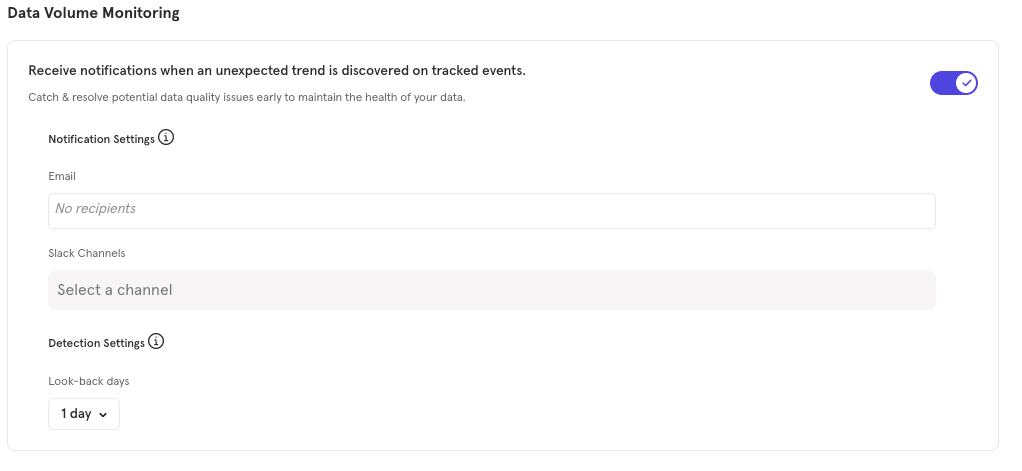
Notes
- Data Volume Monitoring begins as soon as it is enabled, but it may take 24 hours to run for the first time
- We will check once a day as long as Data Volume Monitoring is enabled
- By default, we inspect event volume for the previous day (a 1-day “look-back”), but you can select a 2-day “look-back” to compensate for ingestion delay
- We use up to 24 months of event volume history to determine an “expected” range
- We analyze up to 1,000 of most-active events which have volume of 100+ for at least half of the last month
- Volume needs to be at least 50% higher or lower than the expected range for a change in volume to generate a notification