

Getting Started
Please refer to our Quickstart Guide. The Full API Reference, Library Source Code, and an Example Application is documented in our GitHub repo. The iOS (Objective-C) SDK is open source under the Apache 2.0 license. Its source code is on GitHub at mixpanel/mixpanel-iphone.Installing the Library
You can install the Objective-C library by using CocoaPods, Carthage, or Swift Package Manager.- CocoaPods
- Carthage
- Swift Package Manager
- Install CocoaPods by typing the following in your command line:
- After install CocoaPods, create a local CocoaPods spec mirror by running the following:
- Then navigate to your Xcode project directory and create a Podfile by running the following:
- Open the Podfile that was generated and add the Mixpanel library to your dependencies:
Ruby
- Install the Mixpanel library and create a new Xcode workspace by running the following in the Xcode project directory:
AppDelegate.m and create an instance of Mixpanel using sharedInstanceWithToken: with your project token inside application:didFinishLaunchingWithOptions:.
Objective-C
sharedInstance.
Objective-C
Library Configuration
The library can be initialized with different configurations. See a complete list of the configuration options here. Example UsageObjective-C
Sending Events
Usetrack:properties: to send an event by providing the event name and any event properties. This will trigger a request to the /track API endpoint to ingest the event into your project.
The /track endpoint will only validate events with timestamps within the last 5 days of the request. Events with timestamps older than 5 days will not be ingested. See below on best practices for historical imports.
Objective-C
Timing Events
You can track the time it took for an action to occur, such as an image upload or a comment post, usingtimeEvent:. This will mark the “start” of your action, which you can then finish with a track call. The time duration is then recorded in the “Duration” property.
Example Usage
Objective-C
Flushing Events
To preserve battery life and customer bandwidth, the Mixpanel library doesn’t send the events you record immediately. Instead, it sends batches to the Mixpanel servers every 60 seconds while your application is running, as well as when the application transitions to the background. Callflush manually if you want to force a flush at a particular moment.
Example Usage
Objective-C
flushInterval.
Example Usage
Objective-C
Importing Historical Events
The Objective-C SDK is a tracking SDK designed for real-time tracking in a client-side environment. Callingtrack:properties: triggers a request to our /track API endpoint, which will validate for events with a timestamp that is within the last 5 days of the request. Events older than 5 days will not be ingested.
For bulk import of historical events older than 5 days, we will need to use the /import API endpoint which is optimized for scripting and supports ingesting historical data. We recommend the Python SDK (see the .import_data() function) and mixpanel-utils module (see the import_events() function) which both leverages the /import API for event ingestion.
Setting Super Properties
Super properties are global event properties that you define once and apply to all events. To register super properties, callregisterSuperProperties:
Use registerSuperPropertiesOnce: to register super properties without overwriting existing values.
Example Usage
Objective-C
Managing User Identity
You can handle the identity of a user using theidentify: and reset methods. Learn more about identity management and identifying users.
Identify
Callidentify: when you know the identity of the current user, passing in their user ID as an argument. This is typically at account registration and at log in.
Example Usage
Objective-C
Call Reset at Logout
Callreset to clear data attributed to a user when they logout. This will clear the local storage and allows you to handle multiple users on a single device.
Example Usage
Objective-C
Since v3.6.2, Mixpanel stopped using the IFA(ID for Advertisers) as a distinct_id, meaning calls to reset will generate a new random UUID.If you want to use IFV(identifierForVendor) as the distinct_id, you can set
MIXPANEL_UNIQUE_DISTINCT_ID=1 in build settings Preprocessor Macros on the Mixpanel framework target. The IFV will not change when you call reset, but will change upon app uninstalls/reinstalls.Storing User Profiles
Once your users are identified, create user profiles by setting profile properties to describe them. Example profile properties include “name”, “email”, “company”, and any other demographic details about the user. The Objective-C SDK provides a few methods for setting profile properties underMixpanelPeople accessible via .people. These methods will trigger requests to the /engage API endpoint.
Setting Profile Properties
You must call
identify: before setting profile properties in order to associate the profile properties you set with the target user. If identify is not called, the profile update will be queued for ingestion until an identify call is made..people set:.
If a profile property already exists, it will be overwritten with the latest value provided in the method. If a profile property does not exist, it will be added to the profile.
Example Usage
Objective-C
Other Types of Profile Updates
There are a few other methods for setting profile properties. See a complete reference of the available methods here A few commonly used people methods are highlighted below:- setOnce:
- append:
- union:
- increment:by
The
.people setOnce: method set profile properties only if they do not exist yet. If it is setting a profile property that already exists, it will be ignored.Use this method if you want to set profile properties without the risk of overwriting existing data.Example UsageObjective-C
Group Analytics
Read more about Group Analytics before proceeding. You will need to have the group key defined in your project settings first.
group_key and group_id.
group_keyis the event property that connects event data to a group. (e.g.company)group_idis the identifier for a specific group. (e.g.mixpanel,company_a,company_b, etc.)
Adding Users to a Group
All events must have the group key as an event property in order to be attributed to a group. Without the group key, an event cannot be attributed to a group. Call thesetGroup:groupID: to register the current user to a group, which would add the group_key as an event property set to the group_id value to all events moving forward.
Example Usage
Objective-C
group_key value as a list of multiple group_id values.
Call setGroup:groupIDs: to add additional group_ids to an existing list.
Example Usage
Objective-C
Adding Group Identifiers to User Profiles
To connect group information to a user profile, include thegroup_key and group_id as a user profile property using the set call.
Example Usage
Objective-C
Setting Group Profile Properties
Create a group profiles by setting group properties, similar to a user profile. For example, you may want to describe a company group with properties such as “ARR”, “employee_count”, and “subscription”. To set group profile properties, specify the group that needs to be updated by callinggetGroup:groupID, then set the group properties by chaining the set: method, which will trigger a request to the /groups API endpoint.
Example Usage
Objective-C
Other Group Profile Methods
See all of the methods under the MixpanelGroup class here. A few commonly used group methods are highlighted below:- setOnce:
- unset:
- union:values:
- remove:value:
The
getGroup:groupID setOnce: method set group profile properties only if they do not exist yet. If it is setting a profile property that already exists, it will be ignored.Use this method if you want to set group profile properties without the risk of overwriting existing data.Example UsageObjective-C
Debug Mode
Enable debug mode by setting theenableLogging flag to YES.
Example Usage
Objective-C
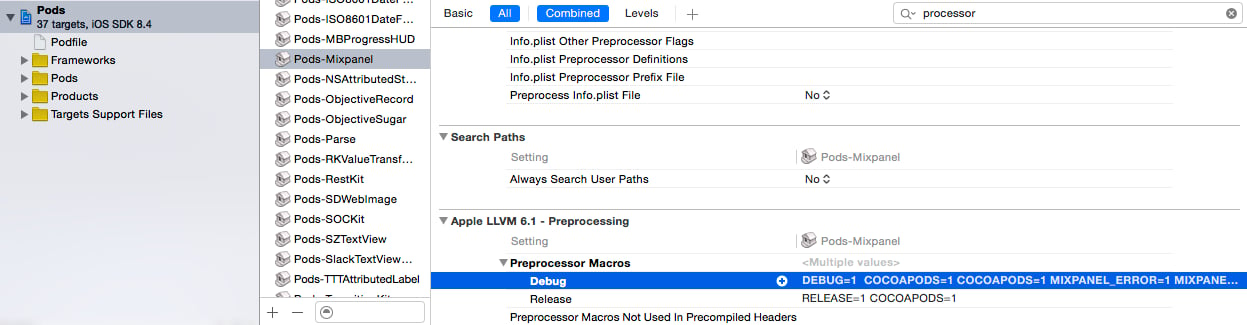
MIXPANEL_DEBUG=1- logs queueing and flushing of events to MixpanelMIXPANEL_ERROR=1- logs any errors related to connections or malformed events
Ruby
Privacy-Friendly Tracking
You have control over the data you send to Mixpanel. The Objective-C SDK provide methods to help you protect user data. Learn more about Privacy.Opt Out of Tracking
The Objective-C SDK is initialized with tracking enabled by default. Use theoptOutTracking method to opt the user out of data tracking and local storage for the current Mixpanel instance.
Example Usage
Objective-C
optOutTrackingDefault configuration. Once the user is ready to be tracked, call optInTracking to start tracking.
Example Usage
Objective-C
EU Data Residency
Route data to Mixpanel’s EU servers by setting theserverURL flag after initializing the Mixpanel instance.
Objective-C
India Data Residency
Route data to Mixpanel’s India servers by setting theserverURL flag after initializing the Mixpanel instance.
Objective-C
Disable Geolocation
The Objective-C SDK parse the request IP address to generate geolocation properties for events and profiles. To disable geolocation, set theuseIPAddressForGeoLocation flag to NO.
Example Usage
Objective-C
Legacy Automatically Tracked Events
Mixpanel’s mobile SDKs have a legacy feature to automatically collect common mobile events. We don’t recommend enabling this, as these events rely on client-side state and can be unreliable. Ensure autotracked mobile events are disabled by settingtrackAutomaticEvents to NO during initialization.
Example Usage
Objective-C