

- How much time do users spend on my site per session?
- What are the average number of pages visited per session?
- Which page is the most common landing page for a session?
- What % of sessions lead to a key action (like signing up or purchasing)?
How Sessions Work
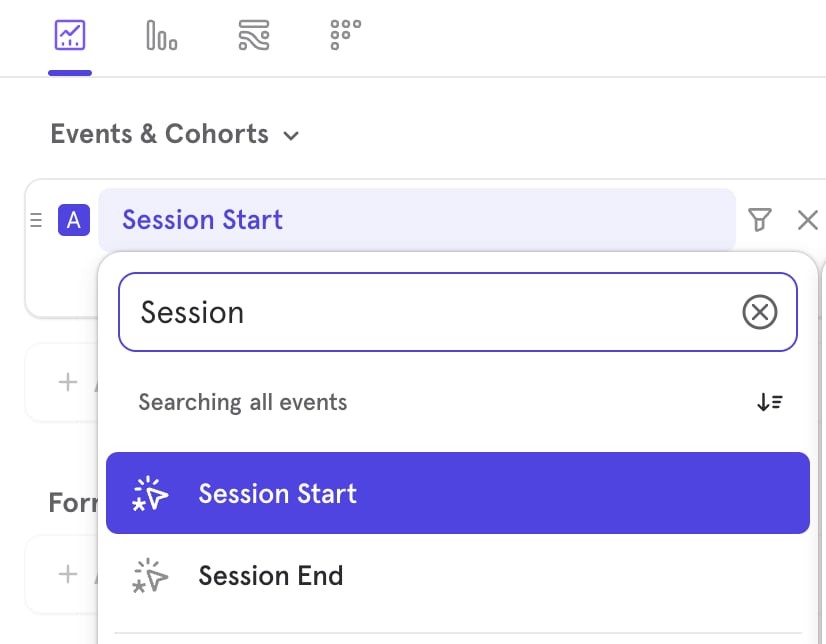
Mixpanel computes sessions automatically from the events you send us. This means you don’t need to do any special tracking work on your end to make sessions work. Sessions consist of two virtual events:- Session Start
- Session End
- Timeout Based (Default): The session starts when a user performs any event, and ends when the user is inactive for some period of time (default: 30 minutes).
- Event Based: Provide a starting event and ending event. The session starts when the user performs the starting event and ends when the user performs the ending event.
- Property Based: Provide a
session_idproperty. All events that a user performs which have the same value forsession_idare considered part of the same session.
Use Cases
These use cases assume that you’re tracking an event for each page a user views. You can do this automatically with our Javascript SDK or using a CDP like Segment. To make these examples more interesting, we’re using our own tracking on our documentation site.How much time do users spend on my site per session?
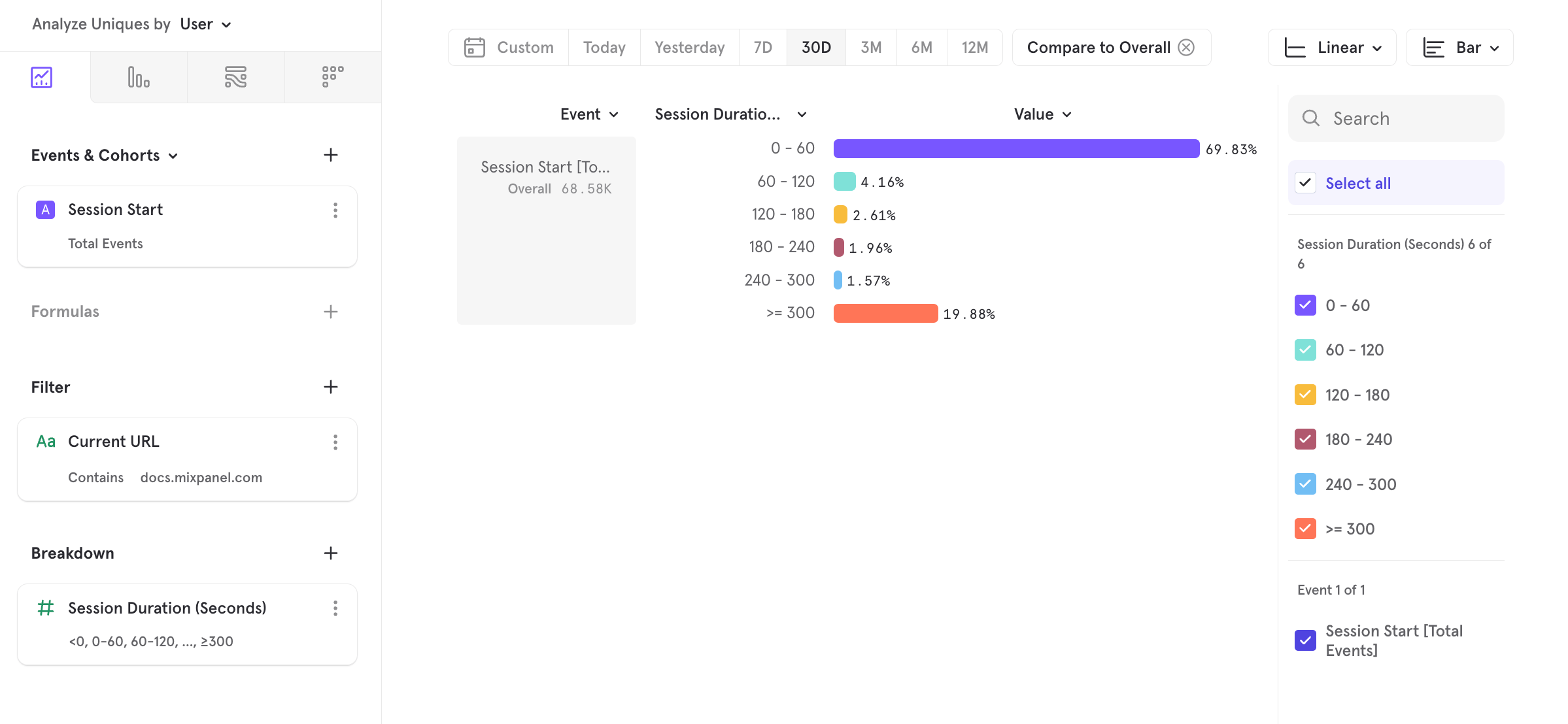
Each Session event comes with a “Session Duration (seconds)” property, which is computed by Mixpanel and indicates the amount of time spent during the session. You can use any of our aggregations (sum, average, 90th percentile, etc.) to study the time spent by your users per session. Here, we look at the average time spent per session: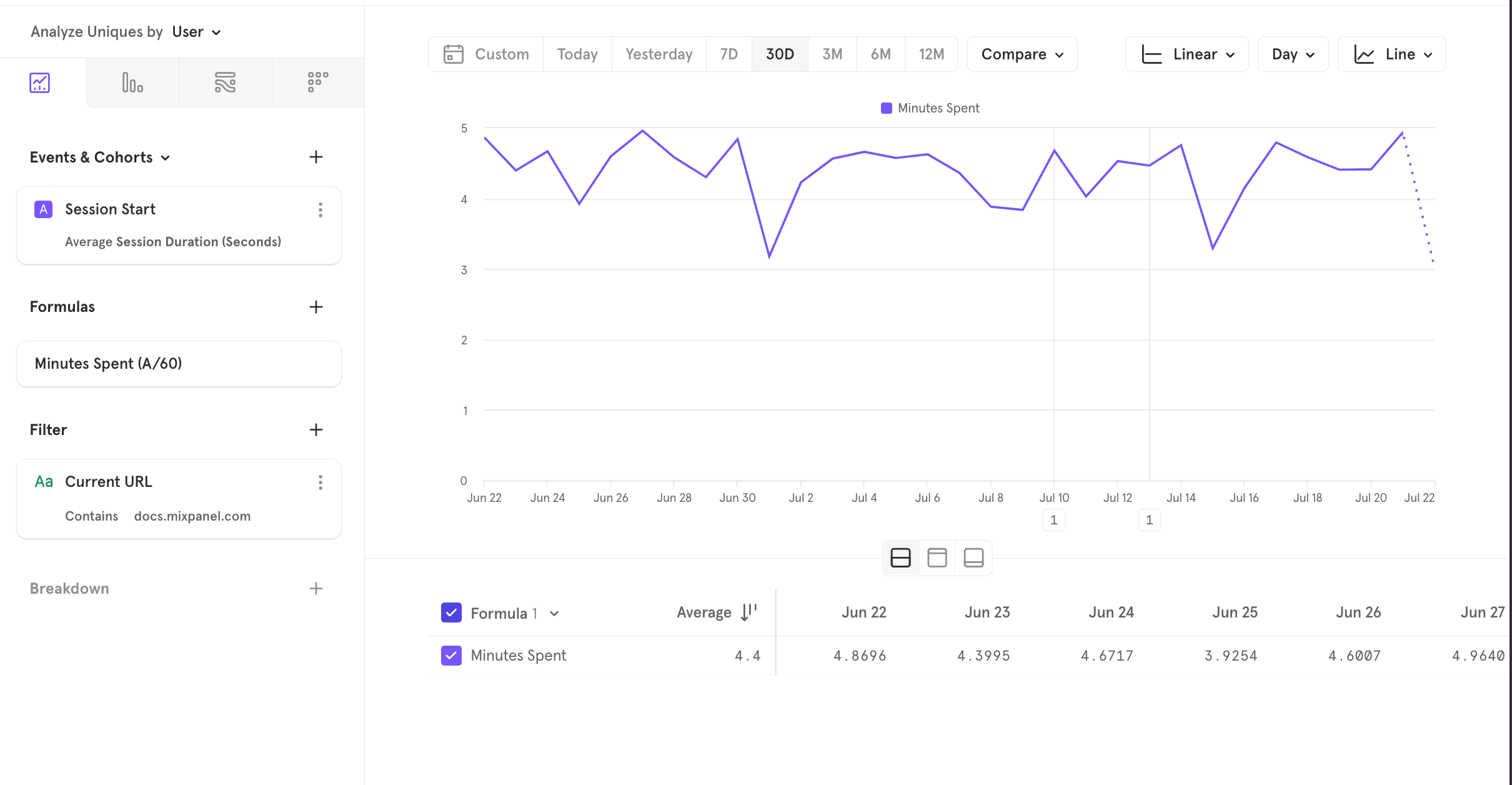
What are the average number of pages visited per session?
You can do this by dividing the number of Page View events by the number of Session Start events, with a formula.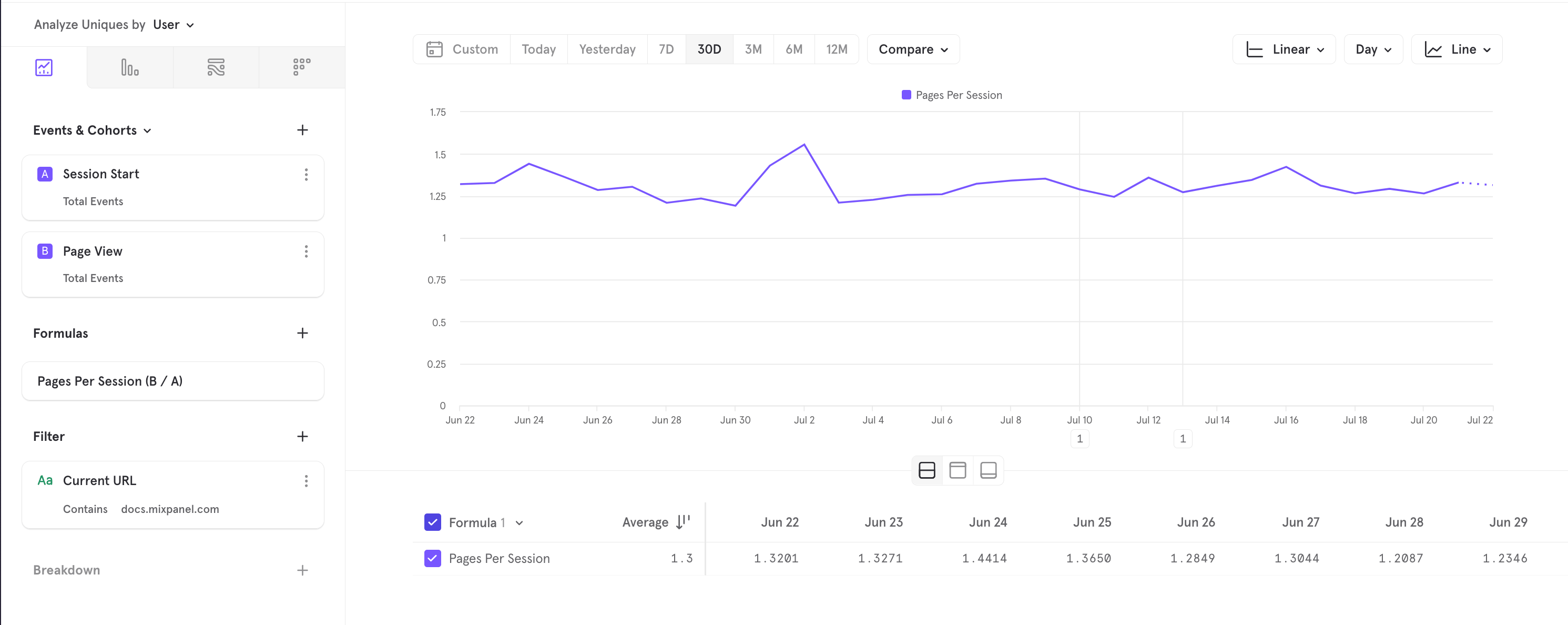
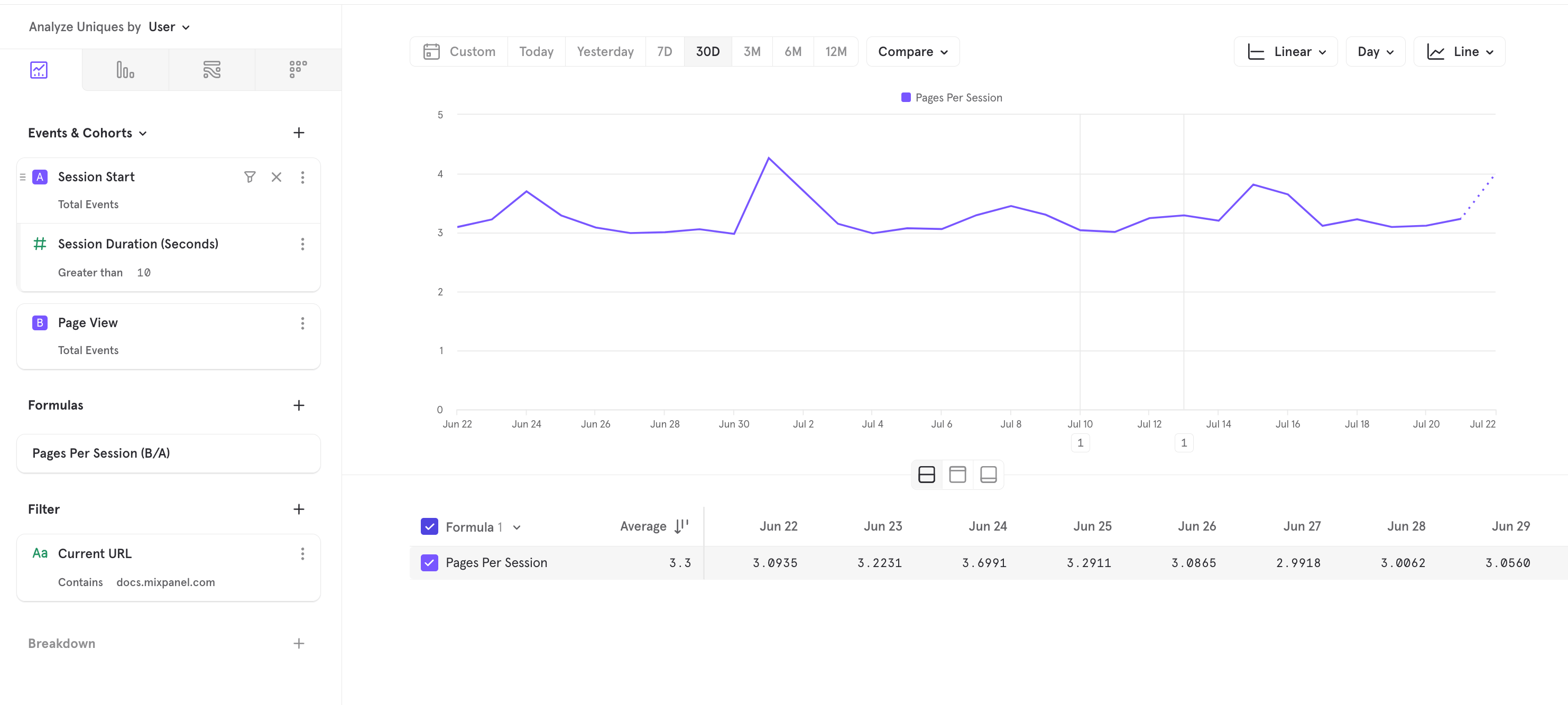
Which page is the most common landing page for a session?
The Session Start event automatically inherits certain properties from the first event in the session (more on this below). Breaking down by the Current URL property tells you which pages are the most common landing pages for a session: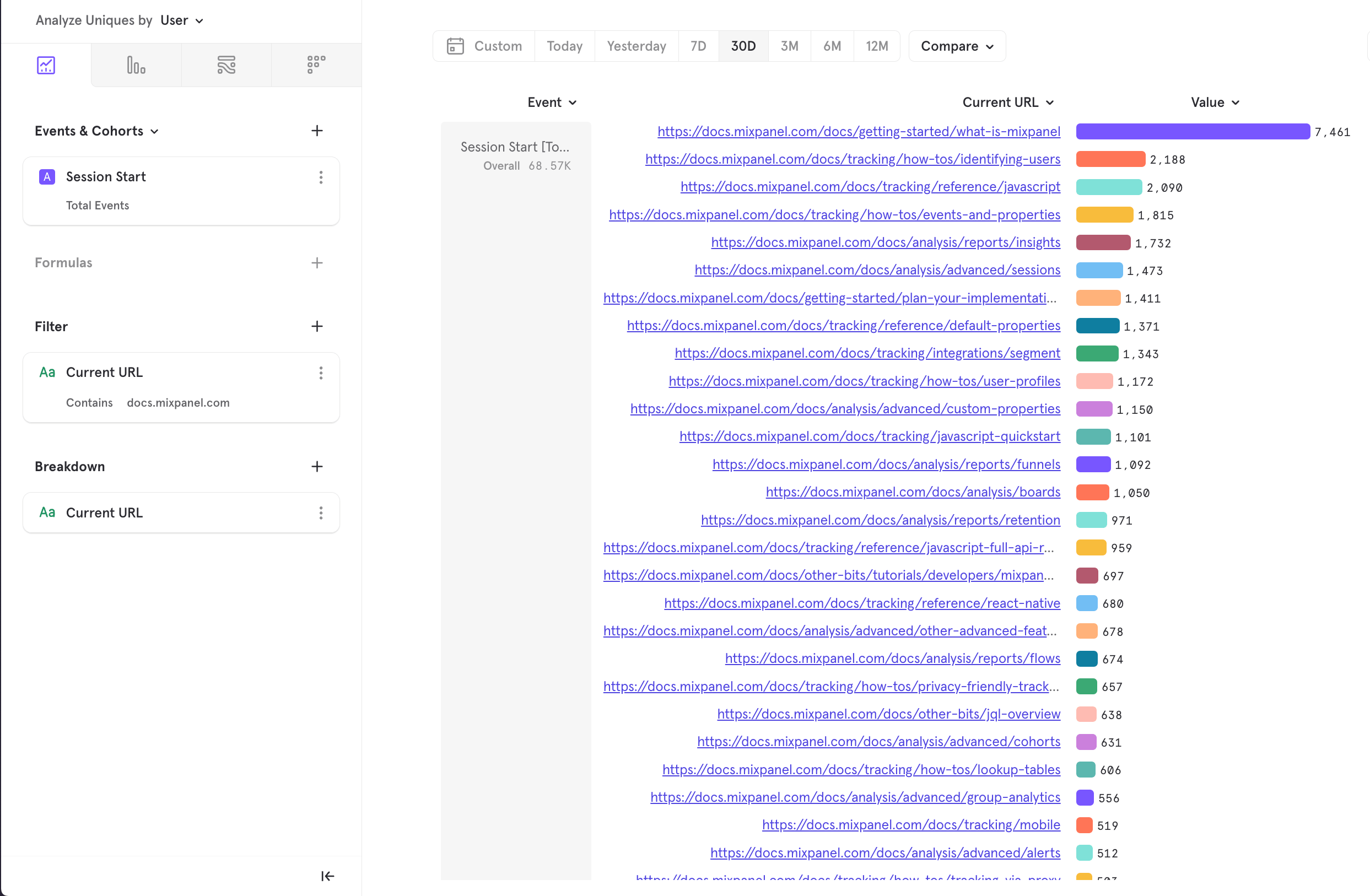
What % of sessions end with a Purchase?
This example uses our E-Commerce demo dataset and shows how you can use Sessions in our funnels report: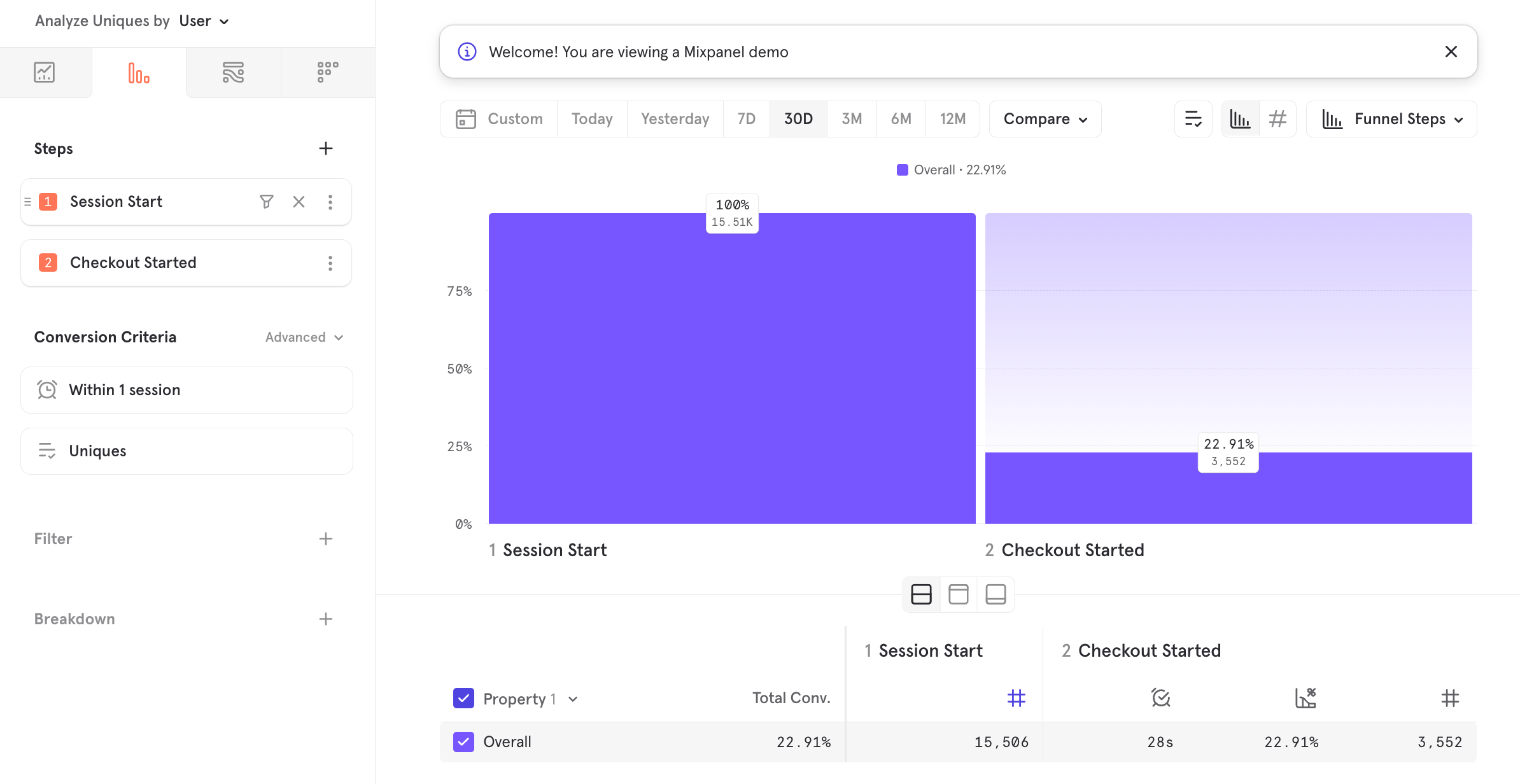
Session Computation Deep-Dive
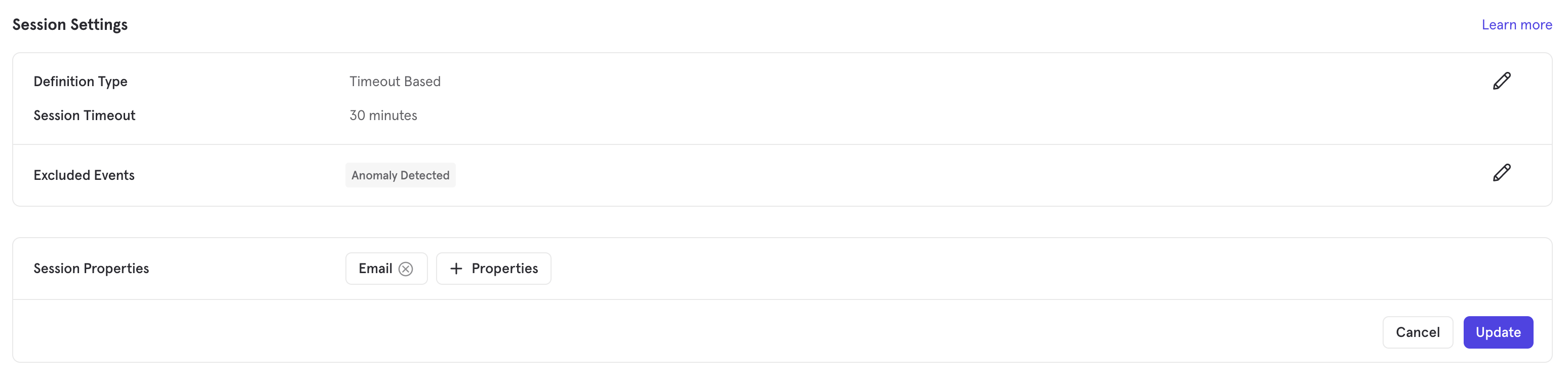
Here, we provide more detail on how sessions are computed under the hood. Project Admins or Owners can choose between one of these session configurations in Project Settings > Overview > Session Settings.Timeout-Based Sessions
A Timeout-Based Session in Mixpanel is defined as a group of events one user performs within a given time frame on your website or app. A session starts when a user performs an event that is not excluded from your Sessions Settings. The set session length is a period of activity at which a session is ended. The end time of the session is the time that the last event was performed before this period of inactivity. A session starts when a user performs an event and ends when a user stops performing events for long enough that the set session length expires. The time of “Session End” is the time that the last event was performed by the timeout. A single user can start multiple sessions. Those sessions can occur on the same day, or over several days, weeks, or months. As soon as one session ends, another session can begin with the occurrence of a new event.Session Timeout
This is the length of time that defines a session timeout after a period of inactivity in Mixpanel. You can set the session timeout period in minutes, hours, or days. The default length is 30 minutes. Any non-excluded event performed within the timeout range of the session will restart the session timeout period on the session. For example, say you set a session timeout length of 15 minutes. A user begins a session when they log into your app and perform the event “Log In.”- The “Log In” event marks the beginning of the session, because that user has not performed other events before.
- The user then performs the “Start Game” event on your app after 14 minutes. This will restart the clock on the session timeout.
- If they then perform no events for 16 minutes, however, the session will end. The session ends at the moment that the “Start Game” event was performed, because it was the last event before a complete session timeout period elapsed.
Estimating Ideal Session Length
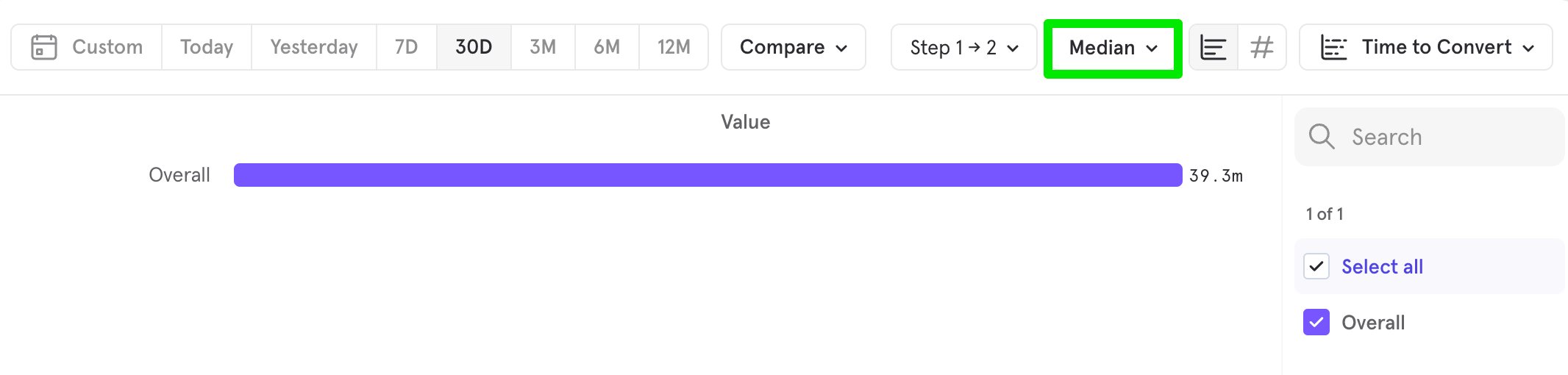
Use your Time to Convert Chart in Funnels to help determine an appropriate session timeout period that aligns with your users’ behavior.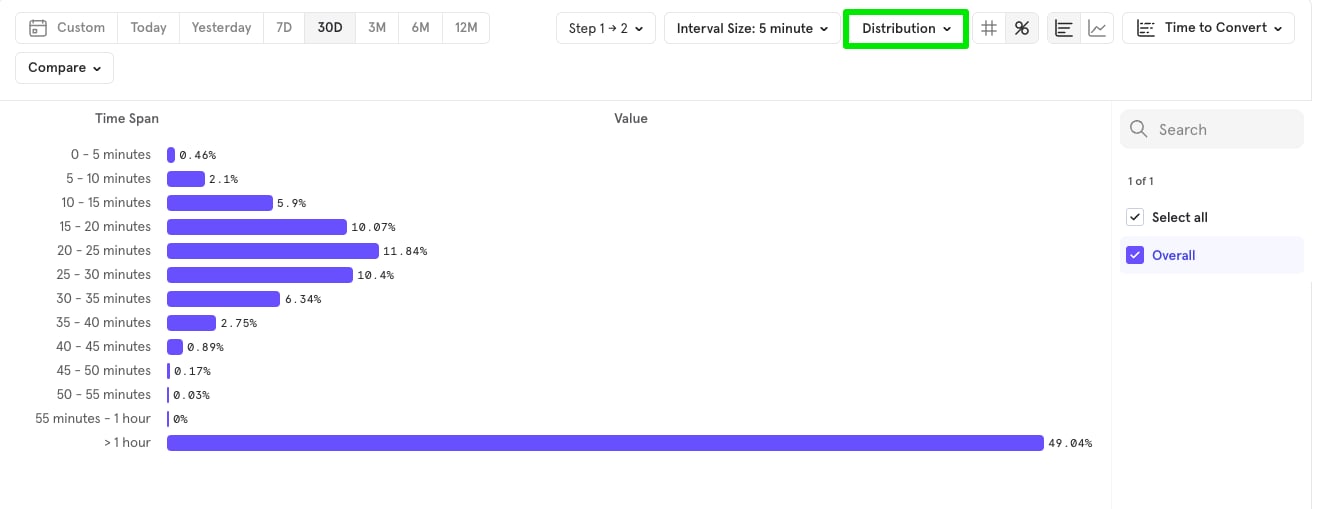
Excluded Events
Events hidden in Lexicon are excluded from session calculations by default so you may notice session numbers change if you change an events status in Lexicon.
- Events triggered when messages are sent to a user (including push notifications)
- Events triggered when a message is received
- Events tracked server-side, such as monthly membership payments not associated with a specific user action
- Events related to API activity
Examples
Example 1
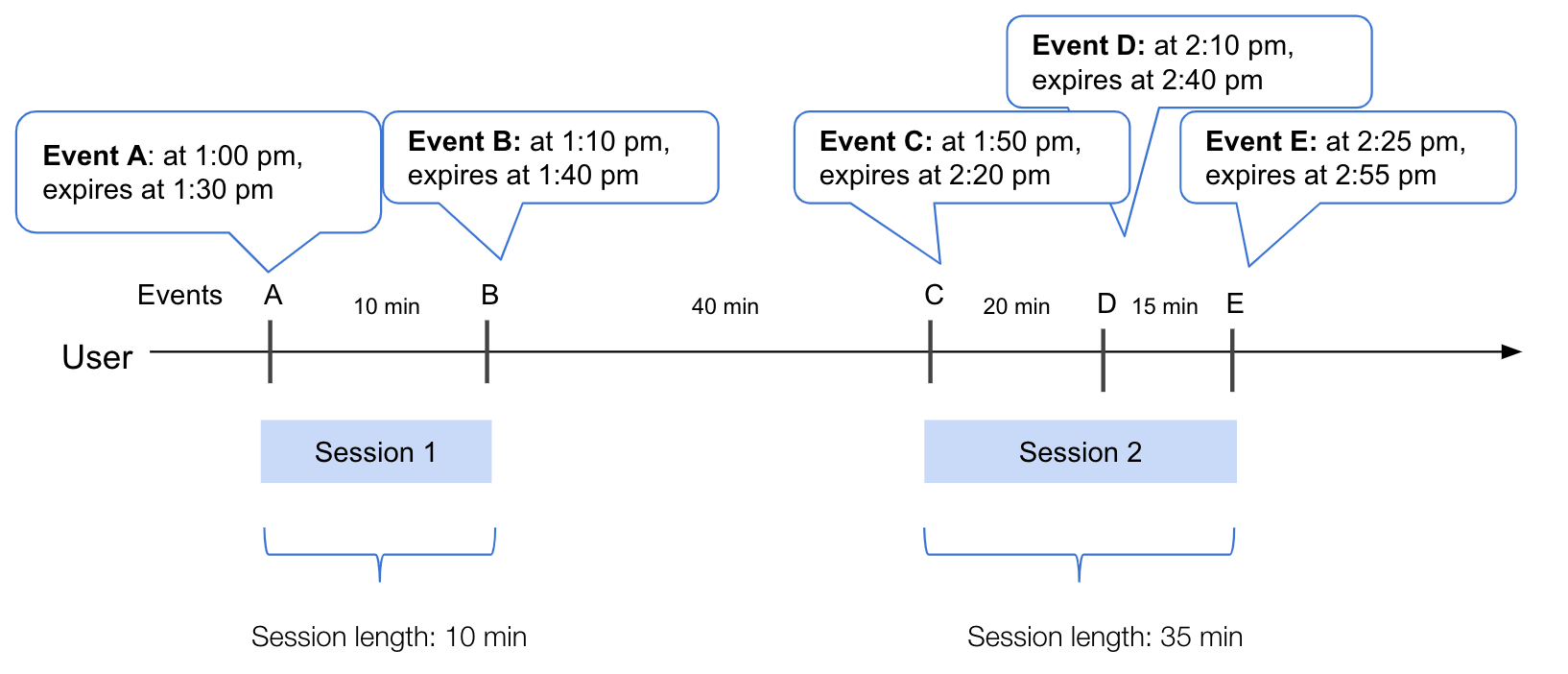
- A user performs “Event A” at 1:00pm, starting the session and triggering the “Session Start” event.
- They then wait 10 minutes and perform “Event B” at 1:10pm.
- They do not perform any other events for 30 minutes, and the session ends and the “Session End” event is triggered. The time of Session End is the time of the last event performed at 1:10pm. Therefore the session length for “Session 1” is 10 minutes.
- The same user then returns after 40 minutes and performs “Event C” at 1:50pm. As the previous session has already timed out, this triggers a new “Session Start” event and starts a new session.
- The user then performs “Event D” 20 minutes later at 2:10pm.
- They perform “Event E” 15 minutes later at 2:25pm.
- When they do not perform any more events in the next 30 minutes, “Session End” is triggered. The time of the “Session End” is the last event performed at 2:25pm. Therefore the session length for “Session 2” is 35 minutes.
Example 2
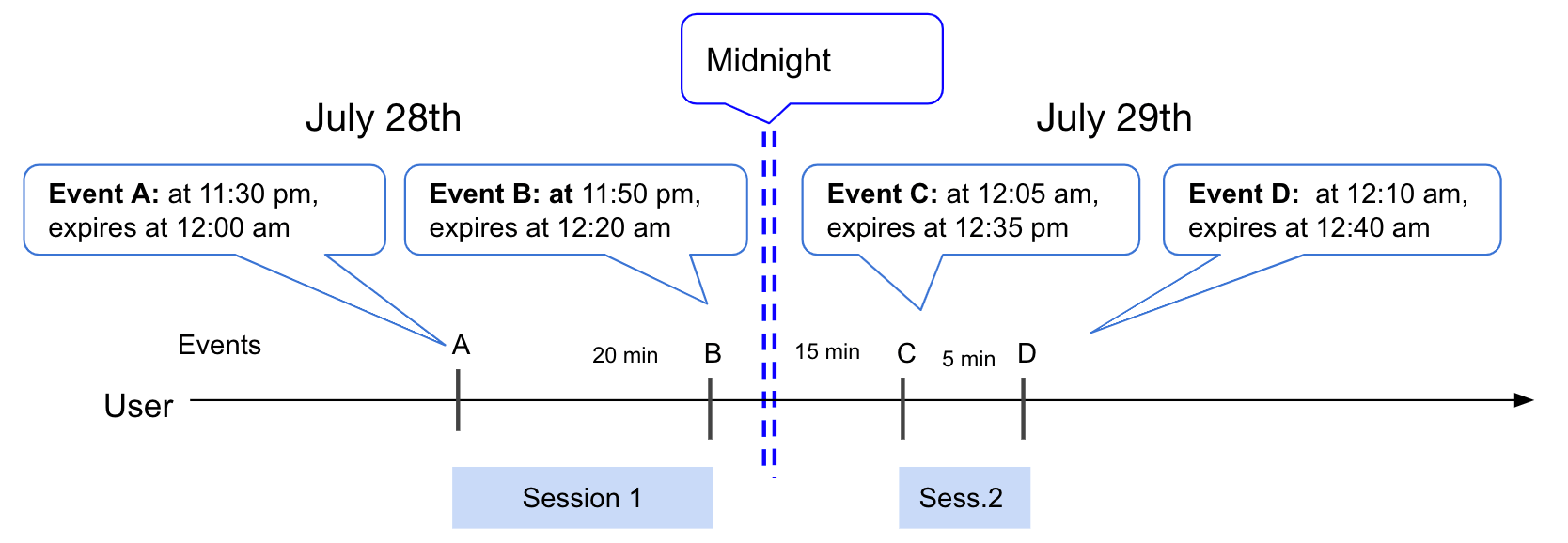
- A user performs “Event A” at 11:30pm, starting the session and triggering the “Session Start” event.
- They then wait 20 minutes and perform “Event B” at 11:50pm.
- While this session is not timed to expire until 30 minutes after this event, all sessions are reset at midnight. Therefore, when the user performs “Event C” at 12:05am, it triggers a new “Session Start”. The “Session End” time is the time that “Event B” was performed. Therefore the length of “Session 1” is 20 minutes.
- “Event C” performed at 12:05am starts the session and triggers the “Session Start” event.
- The user then waits 5 minutes and performs “Event D” at 12:10am.
- They do not perform any other events for 30 minutes, and the session ends. The time of “Session End” is the time of the last event performed at 12:10am. Therefore the session length for “Session 2” is 5 minutes.
Event-Based Sessions
An Event-Based Session in Mixpanel is defined by an event you choose as the “Session Start” (such as “Login”), and an event you choose as the “Session End” (such as “Log Out”). A single user can start multiple sessions. Those sessions can occur on the same day, or over several days, weeks, or months. As soon as a “Session End” event is performed, another session can begin with the occurrence of a new “Session Start” event. If you haven’t clearly defined events that denote the beginning and end of a session, then a Timeout-Based Session may be a better option for your project. Sessions are reset every 24 hours at midnight (according to your project timezone), so the maximum session length is 24 hoursExamples
Example 1
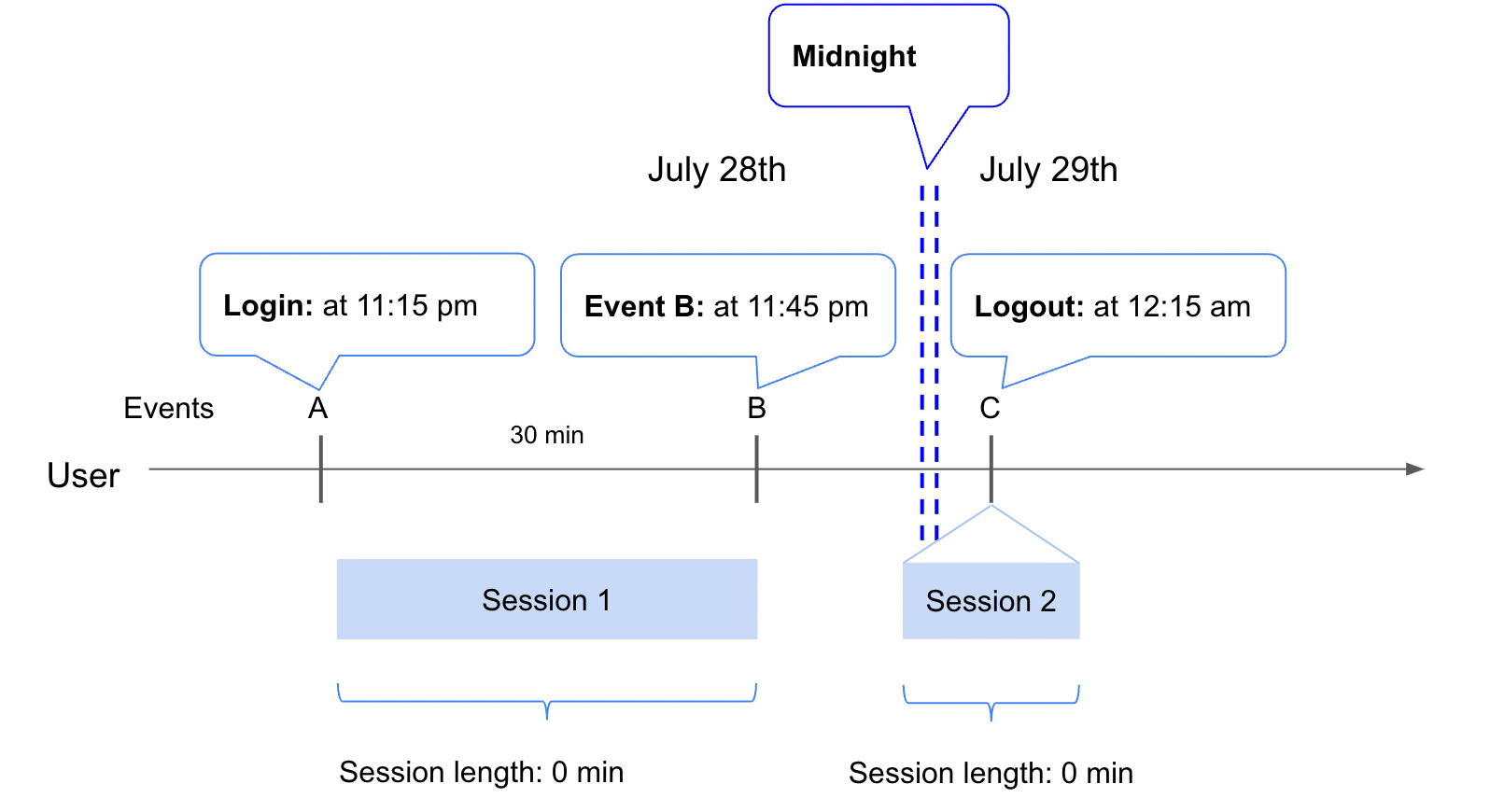
Login and Session End Event is set to Logout.
- A user performs “Login” at 11:15 pm triggering the “Session Start” event.
- They then wait 30 minutes and perform “Event B” at 11:45 pm.
- When the user performs “Logout” at 12:15 am, it triggers a new “Session End”. The “Session End” time is the time that “Logout” was performed. However, since all sessions are reset at midnight, the previous “Session Start” event is no longer associated with the “Session End Event”, and the session duration is not calculated for “Session 1”. Similarly, the “Session End Event” does not have an associated “Session Start Event” and session duration is not calculated for “Session 2”.
Example 2
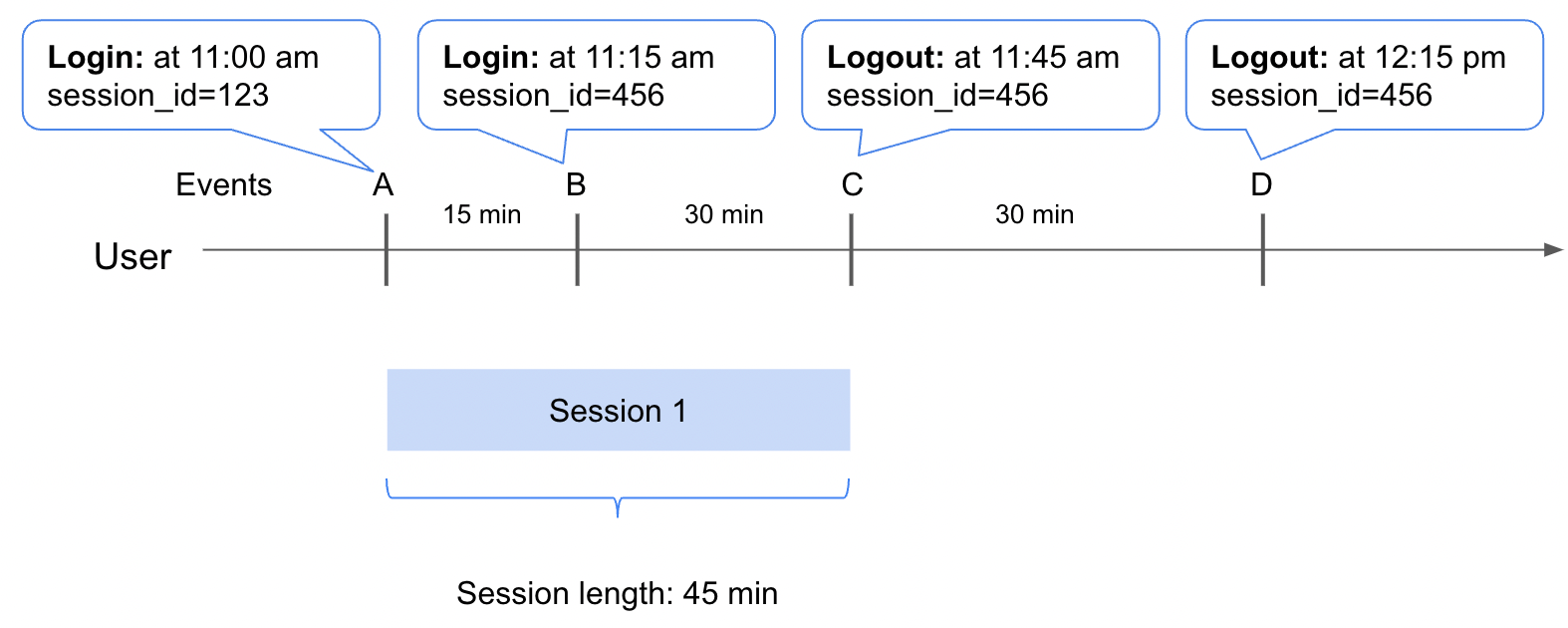
Login and Session End Event is set to Logout.
- A user performs “Login” at 11:00 am triggering the “Session Start” event.
- They then wait 15 minutes and perform a second “Login” at 11:15 am. Since the user is already in a session, a new “Session Start” event is not triggered.
- They then wait 30 minutes and perform a “Logout” at 11:45 am, ending “Session 1” and triggering a new “Session End” event. The duration for “Session 1” will be 45 minutes.
- Finally, after 30 minutes, another “Logout” event is received at 12:15. Since there is no previous “Session Start” event, a “Session End” event is not created.
Property-Based Sessions
A Property-Based Session in Mixpanel is defined by a property you choose as the “Session Id” (such as “session_id”) and the session persists as long as the value of the “Session Id” property remains constant. As soon as the value for “Session ID” changes, another session is started. Events that do not contain a “Session Id” value are not used in calculating Session Start and End events. Events that contain an empty “Session Id” value (i.e. “session_id”: “”) will be tracked and session events created upon transition. Like Event Based Sessions, Sessions are reset every 24 hours at midnight (according to your project timezone), so the maximum session length is 24 hours.Examples
Example 1
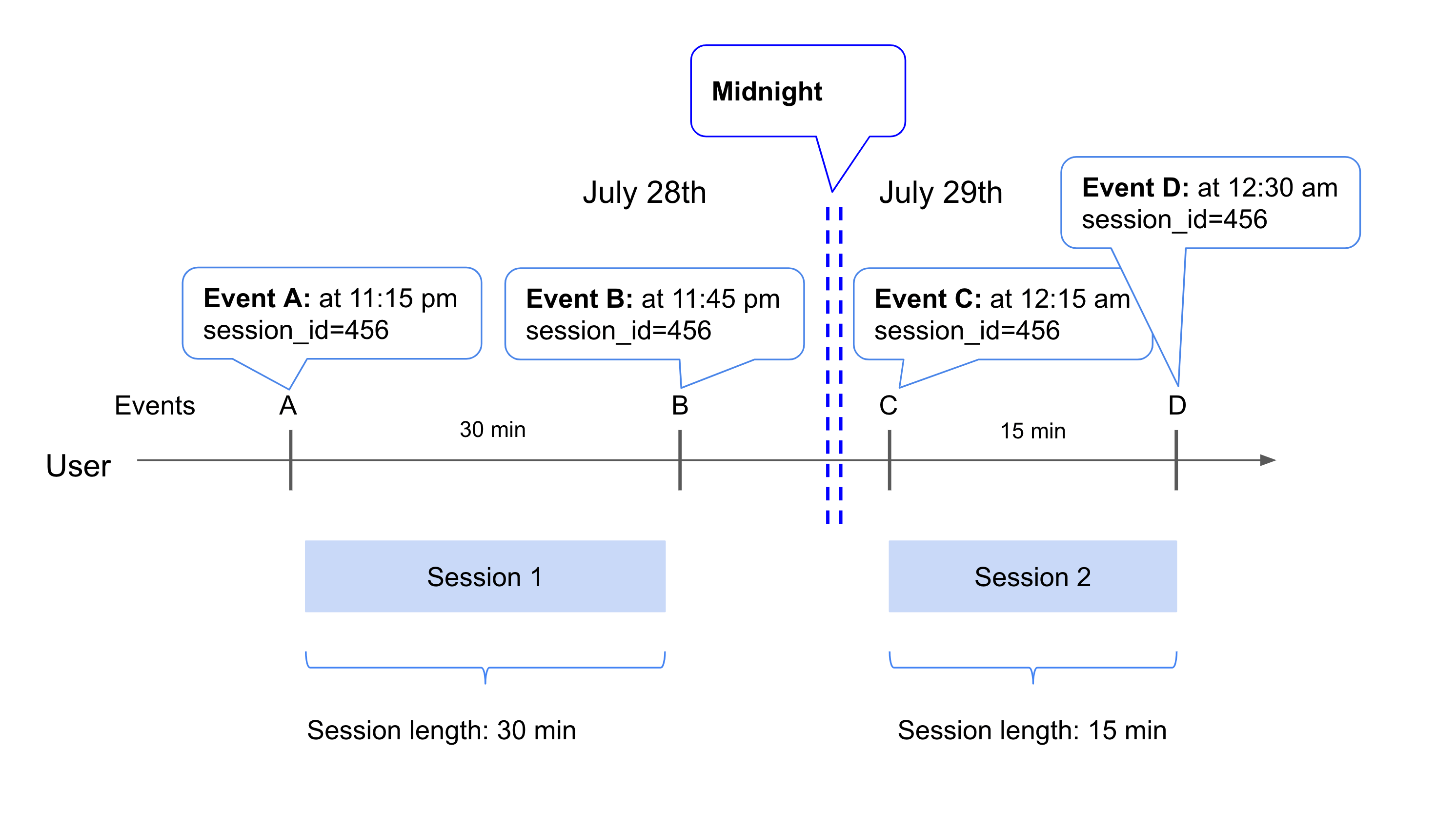
session_id
- A user performs “Event A” at 11:15 pm with the
session_idproperty set to value456and triggering the “Session Start” event. - They then wait 30 minutes and perform “Event B” at 11:45 pm.
- Since all sessions are reset at midnight, when the user performs “Event C” at 12:15 am, it triggers new “Session End” and “Session Start” events despite the
session_idvalue remaining constant. The “Session End” time is the time that “Event B” was performed resulting in a session length of 30 minutes for “Session 1”. - The user then waits 15 minutes and performs “Event D” at 12:30am.
- Assuming the next event has a different
session_idor no other events occur before the second day ends, then another “Session End” event will be triggered. The time of the “Session End” is the last event performed at 12:30 am. Therefore the session length for “Session 2” is 15 minutes.
Example 2
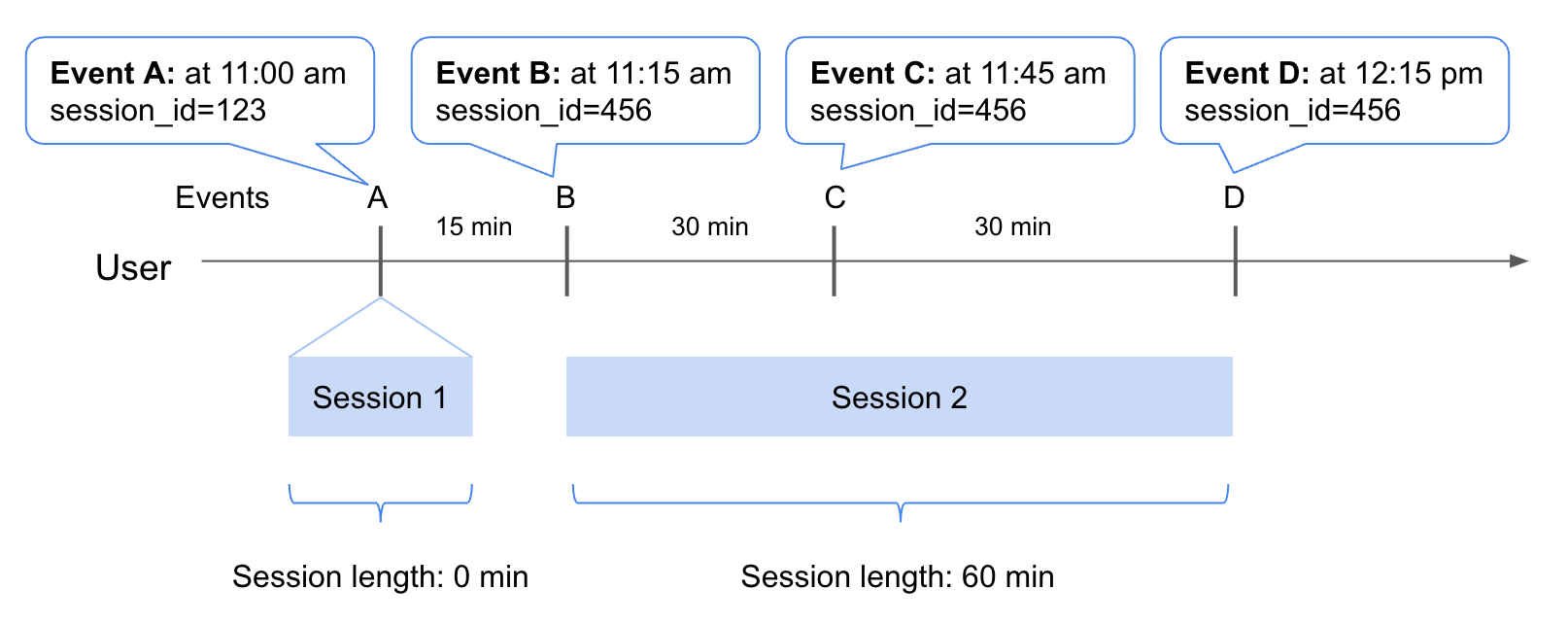
session_id
- A user performs “Event A” at 11:00 am with the
session_idproperty set to value123and triggering the “Session Start” event. - They then wait 15 minutes and perform “Event B” at 11:15 am with the
session_idproperty set to value456. Since thesession_idproperty has changed, “Session End” and “Session Start” events are triggered. The “Session End” time is the time that “Event A” was performed resulting in a session length of 0 minutes for “Session 1”. - The user then waits 15 minutes and performs “Event C” at 12:45 am.
- The user then waits 15 minutes and performs “Event D” at 12:15 pm.
- Assuming the next event has a different
session_idor no other events occur for the remainder of the day, another “Session End” event will be triggered. The time of the “Session End” is the last event performed at 12:15 pm. Therefore the session length for “Session 2” is 60 minutes.
Session Properties
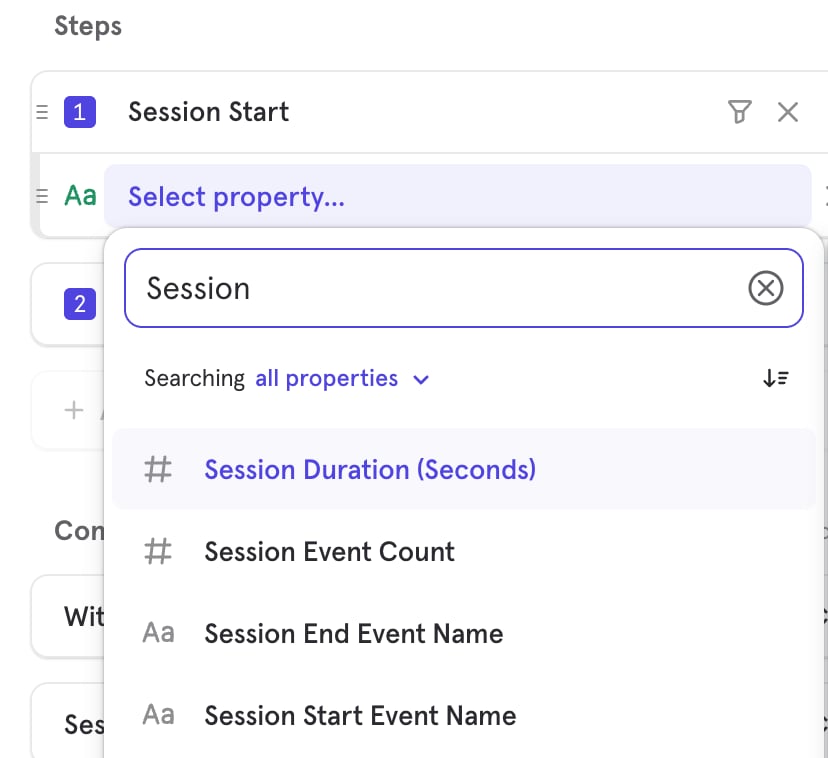
Session Events will automatically have the following properties:- Session Duration (Seconds): The duration between the “Session Start” and the “Session End” events in seconds.
- Session Event Count: The number of events during a session. This does not include Excluded Events and Hidden Events in Lexicon.
- Session Start Event Name: The original event name that triggered the Session Start event.
- Session End Event Name: The original event name that triggered the Session End event.
- $app_build_number
- $app_version_string
- $browser
- $city
- $country_code
- $current_url
- $device
- $manufacturer
- $os
- $region
- mp_country_code
- mp_lib
- mp_platform
- utm_campaign
- utm_content
- utm_source
Session Controls in Reports
Funnels
In Funnels, once you have set up sessions, a “Session Start” and “Session End” events will be generated in the report based on the funnel criteria.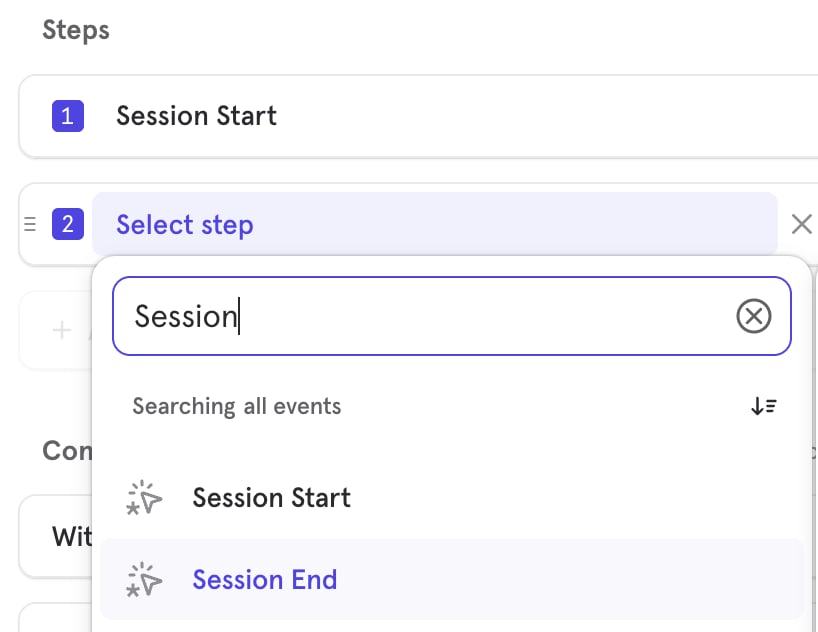
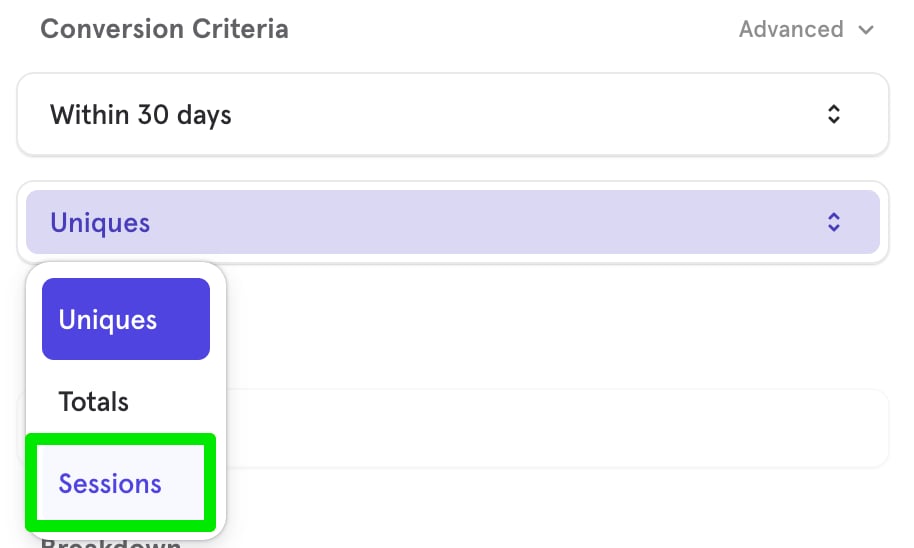
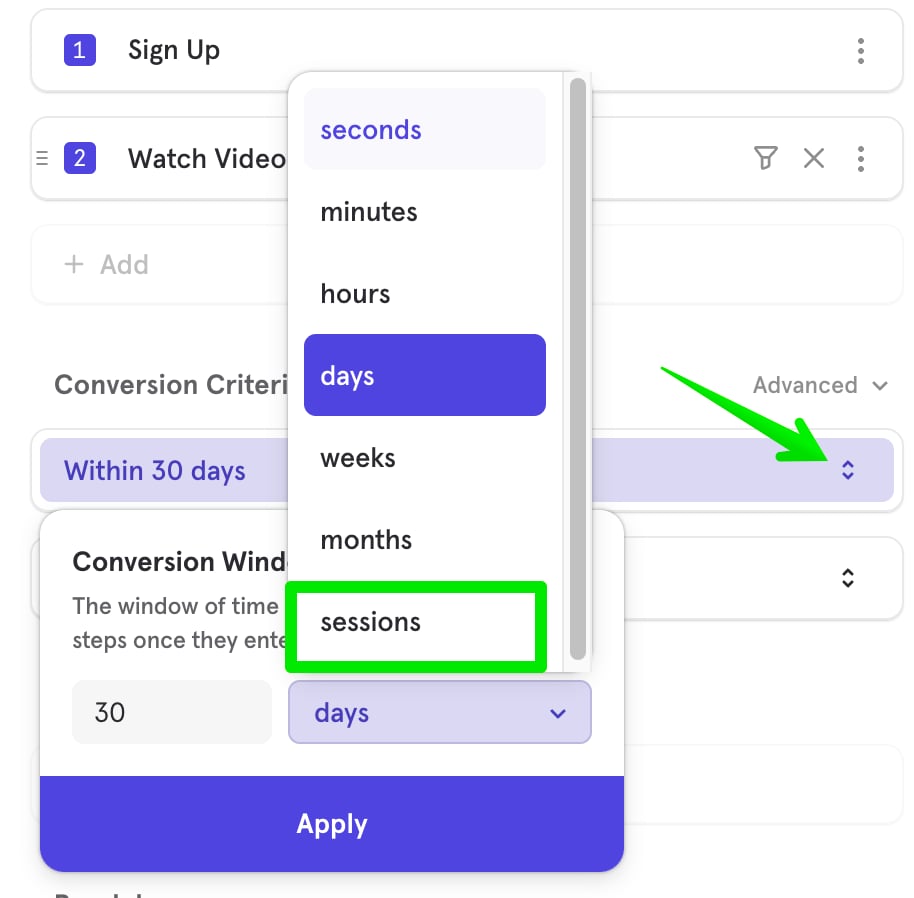
Flows
In Flows, you can use the “Session Start” and “Session End” events to view the top Flows events within a session. When you select sessions in Flows, the flow will be weighted by the number of sessions, rather than unique users.Insights
In Insights, you can use the “Session Start” and “Session End” events to explore a variety of metrics:- The total number of sessions over time
- The average session length per user
- Session duration broken down across all users
- The average number of sessions per user
- Sessions calculated in formulas
Aggregation by Sessions
In Insights, you can also count the number of sessions that contained a particular event. Select the Total drop-down beside an event in your Insights query to select Sessions.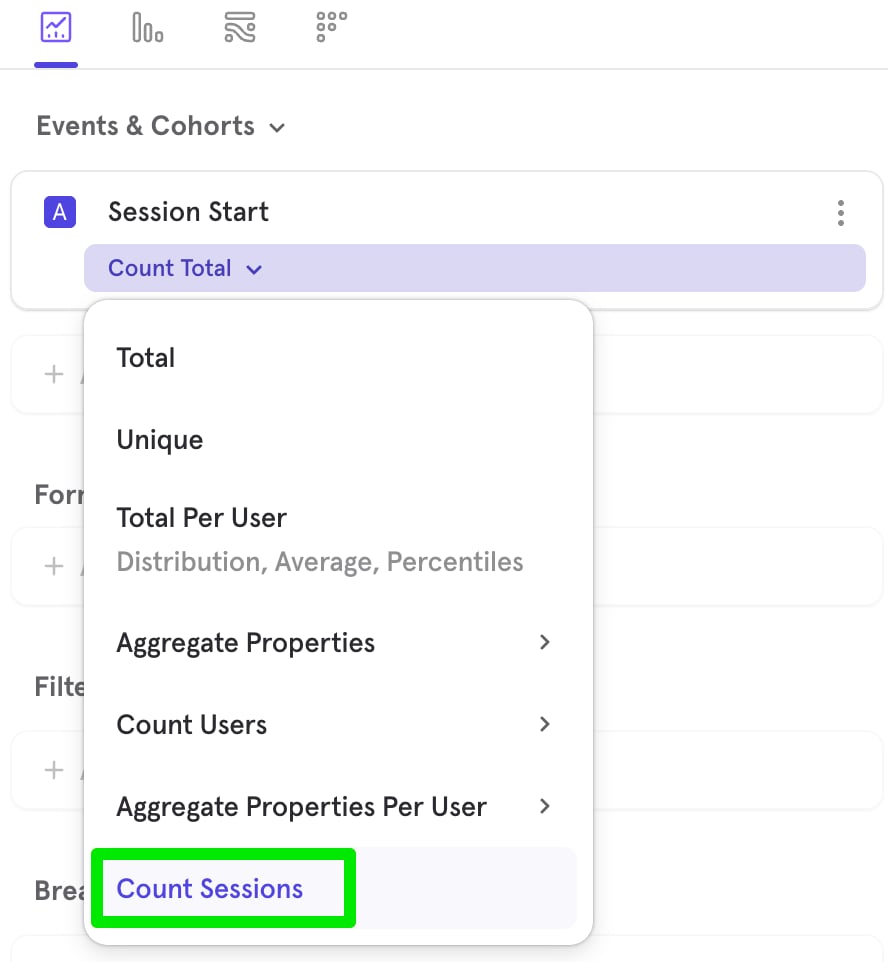
FAQ
How can I find the average session duration using Mixpanel?
You can do so using the “Session Duration (seconds)” property associated with our Session Start/End events, which would measure the Session Duration in Seconds. To change it from seconds to minutes, you can use our formula and divide it by 60. To find the average session duration across all users, you may refer to this report here: https://mixpanel.com/s/vcXKRHow can I find the average session duration per user using Mixpanel?
Similarly, you can use the same property as above. In this case, you would need to use our aggregate properties per user feature. If you select “Aggregate Properties per User” and then “Sum”, it will add up all Session Lengths for any given day and divide it by all unique users. You can then apply a formula to express the values in minutes, simply by dividing by 60: https://mixpanel.com/s/3k1bct For additional information, I’ve also included Formula B to show how “Sum per User by Average” works.Can I export Session Start and Session End events via API?
No. Session Start and Session End are virtual events. Mixpanel computes them dynamically at query time, so they are not stored in your raw event data and cannot be exported through the Raw Data Export API. To get session data out of Mixpanel, build a report that uses the Session Start or Session End events (for example, an Insights report broken down by session properties) and export the report results as CSV. See Export Methods for report export options.What Mixpanel API events are by default excluded from session calculations?
$identify$create_alias$merge$hotshard_events- Message Sent (
$campaign_delivery) - Message Bounced (
$campaign_bounced) - Message Marked Spam (
$campaign_marked_spam) - Message Suppressed (
$message_suppressed) - Message Unsubscribed (
$unsubscribe) - Campaign Entered (
$journey_entered)