

See it in action
New to Mixpanel Agent? Take a quick interactive walkthrough before diving into the details.Note: The interactive demo above isn’t supported on smaller screens, but you can click here to open the experience in a new window.
Before you get started
Two project-level settings shape how all four capabilities behave.Business Context
Business Context is a shared layer where your team defines what Mixpanel can’t infer from raw events: key metric definitions, fiscal calendar, launch history, team structure. Every AI surface reads it automatically. Without it, AI answers are generic. With it, Mixpanel Agent knows your context — that “activation” means a user completed a key value moment, or that a drop on November 1 isn’t anomalous because it’s the day after a promo ended. For setup instructions, see the Business Context documentation.Pro tip: Start with your primary metric definitions and your fiscal calendar. Those two entries eliminate many of the common sources of AI misinterpretation.
Verified Mode
If your project has inconsistent event naming, duplicate metrics, or unverified events, the AI will work with what it finds — and two people asking the same question may get different answers. Verified Mode is how admins control that. When it’s on, AI features lean harder on verified data: events, metrics, behaviors, and cohorts your team has explicitly reviewed in Lexicon. The AI still works with everything you ask about — nothing is removed from its reach — but it strongly prefers verified equivalents and clearly flags any result that draws on unverified data. Users querying AI features see those labels, so they know which parts of an answer haven’t been reviewed yet — this is intentional, so they know it’s a setting, not a Mixpanel limitation. This is primarily an enterprise concern. It’s most valuable when you’re rolling out AI access broadly — to PMs, engineers, and stakeholders who may not know the difference betweencheckout_complete and checkout_complete_v2.
The tradeoff: Verified Mode puts the burden of verification on admins, and its payoff scales with how much you’ve verified. If your team ships events faster than they get verified, agents don’t lose access to anything — but more of what they return comes back flagged as unverified, so the labels carry less signal. The mode is most worthwhile once a meaningful share of your high-traffic data is verified.
Pro tip: Before enabling Verified Mode, audit your verified events against the queries your team runs most often. Get your high-traffic events verified first, then enable the mode.
What you can do with Mixpanel Agent
Mixpanel Agent gives you four capabilities. They’re designed to work together, but each one stands on its own.
They map to four distinct moments in how you work with data: getting an answer, explaining a change, staying close to a metric, and running experiments with confidence.
The full loop in practice: A stakeholder asks for a view of onboarding performance after a recent flow change. Someone asks Mixpanel Agent to build it — it’s ready in minutes. The PM notices activation dropped 8% and triggers RCA, which traces it to a new onboarding variant. The team pauses the variant and uses the Experiments Agent to interpret the results and roll back. The PM then sets up the KPI Agent on activation rate to watch the recovery.
Pro tip: Your judgment is still in the middle of that loop. What the four capabilities remove is the mechanical work surrounding the decisions.
Ask Mixpanel Agent
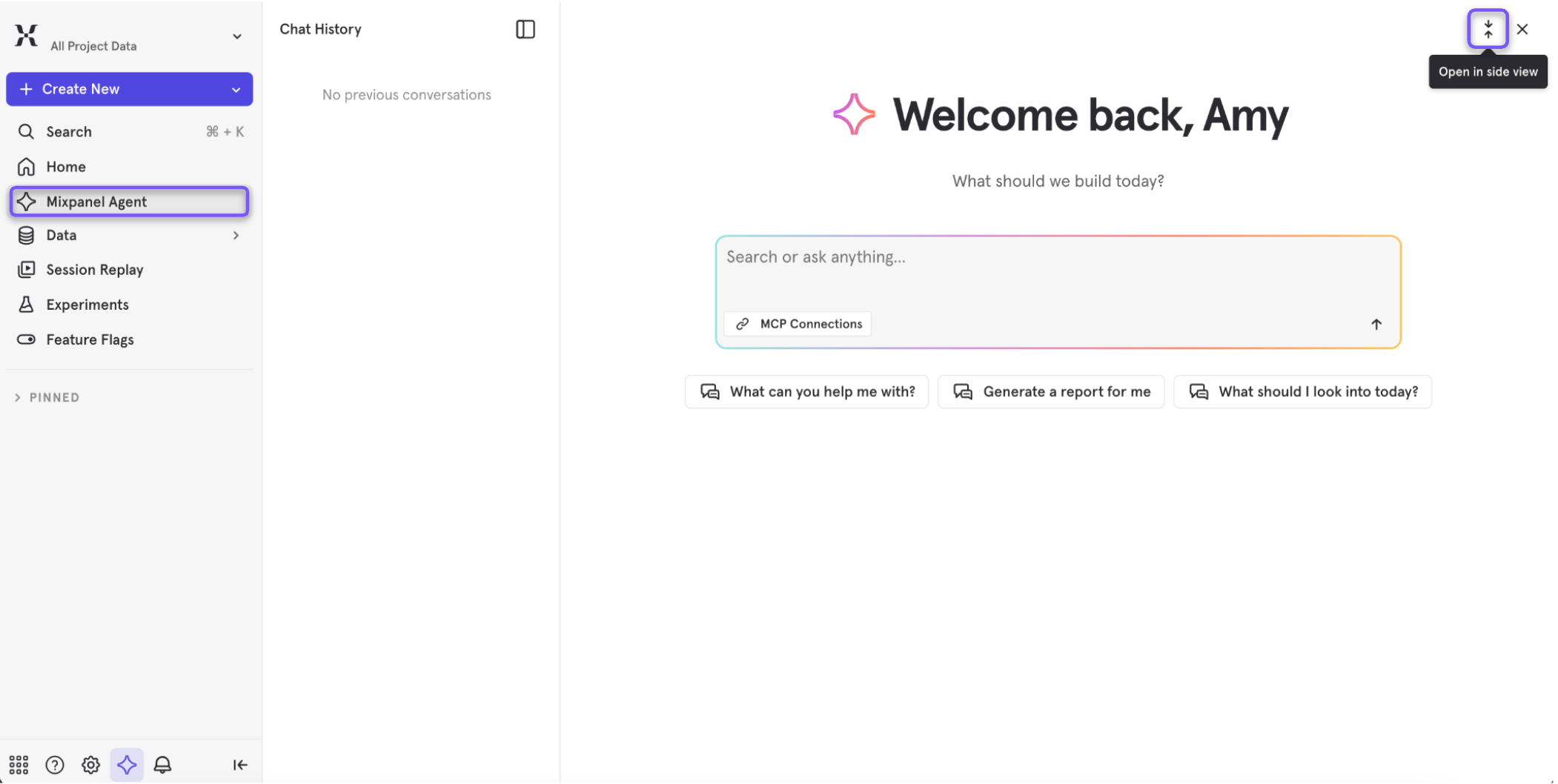
Open Mixpanel Agent from anywhere and ask in plain language. A single prompt can run an analysis, build a report, create a cohort, or walk you through session replays without you specifying each step. The Agent automatically picks up your current page as context, so you don’t need to describe your setup first.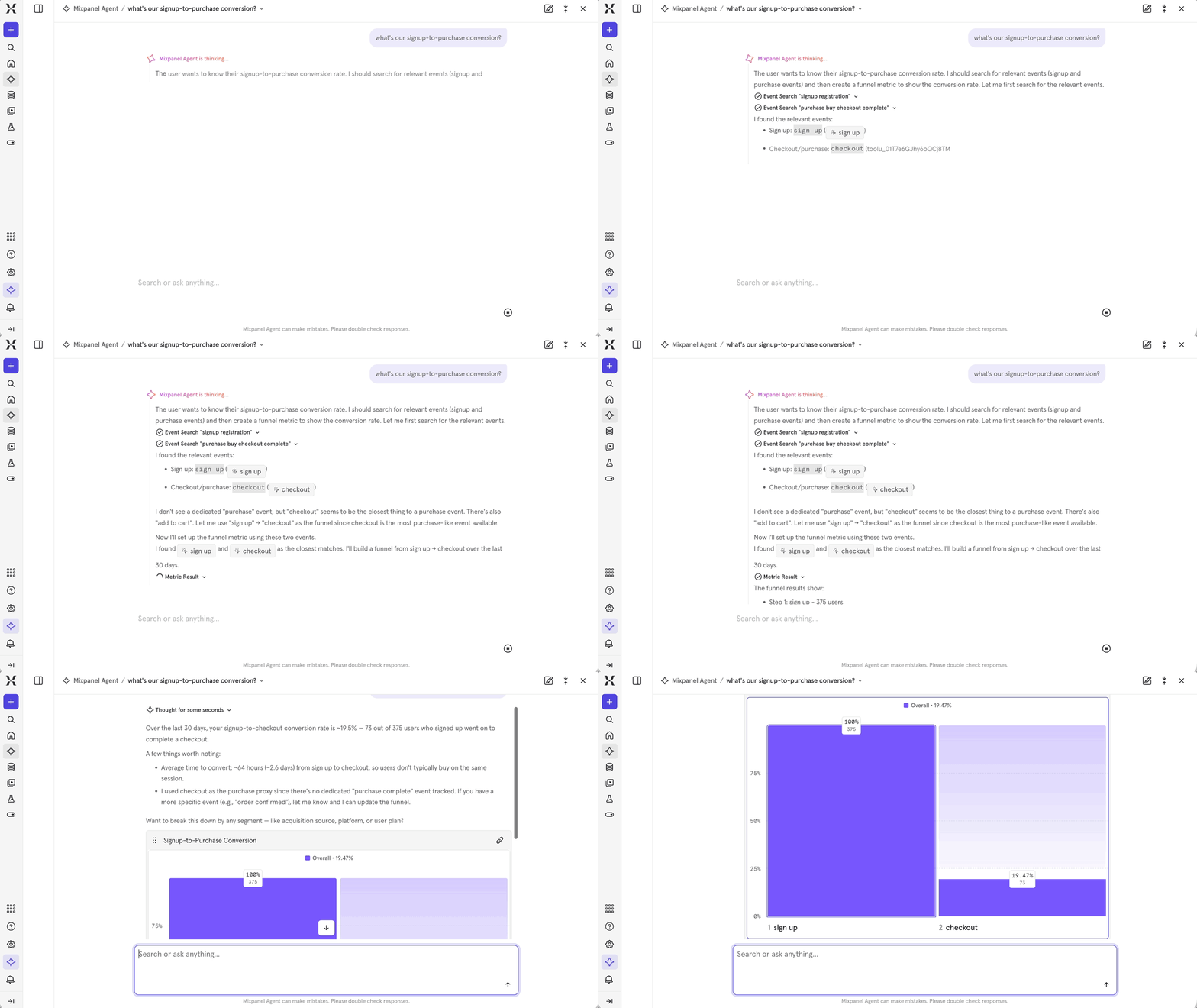
When to use it
- You need a quick answer without opening a report
- A stakeholder asked a question you don’t have a board for yet
- You want to explore an area quickly before deciding whether it’s worth deeper instrumentation
How to use it
A few things you can ask:- Data questions: “Which acquisition channel has the best 30-day retention?” or “How did retention change after the onboarding update?”
- Build requests: “Build me a dashboard for our referral program — invites sent, signups from referrals, conversion rate, breakdown by channel.” The Agent generates a full multi-chart board. Treat it as a first draft and review the events before saving.
- Analysis: “Compare mobile vs. desktop checkout conversion” or “What’s the drop-off in our signup funnel?”
Pro tip: The more your Business Context is configured, the better the answers. If the Agent knows what “activation” means at your company, it uses the right events — not its best guess.
In practice
Marcus leads growth at a consumer app. His VP asks for a view of referral program performance — something that would normally take an hour to build. He asks Mixpanel Agent: “Show me referral program performance — invites sent, signups from referrals, conversion rate, and breakdown by referral channel.” A six-chart board comes back in under a minute. He fixes one event mapping and sends the link before end of day.RCA Agent
When a metric moves, the RCA Agent tells you why. Trigger it from an Insights report, an alert, or directly through Mixpanel Agent, and it generates a board with contribution factor analysis, ranked dimensions, an AI interpretation, confidence levels, and suggested next steps. This is reactive by design — it runs when you ask it to.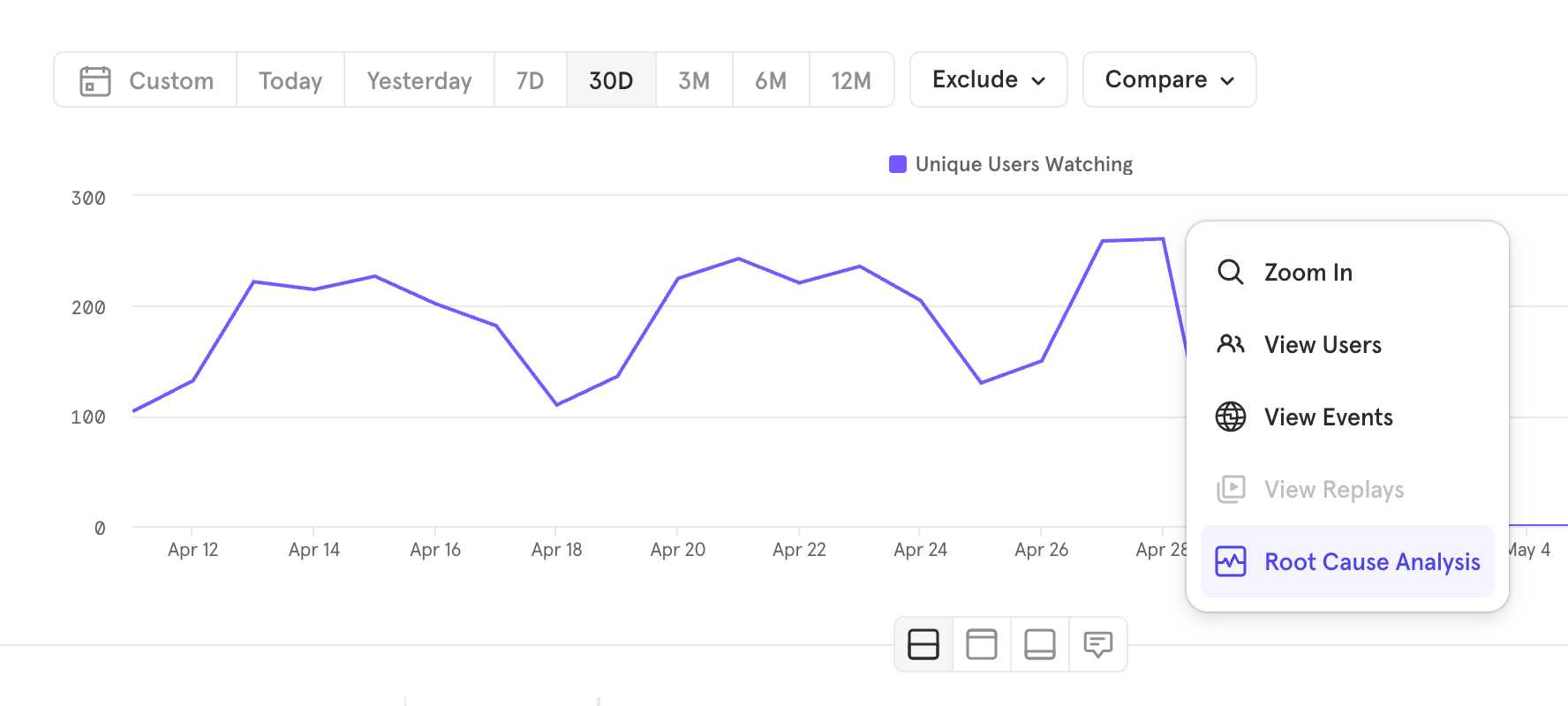
When to use it
- A chart moved and you want an explanation without 30 minutes of manual segment slicing
- An alert fired and you need to know whether it’s signal or noise before escalating
- You want a structured, shareable artifact, not just a hypothesis
How to use it
Trigger the RCA Agent from three entry points:- From an Insights report: Trigger RCA directly when you see a metric shift. The Agent analyzes the visible change in context.
- From an alert: Launch RCA from the notification. Detection and diagnosis in one step.
- From Mixpanel Agent: Ask “why did this metric drop?” and the Agent routes it to RCA and returns a structured explanation.
Pro tip: You can tell RCA which properties to always consider. Go to Project Settings → AI Settings to prioritize the dimensions most relevant to your team’s analysis.
What you get back
- Contribution factor analysis — which dimensions explain the most variance in the shift
- Ranked dimensions — segments or properties most likely driving the change, ordered by significance
- AI interpretation — a plain-language explanation of what the analysis shows
- Confidence levels — how strongly the data supports each finding
- Suggested next steps — where to look or what to test next
Pro tip: The RCA Agent uses your Business Context when it’s configured — pulling from both your Organization and Project settings. Cyclical patterns, seasonality, and known launches are all factored into its reasoning, so a traffic spike on Black Friday gets interpreted differently than an unexplained one.
In practice
Priya is a PM at a SaaS company. Checkout completion dropped 9% week-over-week. She triggers RCA from the Insights report. Top contribution factor: users on iOS 17.4, 61% of the variance, starting Friday — the same day a payment SDK update shipped. She sends the board to engineering: “SDK-related, iOS 17.4, started Friday, confidence is high.” They’re investigating within the hour.KPI Agent
The KPI Agent monitors a metric you care about and delivers a digest to you on a schedule you set. Instead of opening a dashboard to check whether something moved, it comes to you — with context, not just a number.When to use it
- You own a KPI and need to stay informed without opening a dashboard every day
- You send a weekly metric update to stakeholders and want to stop building it manually
- You want a digest that reflects what matters to you, not just raw numbers
- You track a KPI across many segments — regions, facilities, accounts — and want one digest that ranks them instead of one alert per value
How to use it
- Set it up from the Automation creation flow, or just ask Mixpanel Agent — either way it starts as a Draft you activate when you’re ready
- Choose the metric you want to monitor, and optionally a property to break it down by — the digest surfaces the top and bottom performing segments alongside the overall number
- Set your cadence — daily, weekly, or monthly
- Choose your delivery destination — Slack or email
- Use “run now” to preview the digest before committing to a cadence
In practice
Lena owns weekly active users at a fintech company. Every Thursday she pulled the number manually, wrote context, and posted a Slack update. She sets up the KPI Agent on her WAU query with a Wednesday evening delivery. The Thursday update now takes 90 seconds instead of 20 minutes.Experiments Agent
Running an experiment has always required statistical knowledge most PMs don’t have — choosing the right confidence level, understanding what a health check failure means, knowing whether a 4% lift is significant enough to ship. The Experiments Agent works alongside you inside the experiments and feature flags pages. Ask it to help configure an experiment, explain results in plain language, or roll out a winner. It’s a conversation, not a form. Its defining behavior is that it recommends rather than enforces. Every setting it proposes comes with a one-line reason and can be overridden. You stay the decision-maker; the Agent’s job is to make sure no consequential decision is made silently.When to use it
- You’re setting up a new experiment and want to make sure it’s configured correctly before launch
- Your team can run experiments but isn’t confident choosing sample sizes, MDE, or a statistical model
- A health check fired and you need to know whether it’s a real problem
- Your experiment has results and you need to know what they mean and what to do next
- You want to ship a winning variant without navigating the decision modal yourself
How to use it
Open Mixpanel Agent on any experiment or feature flag page, or ask it to create an experiment from anywhere.Setting up an experiment
The Agent works backward from your hypothesis: the hypothesis dictates the metrics that test it, the metrics dictate the sample size, and sample size plus traffic dictate duration and statistical model.1
Write the hypothesis
The Agent coaches you into a falsifiable directional claim with a stated mechanism: If <change>, then <measurable outcome> will <direction>, because <mechanism>. If you give it “test the new onboarding,” it asks for the change, the outcome metric, the expected direction, the minimum effect worth shipping, and why you expect it to work.The mechanism isn’t a formality — it forces the question of whether your metric is actually downstream of your change. An onboarding-screen test shouldn’t be measured on Day-30 retention if nobody has reached Day 30 yet.
2
Pick metrics that test the hypothesis
The Agent assigns each metric one of three roles and sanity-checks your choices:
- Primary (1–3 max) — decides ship/no-ship. Each additional primary raises the false-positive rate.
- Guardrail — must not regress, even if primaries win. The Agent flags an experiment with none, because guardrails are the regression backstop on a ship decision.
- Secondary — diagnostic only, never decisional. If you mention a metric in your hypothesis and then classify it as secondary, the Agent asks whether it should be promoted.
direction on cancel/error/latency-style metrics, where the default of “up” would later read a regression as a win.3
Choose a model, end condition, and statistical settings
The Agent presents all three testing models with a recommendation, and it settles the model before asking about MDE and duration, because the model changes what those numbers mean.It then proposes the statistical configuration as a single grouped question you can veto in one pass, rather than one prompt per setting.
4
Size the experiment from your own data
Rather than guessing, the Agent queries your project: baseline rate and variance for each primary metric over the prior two to four weeks, and daily volume on the exposure event over the same window. From those it computes the sample size each variant needs to detect your MDE, and the duration that implies at your actual traffic.When the numbers don’t work, it says so and gives you the real options: accept a larger MDE, allocate more traffic, enable CUPED to cut variance, pick a higher-volume primary metric, or don’t run the experiment. It also flags the reverse case — an audience narrow enough to be clean but too small to reach power.
Pro tip: The Agent searches your prior experiments before proposing anything new. If the same feature has been tested, it surfaces those results first — and reuses the realized baseline rates and exposure rates to set a realistic MDE and duration instead of a generic default.
Five things the Agent never decides silently
On any create, the Agent states or confirms each of these, in this order, with a one-line reason attached:
The only setting it applies without asking is excluding QA and internal traffic. It turns that on for any experiment whose results matter, because the cost of enabling it is zero and the cost of contaminated results is rerunning the experiment.
Recommended defaults and when it changes them
Sequential is the default because peeking at results early is the most common mistake the Agent sees, and sequential testing makes it statistically safe. The Agent explains each recommendation in terms of what it buys you: CUPED, for instance, cuts variance 30–70%, which means the same statistical power off meaningfully less traffic.
Pro tip: Ask “why?” on any recommendation. The Agent keeps rationale to one sentence per decision by design — over-explaining was the single most common complaint in beta — but it will give you the full reasoning, including the underlying math, when you ask for it.
Pre-launch checks
Before launch, the Agent cross-references your draft configuration against known pitfalls and returns only the ones that actually apply. Each finding names the specific value that triggered it and comes with a fix that pre-fills the relevant field, so you can accept a remediation without retyping parameters. Two findings are blockers, because the experiment cannot answer the question you’re asking it regardless of how clean the rest of the setup is:
For the two blockers, the fix is quantified rather than vague: it tells you roughly how many days to extend, or the cohort size and per-variant target that would make the experiment viable.
Pro tip: You can ask for these checks at any point while filling out an experiment, not just at the end. The Agent skips any check whose inputs you haven’t supplied yet, so a half-finished draft returns real findings instead of a wall of “missing input” noise.
Explaining health checks
When SRM or Pre-Experiment Bias fires, ask the Agent what it means. It reads the same computed verdict the in-app banner reads, so its explanation never contradicts what you’re looking at in the experiment UI. For either check it tells you which metrics and variants are affected — useful when the banner collapses several into “+2 others” — how far the observed split or pre-period difference is from what you’d expect by chance, the likely causes ranked by plausibility, and the recommended action. That action isn’t always “restart.” A failing Retro A/A on a new-visitor experiment, where users have no pre-exposure behavior to differ on, means something different from a failure on an established cohort. The Agent distinguishes the cases and will tell you when a firing check is safe to proceed past.Interpreting results
Ask the Agent to summarize your results and it reads the full experiment — your hypothesis, every metric and its role, the statistical output, exposure counts, and health check status — then returns a plain-language verdict: what happened, whether it’s significant, and a recommendation to ship, iterate, or kill. It translates the statistics rather than restating them. Instead of “p=0.03, lift=+4.2%, CI [1.1%, 7.3%],” you get the confidence interval expressed as a range of plausible real effects. For Bayesian experiments it reports posterior probabilities and credible intervals, never p-values. It also checks guardrails against a hard gate: a 5% relative regression on any guardrail is treated as blocking a ship, even when the primary metric wins.Rolling out a winner
After the Agent gives you a results summary, tell it to ship the winner. It concludes the experiment and writes the decision documentation from its own summary, so you don’t have to touch the decision modal. If the experiment runs on a Mixpanel feature flag, it also updates the flag to send all traffic to the winning variant. If you track the experiment through your own exposure events, shipping records the decision only; roll out the winner in the system that assigns variants.What to ask it
Setup:- “Create an experiment to test a one-page checkout against the current three-step flow.”
- “Is my sample size big enough to detect a 5% lift on checkout conversion?”
- “What metrics should I use as guardrails for a pricing page test?”
- “Should I enable CUPED for this experiment?”
- “Has anyone on my team already tested this feature?”
- “Run the pre-launch checks on this draft.”
- “Why is my Retro A/A check failing?”
- “Which metrics are flagged by the SRM warning?”
- “Is this significant yet, or should I let it run longer?”
- “Summarize these results for my VP.”
- “Ship the winning variant.”
Limits worth knowing
- It recommends; you decide. The Agent doesn’t change your configuration or launch an experiment without you. Pre-launch blockers must be acknowledged before you can create the experiment; warnings are advisory.
- Bayesian experiments work differently. Multiple-testing corrections don’t apply to posterior probabilities, so the Agent turns correction off and omits that recommendation. Fixed-horizon power calculations don’t determine when a Bayesian experiment becomes decisive. SRM and Retro A/A still apply. See which methods apply to Bayesian experiments.
- Segment-level breakdowns of experiment results aren’t available yet. The Agent interprets overall and per-metric results; slicing results by property is planned.
- Secondary metrics are never decisional. If a metric matters to your ship decision, the Agent will push you to make it primary or a guardrail.
In practice: getting the setup right
Jordan is a PM at a health platform. Her team can set up experiments in the UI, but nobody is confident about the statistics — and a bad configuration means a wrong decision that nobody catches for weeks. She asks the Agent to set up a test on a redesigned supplement recommendation flow. It finds a related test from two quarters ago and reuses its realized baseline conversion rate instead of guessing. It proposes uniques ofrecommendation_accepted as the primary metric, recommends sequential so her team can check in early without invalidating the result, and asks what lift would be worth shipping. She says 5%.
The Agent comes back with a problem: at her current traffic, 5% on that baseline needs about four weeks, not the two she had in mind. It offers the trade-offs — accept a 10% MDE and finish in two weeks, or enable CUPED, which on a metric this correlated with pre-exposure behavior gets her most of the way there. She takes CUPED and a three-week run. It also flags that she has no guardrail and suggests time-to-recommendation.
The experiment launches correctly configured. Three weeks later she asks for a summary and forwards it, rather than a table of p-values, to her director.
In practice: making the call
Dev is an engineer at a fintech company. His team’s experiment on the savings goal flow has results — p-values, confidence intervals, a table of metrics — but nobody knows whether to ship the treatment or not. He opens Mixpanel Agent on the results page and asks it to summarize. The Agent comes back: the treatment increased savings goal completion by 3.1%, both guardrail metrics passed, recommendation is to ship. It flags that session length trended down slightly and suggests a follow-up test. The PM sends the summary to the VP instead of the raw stats table. The decision gets made in the same meeting.Migrating your existing workflows
Mixpanel Agent doesn’t replace how you think about your data. It replaces the mechanical work between the question and the answer — and it makes some workflows practical that historically weren’t.
Those are direct replacements — workflows you’re already running that an agent handles better. But there’s a second category worth considering: things that weren’t practical before because the effort was too high relative to the value, so teams either skipped them or did them infrequently. Agents change that calculus.
On alerts: Before, an alert was the beginning of an investigation. Now pair every meaningful alert with RCA — when it fires, the investigation runs automatically and you get a confidence-weighted explanation before you’ve opened Mixpanel.
On questions that weren’t worth asking: A question like “what’s driving retention in our power user cohort by acquisition channel” used to be a 2-hour task. Most of those questions didn’t get answered because the people who could answer them were already underwater. That same question is now a 5-minute task.
On metric ownership: The mechanical parts of owning a KPI — the pull, the summary, the delivery — used to fall to whoever was accountable for the number. Now those are automated. What’s left is interpreting movement, deciding what to investigate, and choosing what to do next.
Key takeaways
- Configure Business Context before you do anything else — it’s what turns generic AI responses into answers that reflect how your team actually works.
- Verified Mode is the right call for teams with broad AI access and a mature verification workflow. If your verification can’t keep pace with instrumentation, the default experience is more reliable.
- Mixpanel Agent picks up your current page as context automatically — you don’t need to describe your setup before asking a question.
- Pair every meaningful alert with RCA. The alert tells you something moved; RCA tells you why, before you’ve had to open a single breakdown.
- Set up the KPI Agent once on the metric you’re accountable for and it delivers a digest on your schedule — daily, weekly, or monthly, via Slack or email.
- Use the Experiments Agent during setup, not just at results time — it can’t fix a misconfigured experiment after the fact.
- The Experiments Agent recommends rather than enforces. It won’t decide silently: your primary metric, testing model, MDE, duration, and statistical settings all come back to you with a one-line reason and a veto.
- The biggest shift these capabilities make isn’t speed — it’s what becomes worth doing. Questions that weren’t practical before now take minutes.