

Customers on an Enterprise or Growth plan can access Data Pipeline as an add-on package. See our pricing page for more details.
Design

mixpanel_nessie_day_partitioned_<PROJECT_ID> will be created if the customer chose to export into Mixpanel managed BigQuery or a dataset should be created with appropriate permissions on customer-managed BigQuery and provide us with a name. We also apply transformation rules to make the data compatible with data warehouses.
For user profile and identity mappings tables, we create a new table with a random suffix every time and then will update the mp_people and mp_identity_mappings views accordingly to use the latest table. You should always use the views and should refrain from using the actual tables as we don’t delete the old tables immediately and you may be using an old table.
Important: Please do not modify the schema of bigquery tables generated by Mixpanel. Altering the table schema can cause the pipeline to fail to export due to schema mismatches.
Partitioning
The data in the tables is partitioned based on_PARTITIONTIME pseudo column and in project timezone.
Note: TIMEPARTITIONING shouldn’t be updated on the table. It will fail your export jobs. Create a new table/view from this table for custom partitioning.
Queries
You can query data with a single table schema or with a multiple table schema in BigQuery. To get more information about the table schemas, please see Schema. To query a single table schema, use this snippet.CLEANED_EVENT_NAME is the transformed event name based on transformation rules.
Getting the number of events in each day
You will need this if you suspect the export process is not exporting all the events you want. As the tables are partitions using_PARTITIONTIME pseudo column and in project timezone, you can use to following query to get the number of events per day in an easy and fast way:
Querying the identity mapping table
When using the ID mappings table, you should use the resolveddistinct_id in place of the non-resolved distinct_id whenever present. If there is no resolved distinct_id, you can then use the distinct_id from the existing people or events table.
Below is an example SQL query that references the ID mapping table to count number of events in a specific date range for each unique user in San Francisco :
Exporting into Customer managed BigQuery (Recommended)
We recommend exporting Mixpanel data into customer-managed BigQuery, for this the customer needs to follow these steps.-
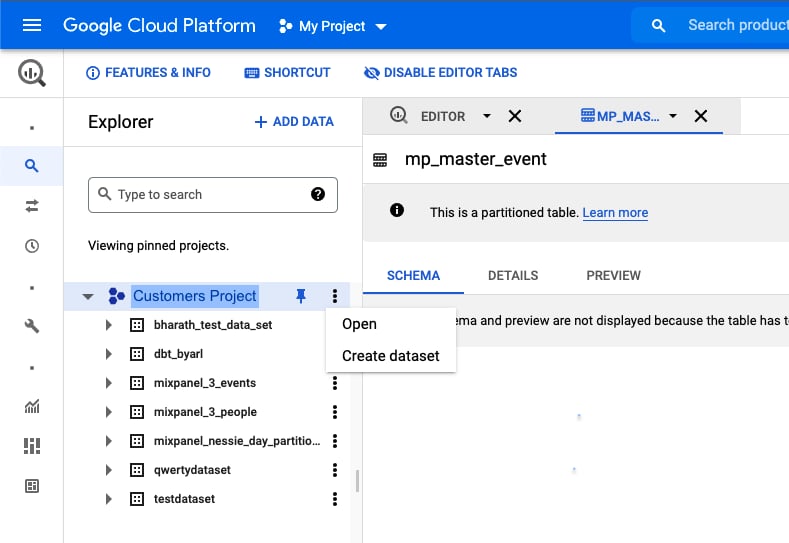
Create a dataset in their BigQuery
-
Give Mixpanel the necessary permissions to export into this dataset.
Note: If your organization uses domain restriction constraint you will have to update the policy to allow Mixpanel domain
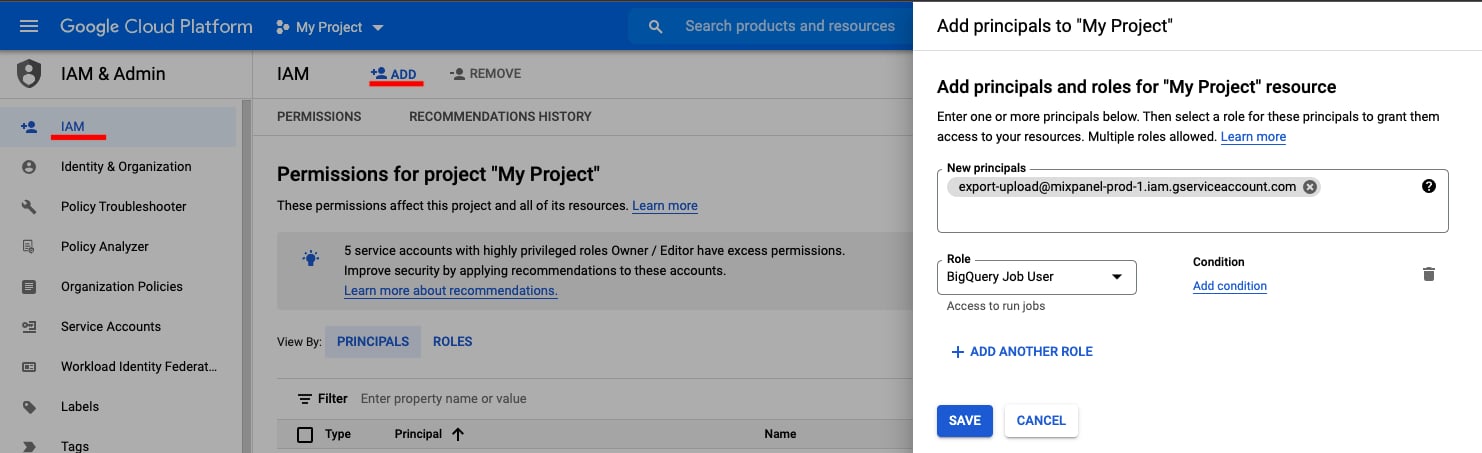
We need two permissions to manage the dataset. BigQuery Job Usermixpanel.comand Google Workspace customer ID:C00m5wrjz.- Go to IAM &Admin in your Google Cloud Console.
- Click + ADD to add principals
-
Add new principal “export-upload@mixpanel-prod-1.iam.gserviceaccount.com” and set role as “BigQuery Job User”, and save.
- Go to BigQuery in your Google cloud Console.
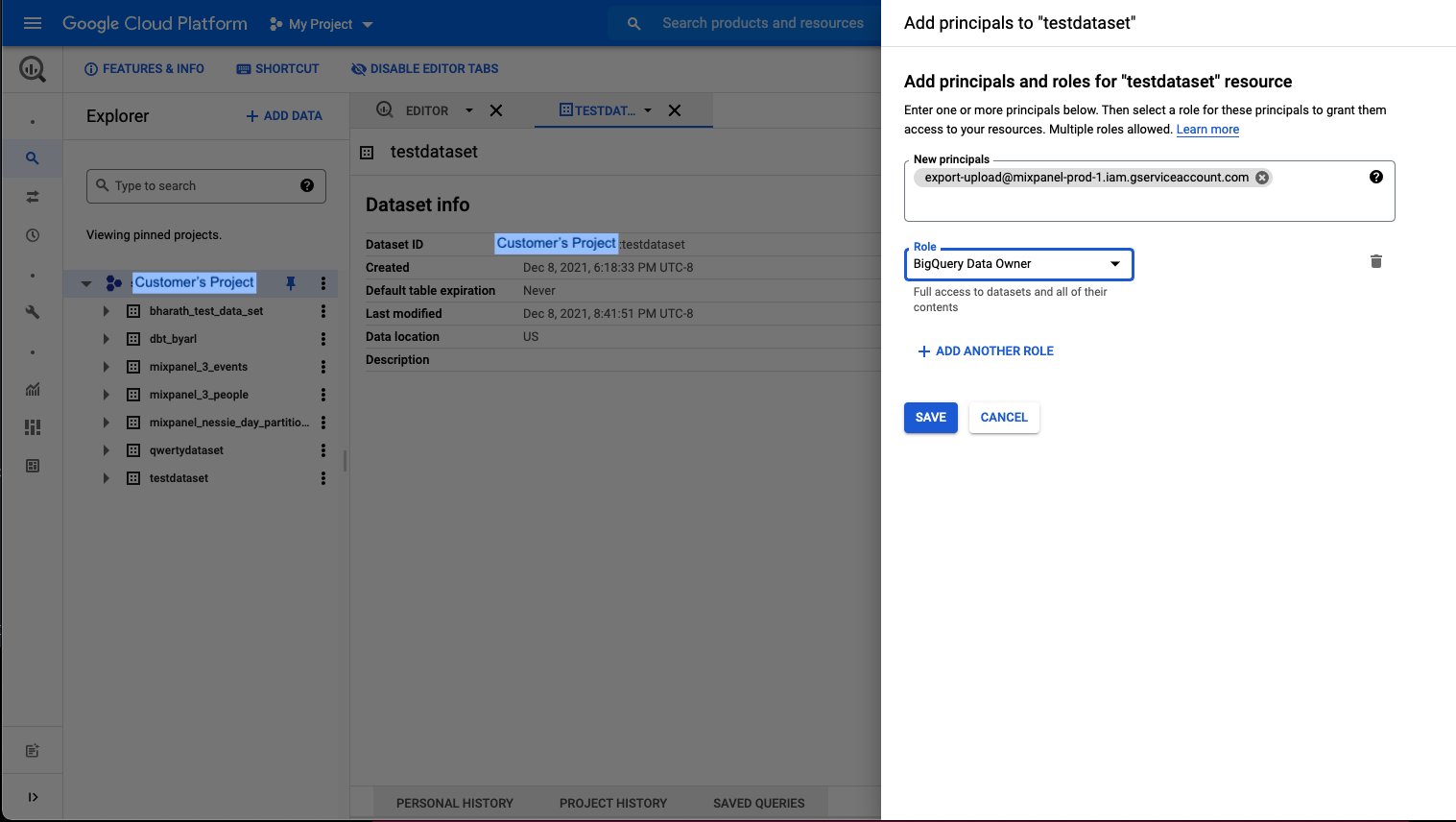
- Open the dataset you want mixpanel to export to.
- Click on sharing and permissions in the drop down.
- In the Data Permissions window click on Add Principal
-
Add new principal “export-upload@mixpanel-prod-1.iam.gserviceaccount.com” and set role as “BigQuery Data Owner”, and save.
- You need to pass this dataset and gcp project id as params when you create your pipeline