

How Snowplow Works
Snowplow is a customer data infrastructure platform for collecting and storing event data from your application. Teams use Snowplow’s SDKs and platform to exercise full control over event data collection in their own cloud. Snowplow’s event-centric approach is fully compatible with Mixpanel; our infrastructure is also purpose-built to ingest, store, and query events. Below we show the architecture of a Snowplow pipeline from their documentation.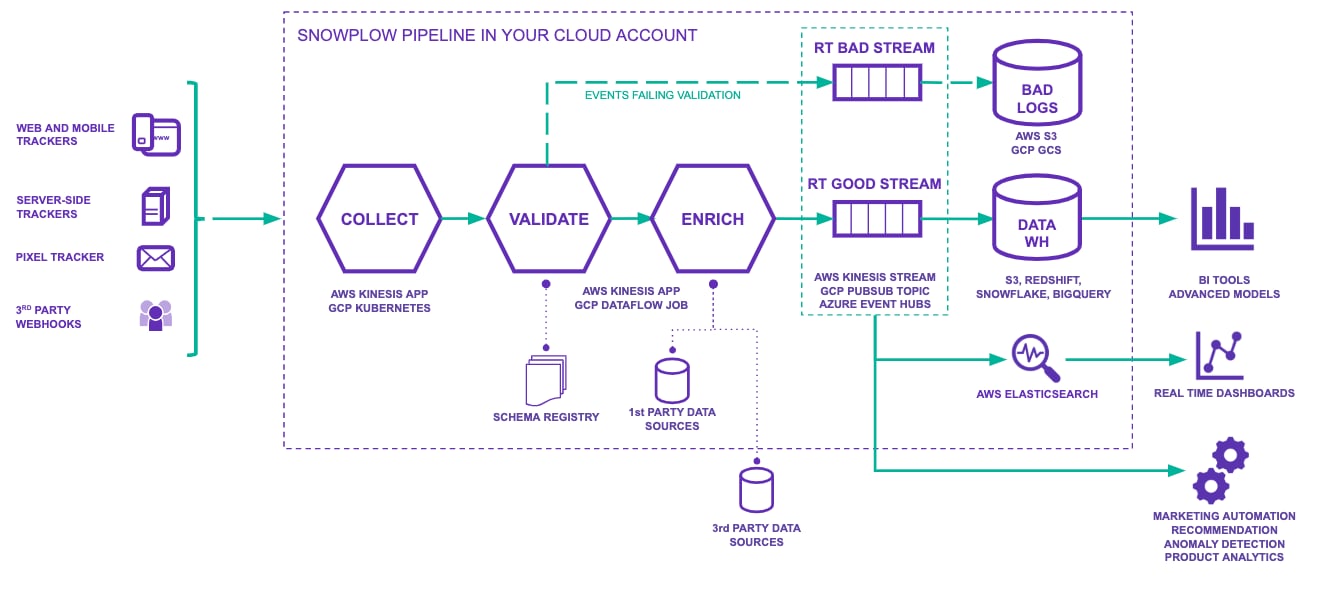
How the Integration Works
The Mixpanel integration uses Snowplow’s event forwarding. It works as a destination in your Snowplow pipeline. As events flow through Snowplow’s collection and enrichment process, the event forwarder sends validated events directly to Mixpanel, in near real-time, via the Mixpanel Import API.Setup
Create the Connection
Add Mixpanel as an event forwarding destination in your Snowplow pipeline. This is configured in Destinations > Connections in the Snowplow Console UI:- Select Set up connection, and choose Loader connection from the menu
- Select Mixpanel as the destination type
- Choose your Mixpanel server location
- Enter your Mixpanel account credentials
Identity Management
The integration automatically handles user identification using Mixpanel’s simplified ID merge functionality. It usesdistinct_id for user identification, and combines domain_userid with client_session.user_id for device tracking, automatically connecting anonymous and identified user activity.
Schema Mapping
The integration provides default mappings for:- Required fields: event name, timestamp, user ID, event ID
- Optional fields: geographic data, device information, browser details, UTM parameters
properties.your_custom_field.
For detailed setup instructions, refer to the Snowplow documentation.